
jlapakeofcdacmmfhiomaijligichffc
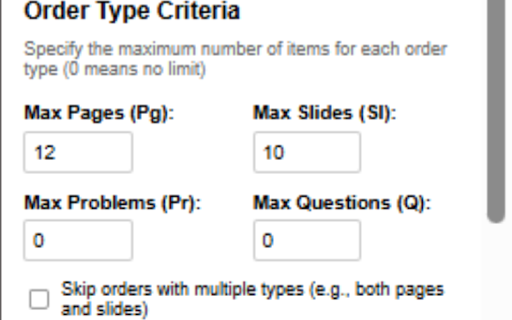

Automatically monitors and applies to Writedom orders based on user-defined criteria Beast Writedom Bidding Bot It is a powerful Chrome extension designed to streamline and automate the bidding process for freelance writers on the Writedom platform. This intelligent assistant monitors available orders in real-time, evaluates them against your customised criteria and automatically places bids on suitable writing assignments—all within seconds of their posting. Key Features Real-Time Order Monitoring - Continuously scans the Writedom dashboard for new writing opportunities - Works silently in the background while you focus on your writing Comprehensive Order Filtering - Word Count Control: Set maximum word limits to avoid overwhelming assignments - Deadline Management: Specify minimum deadline requirements to ensure adequate completion time - Topic Relevance: Filter orders by subject area to match your expertise - Academic Level Selection: Choose which academic levels you're comfortable writing for - Format Specification: Filter by required formatting styles (APA, MLA, Chicago, etc.) - Paper Type Filtering: Select specific types of papers you prefer to write - Source Requirements: Set minimum and maximum source count preferences - Order Composition Control: Set limits on pages, slides, problems, and questions Special Requirements Filtering - Exclude orders requiring progressive delivery - Skip assignments needing abstract pages - Avoid orders requesting soft copies - Filter out orders requiring one-page drafts or summaries - Automatically skip test orders to focus only on genuine assignments Smart Order Processing - Analyze order details to determine suitability against your criteria - Makes intelligent bidding decisions based on your preferences - Opens qualifying orders in new tabs for efficient processing - Places bids automatically when criteria are met - Returns to available orders page to continue scanning Customisable Interface - User-friendly control panel for setting all preferences - Easy-to-use toggles for starting and stopping the bidding process - Real-time status updates and activity logging - Clear indications of currently applied filters Secure Licensing System - 30-day license activation with personal activation key - Countdown timer showing days remaining on your license - Automatic notifications before license expiration Why Install Writedom Bidding Bot? Save Valuable Time The competition for quality writing assignments on Writedom is fierce, with desirable orders often claimed within seconds of posting. Manual monitoring requires constant attention to the dashboard, taking time away from your writing work. This bot eliminates the need for continuous manual refreshing and monitoring, automatically scanning for new orders so you don't have to. Never Miss Opportunities Even the most diligent writers miss opportunities when they step away from their computers, take a break, or focus on completing current assignments. The Writedom Bidding Bot works tirelessly 24/7, ensuring you never miss a suitable order, even when you're not actively monitoring the platform. Work on What You Want Writing quality improves when working on topics and formats matching your expertise and preferences. The comprehensive filtering system ensures you only bid on orders that align with your skills, interests, and availability—improving both your efficiency and the quality of your submissions. Increase Your Earnings By automatically bidding on suitable orders the moment they appear, you'll secure more assignments and maximise your earning potential. The bot's ability to evaluate orders against multiple criteria simultaneously means you'll get more work that aligns with your specific capabilities and preferences. Reduce Decision Fatigue The mental effort of constantly evaluating orders against multiple criteria can be exhausting. The bot handles this decision-making process automatically, applying your predetermined criteria consistently and objectively, freeing your mental energy for the creative work of writing. Gain a Competitive Edge Speed is often as important as quality in the competitive freelance writing marketplace. With the Writedom Bidding Bot, you'll consistently be among the first to bid on new orders, giving you a significant advantage over writers who rely on manual monitoring and bidding. How It Works 1. Installation: Add the extension to Chrome from the Web Store 2. Activation: Enter your activation key to enable the 30-day license 3. Configuration: Set your preferred bidding criteria including: - Maximum word count and minimum deadline - Subject areas, academic levels, and paper formats - Source requirements and unique feature preferences - Maximum pages, slides, problems, or questions 4. Activation: Click "Start Bidding" to begin the automated process 5. Monitoring: The bot scans for new orders every 10 seconds 6. Evaluation: Each new order is analysed against your criteria 7. Bidding: When a suitable order is found, the bot automatically places a bid 8. Reporting: All activity is logged in real-time for your review Setup Instructions Setting up the Writedom Bidding Bot is simple: 1. Install the extension from the Chrome Web Store 2. Contact the developer at +254707188251 via call or WhatsApp to obtain an activation key 3. Enter your activation key in the extension popup 4. Configure your bidding criteria according to your preferences 5. Click "Start Bidding" to activate the automated bidding process 6. Leave the Writedom available orders tab open in your browser The bot will handle everything else, opening qualifying orders in new tabs, evaluating their details against your criteria, and placing bids when appropriate. Customisation Options Basic Settings - Maximum Words: Set the upper limit of assignment word count - Minimum Deadline: Specify the shortest deadline you're willing to accept Subject and Level Filtering - Subject Area: Filter orders by academic subject - Academic Level: Choose from High School, Undergraduate, Master's, or PhD - Paper Format: Select preferred formatting styles - Paper Type: Specify the types of assignments you want to work on Source Requirements - Minimum Sources: Set the lower limit for required sources - Maximum Sources: Set the upper limit for required sources Special Requirements - Toggle filters for orders requiring progressive delivery, abstract pages, soft copies, one-page drafts, and one-page summaries Order Composition - Maximum Pages: Limit the number of pages per assignment - Maximum Slides: Set a cap on the presentation slide count - Maximum Problems: Limit mathematical or scientific problems - Maximum Questions: Control the number of questions to answer Mixed Order Handling - Option to skip orders that combine multiple elements (e.g., both pages and slides) Technical Features - Efficient background service worker for continuous monitoring - Intelligent content script for detailed order analysis - Secure local storage for saving preferences and tracking processed orders - Robust error handling for reliable operation - Smart button detection for consistent bid placement - Automatic tab management for streamlined workflow Privacy and Data Usage The Writedom Bidding Bot operates entirely within your browser and Writedom account. It does not: - Collect or transmit your personal information - Store your Writedom login credentials - Interfere with the Writedom platform's terms of service - Modify any content beyond placing bids as you would manually Professional Support For activation keys, technical assistance, or feature requests, please contact the developer directly at +254707188251 via call or WhatsApp. Transform your freelance writing experience on Writedom with this powerful automation tool. Install the Writedom Bidding Bot today and start securing more writing assignments with less effort, giving you more time to focus on delivering quality work.

WriterHub Applier
An extension to bid over the jobs from 24 WriterHub and easy to use. This is an application for the essay writers that assist them to make biddings automatically over the writing orders and jobs from Writer Hub. It can bid faster and instantly to save time and manual efforts which is required to complete a bid application.

Writerdom Applier
An extension to bid over the jobs from 24 Writerdom and easy to use. An extension to operate orders automatically for Writerdom. It will helps essay writers to search and bid for open projects at Writerdom using this extension.

InstantBid – AI Proposal Generator
Generate AI proposals instantly for Upwork, Freelancer & Guru. Boost job success with smart proposal injection. InstantBid - AI-Powered Freelance Proposal Generator in Seconds and also Turns Average Upwork.com, Freelancer.com & Guru.com Profiles Score into Winning Scores! This Chrome Extension is built for freelancers or agencies who want to work smarter, not harder. No more wasting time thinking about what to write — let AI create the perfect proposal that grabs attention and gets you hired! InstantBid is a powerful Chrome extension that transforms the way freelancers apply for jobs on major platforms like Upwork, Freelancer, and Guru. Using advanced AI technology, it instantly generates professional, personalized, and winning proposals — helping you bid on more projects without compromising quality. With InstantBid, you can save time, boost your profile score, and increase your chances of getting hired. Whether you’re a beginner or a seasoned freelancer or agency, this smart tool ensures every proposal you send stands out from the competition. Automatic Job Detection ✓ Works seamlessly on Upwork, Freelancer.com, and Guru.com ✓ Automatically extracts job descriptions from the page when you click generate ✓ Intelligently detects which platform you're on and adapts accordingly Smart Profile Management ✓ Create multiple freelancer profiles for different skill sets ✓ Store your name, skills, hourly rate, and portfolio links ✓ Switch between profiles to match different job types ✓ Tailors proposals based on your selected profile Profile Audit & Optimization ✓ Analyzes your freelancer profiles on Upwork, Freelancer.com, and Guru.com ✓ Provides actionable recommendations to improve your profile ✓ Identifies missing elements and suggests improvements ✓ Helps you stand out in a competitive marketplace Flexible Credit System ✓ Free Plan: 5 proposal generations daily (resets every day) ✓ Perfect for freelancers just starting out or with selective bidding strategies ✓ Transparent credit tracking - always know how many proposals you have left ✓ Upgrade options available for high-volume users Secure Authentication ✓ Sign in with Google for seamless access ✓ Secure data storage and user privacy protection ✓ Your profiles and preferences sync across devices ⭐ Why You Should Install InstantBid Save Hours of Time Writing personalized proposals for each job can take 15-30 minutes. InstantBid reduces this to under 30 seconds, letting you apply to 10x more jobs in the same time. Increase Your Earnings More applications = more interviews = more clients. The faster you can bid, the more opportunities you can pursue, especially for time-sensitive projects. Maintain Quality at Scale AI-generated proposals are grammatically perfect, professionally structured, and tailored to each job description. You maintain high quality even when bidding on multiple projects. Stand Out from Competition Each proposal is uniquely crafted based on the specific job description and your profile, helping you avoid generic templates that clients ignore. Perfect for All Freelancers ✓ New Freelancers: Learn from well-structured proposal examples ✓ Experienced Freelancers: Scale your bidding without compromising quality ✓ Agencies: Manage multiple profiles for different team members or specializations Smart Workflow Integration InstantBid doesn't replace you—it empowers you. The extension generates a strong foundation that you can personalize further, add client-specific questions, or use as-is for straightforward projects. Data-Driven Improvements The Profile Audit feature analyzes your existing freelancer profiles and provides specific recommendations to optimize your presence, increasing your chances of landing jobs. 1. Browse Jobs: Navigate to any job on Upwork, Freelancer.com, or Guru.com 2. Open InstantBid: Click the extension icon or use the keyboard shortcut (Alt+Shift+X) 3. Select Profile: Choose the profile that best matches the job 4. Generate: Click "Generate" and InstantBid automatically extracts the job description and creates a tailored proposal 5. Auto-Insert: The extension automatically inserts the generated proposal into the application text area 6. Review & Submit: Make any personal touches if needed and submit your application 7. Track Usage: Monitor your daily credits and upgrade when needed ⭐ Perfect For Freelancers or Agencies on ✓ Upwork.com ✓ Freelancer.com ✓ Guru.com ✓ Anyone applying to multiple jobs per day ✓ Professionals who want to focus on delivering work, not writing proposals ✓ New freelancers learning how to craft compelling proposals ✓ Agencies managing multiple client accounts ✓ Built with Manifest V3 (latest Chrome extension standard) ✓ Fast, secure, and privacy-focused ✓ Works offline for profile management ✓ Minimal permissions required ✓ Regular updates and improvements ✓ Professional-grade security with encrypted data handling Expert freelancer have built InstantBid to solve freelancing’s biggest challenge — writing fast, high-quality proposals that win jobs. This powerful Chrome extension for freelancers combines AI-powered proposal writing, profile score analysis, instant job response tools, and time-saving automation so you can bid smarter, stand out faster, and win more freelancing projects. InstantBid also lets you analyze and boost your profile score, increasing your visibility and chances of getting hired on platforms like Upwork and Freelancer. Your next great client is just one click away. InstantBid is committed to protecting your privacy and data security. ✓ Data Storage: All your profiles and settings are stored locally on your device ✓ No Data Selling: We never sell or share your personal information with third parties ✓ Secure Authentication: Google OAuth is used for secure sign-in ✓ API Usage: Job descriptions are sent to OpenAI API only for proposal generation ✓ Minimal Permissions: We only request permissions necessary for core functionality ✓ User Control: You can delete your data at any time from the extension settings For detailed privacy information, visit: [https://instantbid.io/privacy](https://instantbid.io/privacy) Need help or have questions? We're here to assist you. Common Support Topics ✓ Extension setup and configuration ✓ Profile management assistance ✓ Credit and billing inquiries ✓ Technical issues and troubleshooting ✓ Feature requests and feedback

Twitter Tweet Collector
Add a collect button next to Twitter/X tweets to save them to a local folder with one click. 1. Fixed Filtering System Issues - Resolved tag and collection filters not working properly - Users can now correctly filter tweets by tags, collections, authors, etc. - Fixed dropdown menus showing options but not applying filters 2. Corrected Time Display Errors - Fixed all tweets showing "today" instead of actual publish times - Now correctly displays the original tweet publication time - Improved time parsing support for multiple HTML formats 3. Enhanced Metadata Management - Added missing core methods, fixing export functionality - Improved error handling and debugging capabilities - Enhanced tweet metadata saving and loading mechanisms English: - Auto Tag Detection: Intelligently identifies topics and keywords in tweets - Collection Management: Organize related tweets into thematic collections - Advanced Filtering: Multi-dimensional filtering by tags, collections, authors, time - Bulk Operations: Batch tag addition and collection management English: - Visual Interface: Beautiful grid layout displaying saved tweets - Real-time Search: Quick search through tweet content, authors, or tags - Time Filtering: Filter by today, this week, this month, etc. - Media Preview: Support for image and video preview and management - Statistics: Display total tweets, authors count, image count, and more English: - Multi-format Support: Supports both JSON and HTML tweet files - Local Storage: All data stored locally to protect user privacy - Fast Retrieval: Optimized search algorithms for quick retrieval of large tweet collections - Data Export: Export tweet data in multiple formats - Cross-platform: Compatible with Windows, macOS, Linux, and more English: 1. After installing, click the extension icon in the toolbar 2. Select tweets to save and click "Save to Collection" 3. Use the Tweet Browser to view and manage saved tweets 4. Organize your tweet collection using tags and collections English: - Fully Local: All tweet data stored only on your local device - No Data Upload: Extension never sends your tweet data to external servers - Open Source: Completely open source, code available on GitHub for review - Minimal Permissions: Only requests necessary browser permissions English: For issues or suggestions, please visit: - GitHub Repository: https://github.com/aixiaojiao/gglknow - Issue Tracker: https://github.com/aixiaojiao/gglknow/issues --- ⭐ 如果这个扩展对您有帮助,请给我们一个五星好评!/ If this extension helps you, please give us a 5-star rating!
