
jkniefodelncghjkjbagickaggoincob

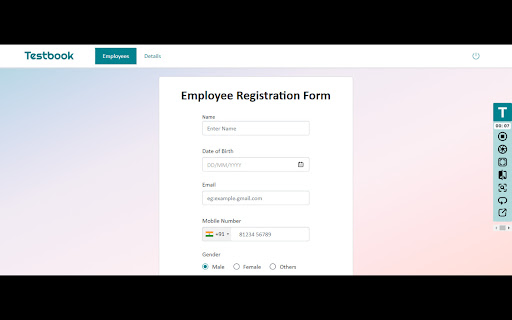
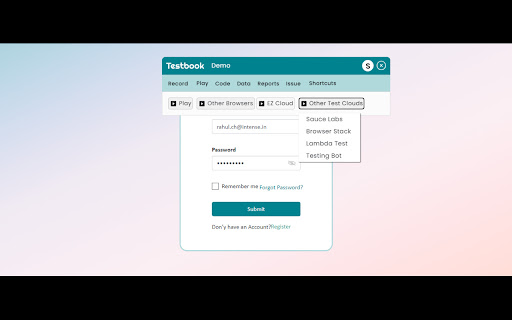


Revolutionize web app testing with Testbook, AI-driven extension for effortless regression testing, UI comparison, and more! 🚀 Welcome to the future of effortless web application testing with Testbook! Cutting 1 week worth of work to just 1 hour, Introducing our cutting-edge Chrome extension designed to revolutionize your development workflow: AI-Powered Automated Regression Testing & UI Comparison Tool with Record and Playback. 🚀 Streamline Your Testing Process: Say goodbye to manual regression testing headaches. Testbook, our no-code automation tool, empowers you to conduct regression tests with ease, ensuring your latest code changes don't disrupt existing features. Validate your application's functionality across updates effortlessly. 🎥 Record and Playback Simplicity: Record interactions with your web application and play them back instantly. Testbook offers an intuitive record and playback feature that allows you to create test scenarios effortlessly. No coding required – simply interact with your application, and our tool captures the actions for future playback. 🌐 Cross-Browser Compatibility: Test with confidence across various browsers and platforms. Our tool ensures your web application functions flawlessly, regardless of the user's browser choice. Deliver a consistent experience, boosting user satisfaction and loyalty. ☁️ Testing Cloud Integration: Testbook seamlessly integrates with popular testing clouds, including Saucelabs, Testing Bot, BrowserStack, and LamdaTest. Just record your tests and play them on any platform through our testing cloud – link your account with us to expand your testing capabilities. 📸 Flexible Screenshot Options: Capture screenshots of the entire page or just the visible part. Choose the option that best fits your testing needs with Testbook, ensuring accurate visual comparisons. 🧠 AI-Powered UI Testing: Utilize AI capabilities in UI testing, enabling intelligent detection of visual discrepancies. Testbook enhances accuracy and efficiency in identifying even subtle differences between expected and actual UI elements. 🖱️ Drag & Drop Test Support Effortlessly record and playback drag & drop interactions. Testbook's advanced capabilities now include support for drag & drop actions, ensuring comprehensive testing scenarios. Capture and replay these interactions seamlessly, enhancing the accuracy of your tests without additional coding. 🗂️ Multi-Window and Multi-Tab Support Expand your testing horizons with multi-window and multi-tab support. Record interactions across multiple child tabs and windows, then playback the entire session seamlessly. Testbook ensures that your web application performs flawlessly, even in complex, multi-window environments. 📊 Detailed Reports & Test History: Experience testing insights like never before. Testbook generates comprehensive, detailed reports, offering an in-depth overview of your test results. Access your test history to track progress over time, ensuring continuous improvement in your application's quality. 🤚 Hybrid Testing with Manual Stepper: With the Manual Stepper feature, Testbook.ai empowers testers to incorporate manual checks into automated scripts. This hybrid approach ensures that critical manual interventions are not overlooked, making your testing more thorough and adaptable to complex scenarios. 🔗 Jira Integration: Seamlessly connect Testbook with Jira to push bugs detected during testing directly to your Jira project in a single click, streamlining bug tracking and enhancing collaboration between testing and development teams. 📜 Code Export & Background Playback: Export your recorded interactions as code snippets, offering flexibility and customization. Run tests in the background, allowing you to continue your work uninterrupted while Testbook ensures the quality of your application. 🗂️ Exportable Test Data: Seamlessly export your test data for further analysis or collaboration. Testbook allows you to export test logs, screenshots, and reports, enabling in-depth examination and efficient team collaboration. 🔄 Looping Interactions & Dataset Support: Effortlessly loop interactions with datasets, enabling comprehensive testing of various scenarios. Test your application's robustness under different conditions, ensuring it performs flawlessly for all users. 🔧 User-Friendly Interface: No coding skills? No problem! Testbook offers an intuitive interface that requires zero programming expertise. Seamlessly create, manage, and run tests directly from your browser. Effortlessly navigate through test scenarios and view detailed reports to identify issues instantly. 🎯 Swift Issue Detection: Our advanced algorithms quickly analyze screenshots, highlighting divergences between expected and actual visual elements. Speed up issue detection and resolution with Testbook, ensuring a flawless user experience for your audience. ⏱️ Save Time and Resources: Reduce testing time and increase productivity. By automating repetitive tasks, you can focus on what matters most—building exceptional web applications. Save valuable resources and deliver high-quality software faster than ever before with Testbook. ✨ Testmate AI-Powered Testing Guide Testmate boosts your Testbook.ai experience with instant answers and smart guidance. It helps with recording, playback, debugging, reports, and integrations. Get quick solutions from the Testbook.ai Help Center—ask anything about test automation for a smoother testing process. 🗔 Seamlessly Navigate iFrames and Shadow DOM Boundaries Testbook.ai seamlessly handles interactions across nested iFrames and Shadow DOM elements. Our smart engine records and replays actions accurately, ensuring stable tests even in complex, component-driven applications—no manual adjustments needed. Get ready to transform your testing process and elevate your web development game with Testbook. Download our AI-Powered Automated Regression Testing & UI Comparison Tool with Record and Playback now and embark on a journey of seamless, efficient, and error-free web application development. Important Disclaimer : To deliver seamless and efficient testing, Testbook.ai requests specific permissions to interact with the websites you choose to test. These permissions are strictly limited to the selected website and are used solely for testing purposes. Rest assured, your data on other websites remains secure and untouched. Testbook.ai ensures that all your browsing activities outside the tested website are fully private and not accessed in any way. We are committed to safeguarding your trust and providing a safe testing experience. #Automated Testing #Testbook #Testbook.ai #Regression Testing #Testing Clouds #Saucelabs #BrowserStack #LamdaTest #UI Testing #No Code #Chrome Extension #Record and Playback #Web Development #Quality Assurance #Cross-Browser Testing #Visual Regression Testing #Web Application Testing #Test Automation #Codeless Testing #Efficient Testing #Web App QA #User Interface #Background Playback #Looping Interactions #Data-driven Testing #Detailed Reports #AI-Powered Testing #Screenshot Comparison #Flexible Screenshot Options #Exportable Test Data #Automation Testing #Jira #ec tool #Selenium #Testing Bot #Hybrid Testing #AI Testing

Quillbot: AI Writing Assistant to Grammar Check, Paraphrase & Translate
Write better emails, essays and messages with Quillbot's Grammar Checker, Paraphrasing Tool, Generative AI, Summarizer and more! Quillbot for Chrome: AI Writing Assistant, Grammar Checker, and Paraphrasing Tool Quillbot is a multilingual writing assistant extension that helps you write clearly, quickly, and with more control, right where you work. This AI writing assistant combines a Grammar Checker, paraphrasing tool, and AI writing tool to improve your writing in real time. From quick emails to full drafts, Quillbot helps you say what you mean without overthinking it. ➤ How It Works Install the extension and keep writing like you normally do. Quillbot works in the background, ready when you need it. Write in any text field across the web, then highlight text or open the toolbar to get instant suggestions. You can fix grammar, use the sentence rewriter to adjust phrasing, or generate new text with the AI text generator. Everything happens in one place, so you don’t have to copy, paste, or switch tabs. ➤ Privacy and Data Safety Your writing is personal. We treat it that way. Quillbot processes only what’s needed to provide suggestions and does not sell your data. Our systems are designed with modern security standards in mind, and we continuously improve how we handle and protect user information. You stay in control of what you write and what gets changed. ➤ Key Features A writing productivity tool that does more than just fix typos; it helps you communicate better. ✓ AI Writing Assistant Get real-time suggestions as you write. Improve clarity, tighten structure, and keep your ideas moving without stopping to edit. ✓ Grammar Checker Catch grammar, spelling, and punctuation issues instantly. Get clean, readable writing immediately to improve communication. ✓ Paraphraser Rewrite text to sound clearer, more concise, or more natural. Adjust tone without losing your original meaning. ✓ Sentence Rewriter Quickly reshape awkward or unclear sentences into communication that reads smoothly and lands the point. ✓ AI Cursor Access Quillbot’s AI tools directly where you write. Use the AI Cursor to generate text, refine drafts, and take action without leaving the page. ✓ AI Text Generator Draft emails, outlines, or full responses in seconds when you need a starting point—or a reset. ✓ Tone and Clarity Suggestions Understand how your writing comes across. Make it more direct, more polished, or more conversational as needed. ✓ Multilingual Writing Tool Write and edit across languages, including English, Spanish, French, German, Portuguese, and Dutch. ✓ Translation Translate text as you write or edit, helping you communicate clearly across languages. ✓ In-Page Editing Make changes directly in emails, docs, and forms. No switching tabs or breaking your flow. ✓ GIF Insertion Drop in relevant GIFs directly from the editor to add context or personality to your messages. ✓ AI Image Generation Create images from prompts without leaving your workflow—useful for quick visuals, drafts, or ideas. ✓ Custom Modes Tailor writing style to your needs, whether that’s formal, simple, or aligned to your voice. ➤ Use Cases Quillbot works for anyone who writes—and wants fewer rewrites. ✓ Professionals Send emails and updates that get to the point faster and don’t need a follow-up to clarify. ✓ Students and Researchers Turn rough drafts into clear, structured writing without losing your original ideas. ✓ Marketers and Creators Adjust tone across channels without rewriting everything from scratch. ✓ Multilingual Writers Write confidently across languages with built-in support and suggestions. ➤ Why Quillbot? Quillbot focuses on improving your writing—not replacing it. It works directly where you write, so you don’t lose time switching tools. Suggestions are fast, practical, and easy to apply. You get more than surface-level fixes, with support for tone and clarity when you need it. And with frequent updates, the extension keeps getting better at helping your writing do its job. ➤ Free vs Premium Start with the essentials. Upgrade when you want more control. ✓ Free Plan Includes: • Grammar checker and basic corrections • Limited paraphrasing tool access • Core writing suggestions • Multilingual writing support ✓ Premium Unlocks: • Full paraphrasing and rewriting capabilities • Expanded modes for tone and style • Advanced tone and clarity insights • More detailed, sentence-level suggestions ➤ Supported Languages Quillbot supports writing and editing in English, Spanish, French, German, Portuguese, and Dutch, with continued expansion to additional languages over time. Get Started Install Quillbot in seconds and start improving your writing immediately. Write faster. Say it better. Keep your voice intact.

Keak - AI A/B Testing & CRO Tool
AI-powered A/B testing that optimizes your website automatically. Generate variants, run tests & boost conversions. No code needed. Let AI optimize your website 24/7. No code required. Keak is the AI-powered A/B testing platform that generates, tests, and deploys winning page variants automatically. Our model is fine-tuned on thousands of successful conversion rate optimization tests so it knows what works. How it works: Install the Keak pixel (just 34kb, 6x lighter than competitors). Open the extension on any page. Click generate. Keak creates A/B test variants using AI, runs the experiment, and when a winner is found, automatically launches the next test. Your site improves on autopilot. Key features: AI-generated A/B test variants (headlines, CTAs, images, layouts) AutoPilot mode: continuous testing without manual intervention No-code visual web editor: edit any page directly in your browser AI image and video generation for testing visual assets Shopify, WordPress, Webflow, Framer, and Squarespace support Ultra-light 34kb pixel with zero SEO impact Statistical significance tracking and analytics dashboard Who it's for: Marketers, growth teams, e-commerce merchants, startup founders, and agencies who want to increase conversion rates without hiring developers or paying for enterprise tools. Get started free. Install the extension and launch your first test in minutes.

Test Bro - Smart Web Test Assistant, Exam Helper & Homework Quiz Solver
Smart AI based test assistant, quiz resolver, homework helper. Solve online tests, pass exams, improve skills for skill assessments. Test Bro app is a simple Chrome extension that can assist and help you to pass online tests. It can help you pass all tests containing text-based questions and text-based answer options. ⚡ Just click the ASK button and see the correct answer for apps and websites where Test BRO is fully optimized (see the optimized for section). ⚡ You can use SELECT TEXT and ask Test BRO through the context menu to resolve online tests. ⚡ If text selection is protected, you can SELECT AREA using the context menu to pass the exam. (https://youtu.be/xUwYspJpU_U) ⚡ The Context Menu is also blocked - use the capture feature in the side panel. (https://youtu.be/xUwYspJpU_U) 🚀 NOW TEST BRO OPTIMIZED FOR! 🚀 ✅ For LinkedIn skill assessments. (https://youtu.be/rjKEXb_8tbk) Check out how it works. I think you'll find it enjoyable. Let's try it, and be sure it will help you pass LinkedIn tests. It's not guaranteed to give you a 100% result, but you can watch the video (https://youtu.be/hXI_bKhOsNk). I passed the LinkedIn assignment and ranked in the top 15% of other people. It's a success! I've never read about Django. I don't even know what it is. Is it a programming language? Is it a framework? :) I don't know... 🚨(If you want your quiz site to be fully optimized for Test Bro, please write to me with the quiz site URL.)🚨 Just click the Test Bro button and get the test resolved. 😠 - How do you do the LinkedIn assessment? 🧐 - Use Test BRO, it will increase your productivity and save your time, Bro. 🙄 - Can you cheat on LinkedIn assessments? 🤫 - I ask you a small secret, use Test Bro, to pass axam - save your time... no one else, shh... 🤔 - What about the LinkedIn assessment quiz answers? 🕵 - You don't need answers. Don't waste your time. Use Test Bro. 🤷 - How can I pass the LinkedIn assessment? 🤦🏼 - Seriously? Pass the exam with Test Bro. 🗣 - How often do people fail LinkedIn assessments? 🗣 - Did you score above 70% on the LinkedIn assessment test? 👨👨👧👦 - We never fail assignments; we always score over 70% because we use Test Bro! 🤩 Let's try it out! And please add a 5-star review if it helped you!!! 🤩

API Tester
Rest API Tester is an easy api testing tool. Streamline your software development and test api online with this Chrome extension. API testing is essential in software development, ensuring interfaces work correctly and provide accurate data. With the rising complexity of modern applications, a reliable tool for validating endpoints is crucial. This api tester streamlines the process, enabling developers and qa engineers to efficiently identify and resolve issues, facilitating seamless integration among systems. Our instrument serves as a comprehensive solution for your needs, whether you are validating or debugging endpoints. The importance of api in software testing cannot be overstated; it enhances workflow efficiency and simplifies the entire process, making it an essential asset for ensuring quality assurance across your projects. 🚀 With this extension, you can test api online without the need for complex setups or additional software. It’s built to help you conduct api tests quickly and accurately, ensuring your applications run smoothly and deliver exceptional performance. Additionally, you can test api endpoint configurations to ensure they function as intended. Why Should You Consider This Option? 1️⃣ Ease of Use: Designed with a user-friendly interface, it’s easy for both beginners and experts to work with endpoints effortlessly. 2️⃣ No Installation Required: As a chrome extension, it’s lightweight and accessible directly from your browser. 3️⃣ Versatility: From verifying web services to making request validations, this tool supports a wide range of methods, including GET, POST, PUT, DELETE, and more. 4️⃣ Real-Time Results: Get instant feedback on your tests with detailed responses, status codes, and headers. 5️⃣ Cost-Effective: Unlike many tools for api testing, this api tester online is free to use, saving you time and money. Who Can Benefit? This instrument is ideal for: 🔺 Developers who need to test rest api during the development process. 🔺 QA engineers looking for reliable api testing tools to ensure software quality. 🔺 Students and learners exploring concepts of endpoint verification. 🔺 Freelancers and professionals who require a quick and efficient test tool for their projects. Advantages of Using This Rest Client ➤ Efficiency: Save time with a solution that simplifies qa procedures and delivers instant results. ➤ Accuracy: Ensure your endpoints are error-free with detailed response analysis. ➤ Accessibility: As an online api tester, it’s always within reach. ➤ Scalability: Whether you’re verifying a single endpoint or multiple services, it scales with your needs. How to Get Started 1. Install the chrome extension from the web store. 2. Open the tool and enter the url you want to verify. 3. Choose the request method (GET, POST, PUT, DELETE, etc.). 4. Add headers, parameters, or body content as needed. 5. Click Send and analyze the response in real-time. What Makes This Application a Preferred Choice This api tester is more than just a solution - it’s a comprehensive resource for all your needs in software development. Unlike other solutions, it combines simplicity, power, and accessibility into one seamless experience. Whether you’re a seasoned developer or a beginner, it helps you be confident in the quality of your product. Use Cases 🔸 Debugging and validating web service workflows. 🔸 Performing http test requests to ensure the reliability of web services. 🔸 Checking endpoints during software development. 🔸 Learning and experimenting with qa concepts related to web services. 💬 Frequently Asked Questions (FAQ) ❓ What is an api tester, and why do I need it? 💡 An api tester is a solution that helps developers and qa engineers evaluate endpoints to ensure they function correctly. This instrument simplifies the process by allowing you to check rest api without complex setups. ❓ Can I use it for rest api testing? 💡 Yes! It’s designed to handle it, allowing you to send requests (GET, POST, PUT, DELETE) and validate responses effortlessly. ❓ Is it free to use? 💡 Absolutely! Unlike many others, this api tester is free to use, saving you time and money. ❓ How do I verify endpoints using this application? 💡 Simply install the Chrome extension, enter the url, choose the request method, add parameters if needed, and click Send. You’ll receive real-time results instantly. ❓ Is it suitable for beginners? 💡 Definitely! With its user-friendly interface, this application is perfect for both beginners and experts looking to test software efficiently. Conclusion Our api tester is the ultimate solution for anyone looking to streamline their api testing online process. With its intuitive design, powerful features, and accessibility as an online api checker, it’s the perfect companion for developers, qa engineers, and tech enthusiasts focused on testing api functionality. Try it today and experience the future of software solutions! 🌟
