
jkjcgfmmgomhegamhdljkohdmgjgdmgp
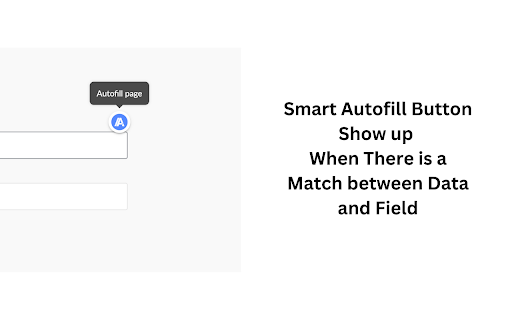


Autofillr is an autofill extension aiming to save you time doing repetitive work Filling out online forms can be cumbersome. With Autofillr, make it a one-click experience. Save time and avoid repetitive typing by having Autofillr fill out forms with your identity. **How It Works:** 1. **Setup Profile** - Navigate to the extension options. - Select "Show Personal Data". - Fill in the fields and hit save. (All fields are optional, just pick the one you want to automate) - (beta) We just launched save on submit feature! so it will prompt you to ask if you want to save the data you just submitted in a form in storage. 2. **Autofill with Autofillr** - Tap any input - Autofillr floating button will appear - Click the button to fill 3. **Edit Profile** - Head to the extension options. - Opt for "Show Personal Data". - Adjust the fields as needed and save. **Features:** - Advanced field detection recognizes inputs such as name, email, address, and more. - Compatible with major websites and web apps using standard input names. - Able to add product as profiles now so u can autofill product details for indiehackers **Safety and Privacy:** Your data's safety is our top priority. It remains securely stored on your local device and is never sent to external servers. **Beta Notice:** Please be informed that Autofillr is currently in BETA and might contain bugs. We value your feedback! Should you encounter any issues or have suggestions, don't hesitate to get in touch with the developer. Why wait? Boost your online form filling experience with Autofillr today. It's free and user-friendly. Let us handle the form filling, while you concentrate on what truly matters!

Simplify Copilot - Autofill job applications, job tracker & AI resumes
The better way to job search. Quick apply and autofill job applications in one click. Track jobs, companies, resumes & more! The Autofill Tool and Career Copilot for Job Applications – used by 1,000,000+ job seekers. Simplify Copilot is an AI tool designed to help you job search more efficiently. Autofill job applications, generate tailored resumes and cover letters, and track every step of your job search–all in one place. ✦ Built by Job Seekers, for Job Seekers Ever spent dozens of hours filling out the same application details over and over? We’ve been there too. That’s why we built Simplify Copilot: a smart, efficient way to job search that actually works and has helped applicants submit over 100 million applications and land thousands of job offers. ⭐ Our Features ⭐ ✔️ Autofill Applications on All Major ATSs Automate job applications across thousands of job boards and ATS platforms like Workday, Lever, Greenhouse, and more—no limits, free forever. ✔️ Identify Missing Keywords in Your Resume We analyze the job description you're applying to and shows you the most important keywords missing from your resume. ✔️ AI-Powered Resumes & Cover Letters Generate tailored, ATS-friendly resumes and personalized cover letters using our recruiter-approved AI. Our free resume builder has been used to create over 1,000,000 resumes. ✔️ Personalized Job Recommendations Tell us your dealbreakers (minimum salary, location, etc.) and we'll match you with jobs that fit YOU. No more endlessly scrolling on job boards. ✔️ All-In-One Job Tracker Bookmark jobs anywhere on the web and track your submitted applications, LinkedIn profiles, referrals, and interview notes from one simple dashboard. 🔍 Why Job Seekers Love Simplify - Save Hours on Applications: Cut application time from 10+ minutes to seconds - Apply to More Jobs: Users report applying to 3-5x more positions with the same effort - Higher Interview Rate: Our AI resume builder helps get your resume past ATS filters - Stay Organized: No more forgotten applications or missed follow-ups with our job tracker - Reduce Job Search Stress: Automate the most frustrating and repetitive parts of job hunting - Works Almost Everywhere: Compatible with millions of job boards and company career sites 🔐 Our Stance on Privacy We're a

SpeedyApply: Job Application Autofill Tool
Applying to jobs just got easier. Automate job applications with a single click and track your progress over time. SpeedyApply is the ultimate solution for job seekers who want to take control of their job application process. With SpeedyApply, you can create a comprehensive job profile and apply to the most common job application portals such as Workday and Greenhouse with a single click. Our powerful autofill scripts ensure that your application is filled out accurately and quickly, saving you precious time and effort. SpeedyApply also tracks your job application progress, so you can stay on top of your job search. You'll be able to see when and which jobs you've applied to allowing you to easily follow up with potential employers and stay organized throughout your job search. Don't waste any more time filling out tedious job applications by hand – download SpeedyApply today and take the first step towards your dream job! For general inquiries or support, please contact me at: https://www.speedyapply.com/contact Join our Discord to be informed on our latest updates and connect with other job seekers: https://www.speedyapply.com/discord

MultiField CopyCat - Copy, Paste & Autofill Forms Instantly
Tired of filling the same forms? MultiField CopyCat is a form-filler chrome extension that lets you bulk copy, paste, and autofill form fields instantly. Drag to select fields to copy and paste them into another form in seconds. Save form data once for future autofills. Save time and energy with every web form! 🐱⚡ ⭐ Benefits 🐾 ------------------------- ⏱️✨ Save time filling forms – Skip typing every field! Copy, paste & autofill forms in seconds 🚀✨ Boost productivity – Do more in less time for work, testing, or data entry 🧠✨ Reduce mental & physical fatigue – Free yourself from wrist fatigue & brain draining repetitive typing ☕✨ Relax while we work – Enjoy more breaks while your forms are pasted instantly or filled automatically 🔒✨ Privacy first – Your data stays local. We never share or sell your information 🐱✨ A cat companion in your browser – Pin Meow Meow to your toolbar for a cute productivity buddy ⚡ Key Features 🐾 ------------------------- 📄✨ Copy & paste form fields in selected area – Drag over target area to copy or paste multiple fields at once 📋✨ Copy & paste all form data on page – Grab all form data with 1 button click. Paste them wherever needed. Perfect for data migration or repeated entries 🧠✨ Smart Match available – Attempt to match fields automatically when pasting, even when form fields aren't in the same order (works best with standard web forms) 🔀✨ Two Paste modes – Use default Sequential Mode for forms with identical layouts (Smart Match off), or Smart Match Mode to match fields for forms with different field positions (toggle in the extension popup) 🏄✨ Auto-Scroll Dragbox (Pro) – Drag your selection area beyond the visible screen, and the page scrolls automatically. Perfect for copying/pasting between long forms or CMS pages 🐱✨ Smart autofill – Save & reuse your form data with instant autofill. Great for repetitive tasks, or saving draft copies on web entries ✌️✨ Apply saved form values on current page – Use 'Apply Autofill' button to instantly fill current page using a selected saved form setting ⚙️✨ Full control over autofill – Easily toggle autofill on or off for each saved setting 💎✨ Custom field group setup in Smart Match (Pro) – Create custom field groups, allowing fields with similar meanings to match across different websites for maximum flexibility 🗂️✨ Save multiple form sets per autofill setting (Pro) – Easily switch between different saved form sets under one autofill setting ⏱️✨ Custom autofill delay for slow-loading pages (Pro) – Ensure autofill applies at the right timing on dynamic or slow websites 🛠️✨ Edit & manage saved settings – Update field values, or edit URL patterns to extend autofill on more pages 💳✨ Built-in Stripe checkout autofill – Instantly fill out Stripe test-mode checkouts. Perfect for developers & QA testers ⌨️✨ Customizable keyboard shortcuts – Use default hotkeys or define your own for a lightning-fast workflow 🧩✨ Supports all standard fields – Works seamlessly with text inputs, checkboxes, radio buttons, dropdowns, content-editable fields, and more 📊✨ Usage insights – Check performed action counts & time saved, right from the profile page (click the cat in the popup 🐱) 🔒✨ Privacy-first storage – All data stays local on your device. We connect only to our official site to verify login/subscription status ⭐ How It Works 🐾 ------------------------- MultiField CopyCat lets you copy, paste, and autofill form fields on any webpage in seconds. 📄✨ Copy form data in selected area – Press Alt+C / Option+C to start copy mode, then drag to select fields 📋✨ Paste form data in selected area – Press Alt+V / Option+V to start paste mode, then drag to paste into fields 📄✨ Copy all form data on page – Press Alt+Shift+C / Option+Shift+C 📋✨ Paste all form data on page – Press Alt+Shift+V / Option+Shift+V 🧠✨ Smart match vs default sequential mode during paste – Switch modes via the 'Enable Smart Match' button in the extension popup. Default Sequential Mode pastes fields in the same order as copied, perfect for identical form layouts. Smart Match Mode helps automatically match fields based on form field similarity when field order differs 🐱✨ Save autofill setting – Fill out a form as usual, then press Alt+A / Option+A to save it. Next time you visit, forms will be autofilled instantly on page load. You can also manually apply saved form values on the current page at any time from the extension popup ✅✨ All actions are accessible via buttons in the extension popup ✅✨ Works on all standard form fields – text inputs, textareas, checkboxes, radio buttons, dropdowns, and more You can manage saved autofill settings, toggle autofill on/off, or view usage stats from the extension popup or options page. 📘 For a step-by-step guide, check out our Onboarding Guide: https://multifield-copycat.com/get-started 💡 If the default shortcuts don't work, they may be overridden by other extensions. You can check & update them in chrome://extensions/shortcuts and try again. Or checkout our Onboarding Guide on how to customize shortcuts. ⭐ Popular Use Cases 🐾 ------------------------- 💼✨ Admin & operations staff – Speed through repetitive form entries for CRMs, dashboards, and internal tools 🛒✨ E-commerce managers – Manage product listings, inventory, or vendor forms in CMS with less manual typing 💻✨ Developers, QA testers & project managers – Instantly autofill test forms, replicate bug reports, migrate form data across environments, and speed up form-heavy testing ✍️✨ Content editors & marketers – Reuse content or metadata across CMS forms and SEO tools, or save draft copies in web forms with autofill 🧑💼✨ HR teams & job seekers – Prefill job application forms, or copy candidate data without retyping 👨💻👩💻✨ Everyone – Stop wasting time on copy-paste loops. Save effort on any form, anywhere ⭐ All Plans 🐾 ------------------------- 💛✨ Free – 10 copy & paste actions per week – Unlimited autofill usage with up to 3 saved settings 💝✨ Pro – Unlimited copy & paste actions – Unlimited autofill usage without restrictions – Auto-Scroll Dragbox for copying & pasting fields beyond the viewport – Custom field group setup in Smart Match – Save multiple form sets per autofill setting – Custom autofill delay for slow-loading pages – Priority support 🔒 Privacy & Security 🐾 ------------------------- We respect your privacy — MultiField CopyCat does not track your browsing activity or collect any personal information. All data is stored locally in your browser. While no encryption is applied, we recommend avoiding the storage of sensitive data like passwords or credit card numbers when using autofill. 📧 Contact us 🐾 ------------------------- Need help, got a feature idea or find out any issues? Please contact us via email at contact@multifield-copycat.com or join our Discord listed on our official site for support ⭐ Get Started Today ⭐ ------------------------- Say goodbye to repeat form entry! Install MultiField CopyCat now and experience lightning-fast workflow 🐱⚡

AutoRefresh - Automatic Page Refresh Extension
A tab-specific auto-refresh timer with customizable intervals, in tab visualization and much more! AutoRefresh - Automatic Page Refresh Extension Effortlessly refresh your web pages with AutoRefresh, the ultimate extension for managing automatic page reloads. Perfect for developers, power users, and anyone who needs to keep web content updated in real time. Features - Tab-Specific Timers: Set unique refresh intervals for each tab, tailored to your needs. - Multiple Timers: Manage multiple active timers across various tabs simultaneously. - Pause & Resume Timers: Control your timers with ease—pause when you need a break and resume whenever you're ready. - Disable Caching: Ensure you always see the latest content by disabling browser caching during refreshes. - Live Timer Display: Monitor the remaining time directly on the website for full transparency. - Active Timer Management: View a list of all active timers in the popup. Quickly navigate to any tab with a single click. - Quick Options: Choose from predefined intervals like 30 seconds, 1 minute, 5 minutes, and more for instant setup. - Custom Quick Options: Add your own quick options to match your specific needs or delete predefined ones to simplify your list. Why Choose AutoRefresh? AutoRefresh provides a seamless, user-friendly experience for automatic page reloading. Whether you're monitoring live updates, debugging web apps, or tracking changes, this extension keeps you in control of your workflow. How It Works 1. Install the extension and click the AutoRefresh icon in your browser toolbar. 2. Set a custom timer for any tab or select a Quick Option for instant activation. 3. Add, delete, or modify Quick Options to create a fully personalized timer setup. 4. Pause, resume, or modify timers as needed—all from an intuitive interface. Take the hassle out of manual refreshing. Install AutoRefresh today and boost your productivity!
