
jkidgkjdapbdaghckbnpfmpccdlodahk

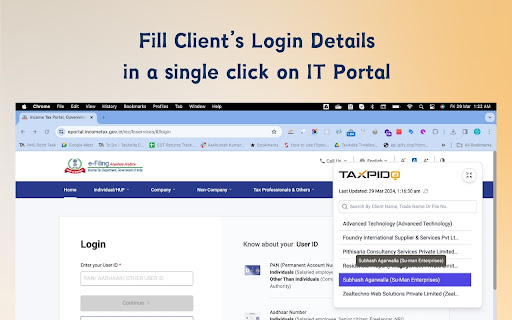

Login Extension allow to login into client's accounts on many portals like GST, Income Tax, TRACES, E-way Bill and DGFT TaxPido Login Extension allows CA and Tax Professionals to quickly login into Client's Accounts on various Government Portal to save time. Users are required to select the client name in Login extension and the username and password will get autofilled by the extension. Currently we cover following portals: - 1) GST - Goods and Service Tax 2) GST E-way bill. 3) Income tax login as tax payer 4) Income tax login as tax deduction (required to login as deduction for TDS return and TDS challans) 5) TRACES as tax deductor 6) TRACES as tax payer 7) DGFT (IEC Code Login) Our roadmap is to include following additional portal for Quick Login (by the end of Sep 24) : - 1) PF 2) ESI 3) GST e-invoicing To use this Login extension, you are required to do a sign up for TaxPido Login. You can do that from this link https://login.taxpido.com/signup After installing this extension, you will get a side popup to select the client name on the Government portal from where you can select the client name and the login details will get autofilled automatically. Release History v1.0.0 - 03 Aug 2024 Release initial version of TaxPido Login Extension after distribution of TaxAdda Software Division v1.0.1 - 03 Aug 2024 Small correction in the published details. v1.0.2 - 11 Aug 2024 Resolving the issue of slow speed of browser when the user have lot of clients. v1.0.3 - 21 Aug 2024 Adding functionality of focusing in the client search by default along with selecting client using key up and key down.

GST Credential Manager
An extension for one to fill-up username / passwords of various clients in a click on GST website Entering GST username and password of clients is a time consuming task. Add to it, password field cannot be copy-pasted as this action is blocked for this field. This credential manager is a handy extension for storing and automation copy/paste of username and password of clients in just one click. Store the name of the client and GST login username/password of multiple clients. Before login, just select the client name from the dropdown and press "Paste" button, which shall automatically fill up stored username/password on GST login page. The extension is free of Cost. Note: 1) GST Credentials of client are stored by extension in your browser's storage and not on cloud. Extension may prompt you an option to sync data while installation. Please refrain from using that sync option 2) Clearing browser storage (or cache) will delete the credentials stored by extension. For any suggesation or feedback or reporting bug, kindly email at dhananjay1405@gmail.com or whatsapp on +919028463366 Extension Developed by: Dhananjay Gokhale

WOP GSTR Downloader
Automation helper for GST return downloads. WOP GSTR Downloader helps you automate GST return and ledger file downloads from official GST portals after you click `Run`. Prerequisites: - Chrome browser - Logged in GST account on official GST portal - Extension installed and enabled - Download location permissions allowed in Chrome Basic Usage: 1. Open GST portal and log in. 2. Open the extension popup. 3. Select FY, Return, and File type. 4. Click Run to load review status. 5. In Review Status, choose month-wise action: - Download / Generate as applicable - Select All Download / Select All Generate where available 6. Click Run Selected Months to execute. 7. Use Stop anytime to stop flow. Stop and Completion Behaviour: - Clicking Stop halts the active flow and status becomes Stopped. - After all selected items finish successfully, status becomes Completed. - If session logout is detected, flow stops and asks user to log in again. Ledger Date Range Behaviour: - You can choose: - Continue with Selected FY Date Range - Select Specific period to download - Specific period date inputs are shown only when that option is selected. - FY mode does not use future dates; end date is capped to current date. Troubleshooting - If Quarter/Period selector is temporarily missing, the extension waits and refreshes automatically. - If portal page changes or slow load happens, retry with stable internet and keep the GST tab active. - If a file is slow to appear for download, the extension retries click as per flow logic. - If anything is stuck, click `Stop`, return to dashboard, and run again. Data and Safety - Works only on GST domains: - Uses local Chrome storage for runtime state. - No third-party ad sharing. Before using, for smooth performance: 1. Go to Chrome `Settings -> Downloads` and turn off `Ask where to save each file before downloading`. 2. Set your preferred default download folder. 3. Open Chrome settings (`Ctrl + K`), go to `General`, and uncheck `Always open PDFs saved from the web`. Important: - This extension is a personal project built to automate repetitive GST workflow tasks. Open for feedback: worldofprofessionalsin@gmail.com

GSTOne
This extension enables CA & Tax practitioners to login in their client's GST portals with one click. This extension enables CA & Tax practitioners to login in their client's GST portals with one click. Introducing our Chrome extension designed to streamline your client management process with ease and security. With our extension, you can securely store login credentials for your clients directly within Chrome, ensuring convenient access whenever you need it. One of the standout features is seamless synchronization across multiple devices, allowing you to access your client credentials wherever you go. Whether you're in the office, on the go, or working remotely, your data is always at your fingertips. Our extension prioritizes user-friendliness, with an intuitive interface that makes saving and retrieving credentials a breeze. Say goodbye to the hassle of managing multiple client logins across different platforms. For professionals handling multiple clients, our extension is a game-changer. It provides a centralized hub for securely storing and accessing client credentials, streamlining your workflow and saving you valuable time. Experience the convenience and peace of mind that comes with our Chrome extension. Try it today and discover why it's an essential tool for anyone managing multiple client accounts.

TDS Credential Manager
Browser Extension for managing TDS website credentials with one-click copy-paste functionality This extension is a one-click solution for automated copy-paste (or auto-populate in technical terms) of various fields on login page of tdscpc.gov.in website, which otherwise manually takes almost 40-60 seconds. Extension manages and store list of client with respective information/credentials list in browser storage for quick selection of client. It supports import of client information/credential list from Excel into extension memory using by grabing Excel clipboard data. Also export for backup is supported in the form of copy to clipboard in the form of Excel data Source of the add-in availble on GitHub https://github.com/dhananjay1405/tds-credential-manager-extension
