
jkhnlbnfjlclkanjkjlilpedadnoigab
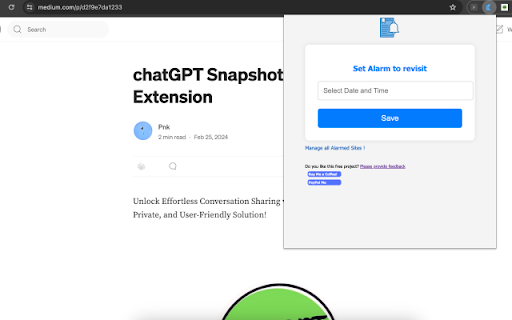

Introducing Alarmed Bookmark, your friendly Chrome extension designed to provide timely reminders for your bookmarked sites. Effortlessly set the date and time for personalized notifications, ensuring that you never miss a revisit to your favorite websites. You have the flexibility to update reminders as needed, with only the latest revision influencing the notification display. Managing your alarmed websites is a breeze – simply navigate to the extension's options page. Here, you can review all your reminders and even cancel alarms if plans change. Click on a notification, and voila! Your 'alarmed' website opens up. Worried about accidental closures? Don't be – our notifications stay put until you choose to interact, ensuring you have ample time to revisit the site. Enabling Alarmed Bookmark is a snap – just click the extension icon or use the convenient shortcut (Ctrl+Shift+V for Windows or Shift+MacCtrl+V for Mac). Input your preferred date and time, save, and let the extension handle the rest. For Mac users, a quick trip to System Preferences ensures you won't miss a single notification. Experience the simplicity of Alarmed Bookmark – because timely reminders make for a smoother online experience.

PriorityTab - Tabs to Tasks
A minimalist, privacy-first todo app in your new tab, automatically prioritizing tasks by urgency so you focus on what matters now. PriorityTab is a simple privacy-first to-do app that shows your task list every time you open a new tab with a minimal UI. - New tasks go to the top, and older ones move down, so it’s easier to pick what to do next. - When you finish something, you can mark it as done and even add a link to the work you did. - It’s great if you’re tired of keeping tasks in different places—everything stays in one list, and nothing gets lost. This extension helps you to finally close your open tabs and get stuff done. - If something’s quick (like replying to an email), just do it and close the tab. - If it’s a task that’ll take time, add a one-line note with a link (if needed) to the To-do tab — and close the tab. - If it’s not a task but something you want to read or save, add it to the Links tab — and close the tab. We care about your privacy. We never look into your task list or browser history. Neither do we collect any user or usage data.

Internal Link Builder
Boost Your SEO with Smarter Internal Linking The Internal Link Builder by LinkStorm helps you uncover internal linking… Boost Your SEO with Smarter Internal Linking The Internal Link Builder by LinkStorm helps you uncover internal linking opportunities across your website, directly from your browser. 💡 Why You Need It Internal links help Google crawl your site, distribute authority, and improve your search rankings. But finding the right links manually is time-consuming. This extension shows you natural opportunities based on real content, with zero guesswork. 🔎 How It Works This extension analyzes your site’s content to detect matching phrases that can serve as anchors to link to other relevant pages on your site. When the analysis is done, you’ll get a list of pages with suggested internal links. Click any suggestion to open the referring page in a preview window, with the anchor phrase highlighted in green. You can review and apply these opportunities manually in your CMS or editor. ⚡ Features - Finds internal linking opportunities across your site - Highlights relevant anchor phrases in context - Works on any website (WordPress, Shopify, static HTML, etc.) - Does not alter your website or content - No signup required 🔒 Privacy-Friendly Your website data is processed locally in your browser. We do not collect or store any of your content. 📄 Note This tool relies on your website’s XML sitemap to discover pages. Make sure your site has a publicly accessible sitemap. 🚀 Created by the team behind LinkStorm.io, the AI-powered internal linking tool for SEO.

No Noise LinkedIn
Block Ads, News, Suggested & Promoted posts on LinkedIn. Activate Focus Mode for a clean, distraction-free professional feed. ✨ No Noise LinkedIn (v2.2.1) – A Clean & Focused Feed Clean up your LinkedIn experience. 💼 🚀 Features: 🔹 🧹 Removes Suggested and Promoted Posts from your LinkedIn feed. 🔹 ❌ Block LinkedIn News and ad modules across the site. 🔹 🎯 Focus Mode: Hide the entire feed to stay distraction-free. 🔹 🌗 Dark/Light Theme: Seamlessly switch between dark and light themes. 🔹 ⚡️ Lightweight, open source, and privacy-friendly — no tracking! 🔹 🕹️ Control Panel to toggle features on/off. 🔹 🔓 Open Source: The code is transparent and available on GitHub. 🔹 🔐 Privacy-First: No tracking or data collection.

Pomodoro Focus Timer
A simple Pomodoro timer to help you stay focused This simple Pomodoro Timer helps you beat procrastination, stay on task, and take guilt-free breaks — no complex setup required. Using the Pomodoro technique, you’ll work in focused 25-minute bursts followed by short breaks. After every 4 focus sessions, you’ll get a longer break to rest and recharge. 🕒 Here’s how it works: - Click Start to begin a 25-minute focus session - When the focus timer ends, you’ll be reminded to take a short break - After every 4 focus sessions, enjoy a long break instead - Adjust your timer settings anytime to suit your rhythm - Progress is tracked with a session counter each day - Get sound notifications and visual cues to stay on track - Badge updates show your remaining time at a glance Perfect for work, study, or creative deep work. Keep distractions out and get more done - one Pomodoro at a time.
