
jkdcbabhagklbkoidneelnhbhcliekak
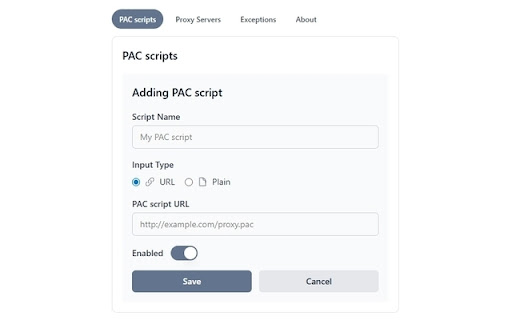


🚀 Take full control of your proxy settings with intelligent automation. Set rules once, browse comfortably forever! Perfect for accessing geo-restricted content, securing your connection, or managing corporate network requirements effortlessly. ✨ Key Features: • Smart PAC script management - load from URLs or paste directly • Domain-specific exceptions with wildcard support (*.example.com) • Multiple proxy server configurations (HTTP, HTTPS, SOCKS4, SOCKS5) • Bulk domain import for enterprise setups • Real-time proxy switching with intelligent fallbacks • Modern, responsive interface built with React • Multi-language support (13+ languages) 🔒 Privacy & Security: • 100% free and open source - inspect the code yourself • Minimal permissions (only 3 required) - maximum privacy • All data stored locally on your device • No tracking, no analytics, no data collection • Built with Manifest V3 for enhanced security 🚀 How It Works: 1. Install the extension and click the toolbar icon 2. Add PAC scripts from URLs or paste script content 3. Configure domain exceptions for granular control 4. Set up proxy servers if needed 5. The extension automatically handles proxy routing 💡 Perfect For: • Accessing geo-restricted content and streaming services • Securing your connection on public WiFi networks • Remote workers connecting to corporate resources • Students and researchers accessing academic content • Business professionals managing multiple network requirements • Anyone wanting automatic proxy switching without manual hassles ⚙️ Permissions Explained: We use only 3 minimal permissions for maximum transparency: • "proxy" - Required to modify your browser's proxy settings • "activeTab" - Used to detect the current tab's domain for easy exception setup • "storage" - Saves your configuration locally on your device 🌐 Enterprise Ready: • Bulk import exception domains from text lists • Support for complex PAC script logic • Multiple proxy server configurations • Wildcard domain matching for easy exception management Why Choose PAC Proxy Manager? Unlike other proxy extensions that are closed-source black boxes, we're completely transparent. Every line of code is available on GitHub. Our minimal permission model means we don't know what websites you access - PAC scripts execute in a controlled, encapsulated environment managed by Chrome itself. Other proxy managers often require broad permissions like "read all websites" or "modify all data." We only ask for exactly what we need and nothing more. 🆓 Always Free: This extension will always remain free and open source. No premium features, no subscriptions, no hidden costs. However, if you find it useful and want to support development, coffee donations are greatly appreciated! 💻 Open Source: View the source code, contribute features, or report issues: https://github.com/ilyachase/pac-proxy-manager-extension ☕ Support the Developer: https://buymeacoffee.com/ilyachase Built with ❤️ for the community by Ilya L.

Proxy Manager
Quickly switch and manage proxy settings from your browser toolbar. Proxy Manager makes it easy to manage browser proxy settings without digging through system or browser configuration pages. The extension opens in a compact popup and lets you quickly choose a saved proxy profile, turn proxy usage on or off, and keep your proxy list organized. Key features: - save multiple proxy profiles; - switch the active proxy with one click; - turn proxy usage on or off from the popup; - support for HTTP, HTTPS, SOCKS4, and SOCKS5; - support for proxies with username and password authentication; - import proxy lists from JSON or lines in the protocol://user:pass@host:port format; - export saved profiles for backup or transfer; - search by label, host, or protocol; - sort the profile list; - edit, copy, and delete saved proxies. How to use: 1. Click the Proxy Manager icon in your browser toolbar. 2. Add a new proxy with “Add new proxy”. 3. Enter a label, protocol, host, port, and authentication details if needed. 4. Select a saved profile from the list. 5. Turn proxy usage on or off with a single switch. For larger proxy lists, use Import proxies: paste a JSON array or lines such as http://user:pass@1.2.3.4:8080. Saved profiles can also be exported for backup or moved to another browser. Privacy: Proxy profiles are stored locally in your browser storage. The extension does not require registration and does not send your proxy settings to external servers. Additional capabilities: - Add Proxy: Create a proxy profile with label, protocol, host, port, and optional authentication. - Export proxies: Export saved profiles for backup or migration. - Search by label, host or protocol: Search saved profiles by label, host, or protocol. - Copy proxy: Copy a saved proxy as a connection URL. - Bypass: Keep a per-profile bypass list for hosts that should use a direct connection. - Reset all proxies: Remove every saved proxy profile and disable proxy use when a clean reset is needed. - Theme: Switch the popup between dark and light themes. - Diagnostics: Review proxy control, authentication, and diagnostics state. - Check proxy: Check the current external IP through the active proxy. - Proxy authentication: Handle proxy authentication challenges for the active profile. - Choose backup file in a tab: Open JSON backup import in a browser tab when Firefox would close the popup for file selection.

Proxy Switcher and Manager
Manage and switch between multiple proxy types (SOCKS, PAC, and Direct) with profile support "Proxy Switcher and Manager" extension brings the power of proxy management to your browser. Using this extension, you can configure your browser to use a proxy server without altering your operating system's network. The toolbar icon indicates the current type of proxy your browser is using (No Proxy Mode (Direct), Auto-detect Proxy Mode, Manual Mode (SOCKS and HTTPS), and PAC Script Mode). The extension is designed such that no resource is used while the panel is closed. Features: 1. Supports profiles to store multiple proxy servers and switch between them when needed 2. Supports inline PAC script 3. Supports refreshing the PAC script from a remote server 4. Displays failed resources and the reason they failed 5. Supports badge text and toolbar color to differentiate between proxy profiles Notes: 1. The toolbar icon is an indicator of the current proxy type. Place your mouse over the toolbar button to get more info. 2. The badge text displays the number of failed resources. Opening the panel, you can check these resources by pressing the "Error Log" button (this feature is disabled by default). 3. It is possible to search for free transparent or anonymous proxy servers in the manual proxy tab. Why do I need this extension to alter my proxy? By using a proxy server that sits intermediary between your computer and the internet, you can hide your real location or access websites that would otherwise be blocked. Proxy Switcher and Manager is an open-source project.

ReYohoho Twitch Proxy 1080p/1440p (Russia)
Прокси для Twitch с поддержкой 1080p/1440p Прокси для Twitch, чтобы смотреть в 1080p/1440p (РФ). Расширение перенаправляет запросы Twitch через наш прокси, обеспечивая доступ к качеству 1080p/1440p для российских пользователей. ⚠ Расширение передаёт ваш OAuth-twitch токен на наш бэкенд. Это необходимо для отстуствия рекламной заглушки и работы 1440p качества. ⚠ Для поддержки 1440p должна быть поддержка кодека H.265 в браузере ⚠ Расширение не проксирует сами потоки стримов, поэтому не влияет на их работу(например если подлагивает стрим)

LostFilm.TV - официальный плагин
Беспрепятственный доступ к сайту LostFilm.TV LostFilm.TV - официальный плагин для Google Chrome Беспрепятственный доступ к сайту LostFilm.TV
