
jkcndenmlmibokknlonfeemndgappgac
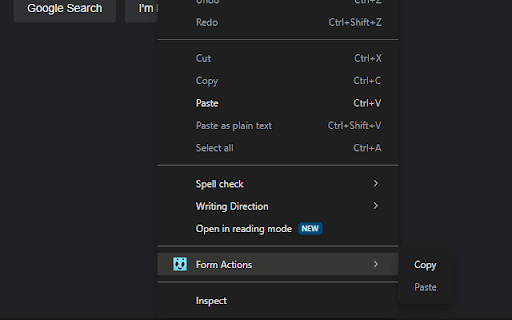
A simple extension that allows the user to copy data from one form to another. This extension will add additional item to the context menu, which will allow you to copy form content and then paste it to another form, keeping track of inputs' types and names. The data is stored in the browser's internal session storage and is discarded after the browser is closed.

Form Saver
Save and fill form No need to fill same form every time. Just fill for first time and Save form data using this tool then fill when required. This will save time and hustle filling form.

MultiField CopyCat - Copy, Paste & Autofill Forms Instantly
Tired of filling the same forms? MultiField CopyCat is a form-filler chrome extension that lets you bulk copy, paste, and autofill form fields instantly. Drag to select fields to copy and paste them into another form in seconds. Save form data once for future autofills. Save time and energy with every web form! 🐱⚡ ⭐ Benefits 🐾 ------------------------- ⏱️✨ Save time filling forms – Skip typing every field! Copy, paste & autofill forms in seconds 🚀✨ Boost productivity – Do more in less time for work, testing, or data entry 🧠✨ Reduce mental & physical fatigue – Free yourself from wrist fatigue & brain draining repetitive typing ☕✨ Relax while we work – Enjoy more breaks while your forms are pasted instantly or filled automatically 🔒✨ Privacy first – Your data stays local. We never share or sell your information 🐱✨ A cat companion in your browser – Pin Meow Meow to your toolbar for a cute productivity buddy ⚡ Key Features 🐾 ------------------------- 📄✨ Copy & paste form fields in selected area – Drag over target area to copy or paste multiple fields at once 📋✨ Copy & paste all form data on page – Grab all form data with 1 button click. Paste them wherever needed. Perfect for data migration or repeated entries 🧠✨ Smart Match available – Attempt to match fields automatically when pasting, even when form fields aren't in the same order (works best with standard web forms) 🔀✨ Two Paste modes – Use default Sequential Mode for forms with identical layouts (Smart Match off), or Smart Match Mode to match fields for forms with different field positions (toggle in the extension popup) 🏄✨ Auto-Scroll Dragbox (Pro) – Drag your selection area beyond the visible screen, and the page scrolls automatically. Perfect for copying/pasting between long forms or CMS pages 🐱✨ Smart autofill – Save & reuse your form data with instant autofill. Great for repetitive tasks, or saving draft copies on web entries ✌️✨ Apply saved form values on current page – Use 'Apply Autofill' button to instantly fill current page using a selected saved form setting ⚙️✨ Full control over autofill – Easily toggle autofill on or off for each saved setting 💎✨ Custom field group setup in Smart Match (Pro) – Create custom field groups, allowing fields with similar meanings to match across different websites for maximum flexibility 🗂️✨ Save multiple form sets per autofill setting (Pro) – Easily switch between different saved form sets under one autofill setting ⏱️✨ Custom autofill delay for slow-loading pages (Pro) – Ensure autofill applies at the right timing on dynamic or slow websites 🛠️✨ Edit & manage saved settings – Update field values, or edit URL patterns to extend autofill on more pages 💳✨ Built-in Stripe checkout autofill – Instantly fill out Stripe test-mode checkouts. Perfect for developers & QA testers ⌨️✨ Customizable keyboard shortcuts – Use default hotkeys or define your own for a lightning-fast workflow 🧩✨ Supports all standard fields – Works seamlessly with text inputs, checkboxes, radio buttons, dropdowns, content-editable fields, and more 📊✨ Usage insights – Check performed action counts & time saved, right from the profile page (click the cat in the popup 🐱) 🔒✨ Privacy-first storage – All data stays local on your device. We connect only to our official site to verify login/subscription status ⭐ How It Works 🐾 ------------------------- MultiField CopyCat lets you copy, paste, and autofill form fields on any webpage in seconds. 📄✨ Copy form data in selected area – Press Alt+C / Option+C to start copy mode, then drag to select fields 📋✨ Paste form data in selected area – Press Alt+V / Option+V to start paste mode, then drag to paste into fields 📄✨ Copy all form data on page – Press Alt+Shift+C / Option+Shift+C 📋✨ Paste all form data on page – Press Alt+Shift+V / Option+Shift+V 🧠✨ Smart match vs default sequential mode during paste – Switch modes via the 'Enable Smart Match' button in the extension popup. Default Sequential Mode pastes fields in the same order as copied, perfect for identical form layouts. Smart Match Mode helps automatically match fields based on form field similarity when field order differs 🐱✨ Save autofill setting – Fill out a form as usual, then press Alt+A / Option+A to save it. Next time you visit, forms will be autofilled instantly on page load. You can also manually apply saved form values on the current page at any time from the extension popup ✅✨ All actions are accessible via buttons in the extension popup ✅✨ Works on all standard form fields – text inputs, textareas, checkboxes, radio buttons, dropdowns, and more You can manage saved autofill settings, toggle autofill on/off, or view usage stats from the extension popup or options page. 📘 For a step-by-step guide, check out our Onboarding Guide: https://multifield-copycat.com/get-started 💡 If the default shortcuts don't work, they may be overridden by other extensions. You can check & update them in chrome://extensions/shortcuts and try again. Or checkout our Onboarding Guide on how to customize shortcuts. ⭐ Popular Use Cases 🐾 ------------------------- 💼✨ Admin & operations staff – Speed through repetitive form entries for CRMs, dashboards, and internal tools 🛒✨ E-commerce managers – Manage product listings, inventory, or vendor forms in CMS with less manual typing 💻✨ Developers, QA testers & project managers – Instantly autofill test forms, replicate bug reports, migrate form data across environments, and speed up form-heavy testing ✍️✨ Content editors & marketers – Reuse content or metadata across CMS forms and SEO tools, or save draft copies in web forms with autofill 🧑💼✨ HR teams & job seekers – Prefill job application forms, or copy candidate data without retyping 👨💻👩💻✨ Everyone – Stop wasting time on copy-paste loops. Save effort on any form, anywhere ⭐ All Plans 🐾 ------------------------- 💛✨ Free – 10 copy & paste actions per week – Unlimited autofill usage with up to 3 saved settings 💝✨ Pro – Unlimited copy & paste actions – Unlimited autofill usage without restrictions – Auto-Scroll Dragbox for copying & pasting fields beyond the viewport – Custom field group setup in Smart Match – Save multiple form sets per autofill setting – Custom autofill delay for slow-loading pages – Priority support 🔒 Privacy & Security 🐾 ------------------------- We respect your privacy — MultiField CopyCat does not track your browsing activity or collect any personal information. All data is stored locally in your browser. While no encryption is applied, we recommend avoiding the storage of sensitive data like passwords or credit card numbers when using autofill. 📧 Contact us 🐾 ------------------------- Need help, got a feature idea or find out any issues? Please contact us via email at contact@multifield-copycat.com or join our Discord listed on our official site for support ⭐ Get Started Today ⭐ ------------------------- Say goodbye to repeat form entry! Install MultiField CopyCat now and experience lightning-fast workflow 🐱⚡

Copy paste value
Copy and paste to the value property of the target element "Copy paste value" is an extension that copies and pastes the ".value" property of the target element to the clipboard. You can use it instead of running commands like "copy ($ 0.value)" or "$ 0.value =` text` "in the DevTools console. * You can also set a value for an input form that blocks the onPaste event. * You can copy the value of select box or radio button. * You can copy the auto-completed password. * Since the UI is added only to the context menu, it does not interfere with normal operations.

CopyPlus
Enables single-click copying of HTML form data from one web application to another with a set of custom field-to-field mappings. Do you hate wasting time entering the same data into multiple systems? We do too. That’s why we created CopyPlus. CopyPlus eliminates duplicate data entry by allowing you to single-click copy data from one web application to another. That means you can copy data from your CRM to your Billing system and from your Billing system into your ERP system. It’s that easy.
