
jjllimldkgifclpeokoigimefkmjdkpm

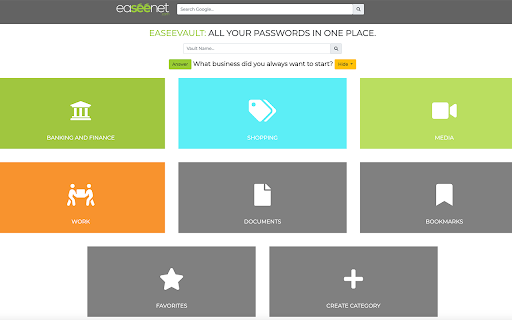
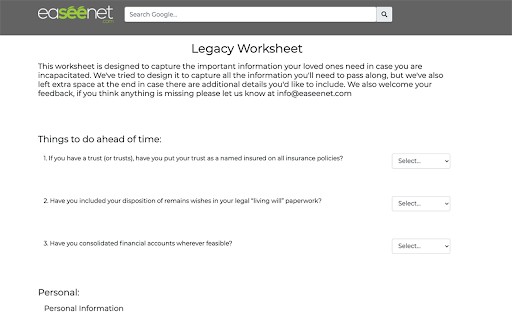
Make using the internet easy and secure by using the official Easeenet web browser extension. Make “forgot my password” and “what’s that website again?” a thing of the past, and keep your loved ones from getting locked out of your online accounts if anything happens! Easeenet makes your online life easy to see, for you today and your loved ones tomorrow. Easeenet combines a simple, secure password manager, designed for non-techy users, with a digital vault, to effortlessly organize and preserve your online life, and seamlessly pass on your digital estate to your next of kin if anything happens to you. Our extension is available for Chrome, Firefox, and Edge, and will automatically recognize when you put in your login credentials for a website, and prompt you to store and categorize them in your Easeenet dashboard. Next time you visit that site, either by navigating directly to the site or clicking on your vault from your Easeenet dashboard, your credentials will autofill for you. Your Easeenet account also has a place to securely store and share documents, capture your memories and stories, and log the critical details that your next of kin will need if anything happens to you.

Helper Extension for Gridiron Dynasty
This extension is for coaches who play Gridiron Dynasty on Whatifsports.com (WIS). When you search for recruits, the web page displays the recruits hometown (City, ST). This extension modifies the hometown to be a URL that opens the The Next Guess website (www.thenextguess.com) and leverages its mapping capability to show you where the recruit is located compared to all human coaches in that world and division. The extension will also highlight a recruit's row BLUE if you are watching the recruit, YELLOW if you are in a battle for the recruit with other schools, and GREEN if the recruit is considering only your school. In addition, in the active team's schedule page, as well as the team's profile schedule tab, the extension will insert a link to the active team's schedule/game analysis page on The Next Guess website. Finally, next to each boxscore link, the extension will insert a small green plus icon that is hyperlinked to The Next Guess game analysis. Clicking the green plus icon will open The Next Guess in a new tab and instantly analyze the boxscore. Release Notes: v2.0.0.3 Fixed broken location link in recruit profile page due to space between city and state. v2.0.0.0 Migrated all of the links to use The Next Guess website as the full replacement for the GDAnalyst website which will be deprecated soon. v1.0.0.2 Fixes a minor issue that may or may not appear depending on the browser. v1.0.0.1 Fixes issue where links were not getting inserted for the upcoming scheduled game. Adds GDAnalyst Schedule page and GUESS page links for the previous game's opponent. v1.0.0.0 Added links to GDAnalyst Schedule Page and GUESS page for the Active Team. Added GDAnalyst Analyze link for the previous game's box score. Added GDAnalyst Schedule Page and GUESS page links for the current game's Home and Away teams. Added GDAnalyst Analyze link for the current game's box score. (Only visible at half-time of current game). On the Recruit Profile page, GDAnalyst link to the recruit's Hometown will now show on every tab of the Recruit Profile page. v0.0.2.3 Fixed an issue with 8-digit gameId's. v0.0.2.2 Renamed the extension to Helper Extension for Gridiron Dynasty. Release Notes: v0.0.2.1 Corrects GDAnalyst link on the Team Profile page's Schedule tab. v0.0.2.0 1. In the active team's schedule page, as well as the team's profile schedule tab, the extension will insert a link to the active team's schedule/game analysis page on GDAnalyst website. 2. Next to each boxscore link, the extension will insert a small green plus icon that is hyperlinked to GDAnalyst game analysis. Clicking the green plus icon will open GDAnalyst in a new tab and analyze the boxscore. v0.0.1.2 Resolves an issue where the page updates made by the extension may disappear if certain actions are taken on the page (e.g. clicking check box to add a recruit to your watchlist or changing some of the search filter options at the top).

Trackball Scroller
Scroll with your trackball Trackball Scroller lets you scroll pages with your trackball. When you activate "scroll mode", you can roll your trackball to scroll. Browse infinite-scrollable websites or long documents easily. Flick the ball to jump quickly, or move it slowly to scroll in a smooth continuous manner; gives better scrolling experience if you're not satisfied with your trackball's scroll wheel. Works best with trackballs, feels awkward with traditional mice, no big changes with two-finger scroll on touchpads - except one finger vs two fingers. --- • customize shortcut with a mouse button or a key (key combo activates on the largest scroll element on the screen.) • sensitivity

Waybook Shots - Turn Screenshots into SOPs Instantly
Stop pausing your work to document it. Capture your screen and instantly turn every click into a step-by-step guide. Stop pausing your work to document it. With Waybook Shots, every click becomes a step-by-step guide automatically. Waybook Shots is a free browser extension that turns your everyday workflows into clear, visual SOPs. Start recording and Shots instantly captures screenshots and captions so you can document processes effortlessly. Key Features – Instant documentation: Click Record, complete your process as normal, and Shots builds a guide with screenshots and instructions. – Capture anything, anywhere: Record across windows and other desktop apps — not limited to just tabs in your browser. – Smart screenshots: Auto-snap when the screen changes and fill any missed steps from your recording. – Simple editing: Edit text, reorder steps, and redact sensitive data with Shots powerful image editor. – Flexible sharing: Share a link, embed in any website, or import into your Waybook — your guides stay private until shared. Why Teams Choose Waybook Shots – Capture once, document forever. – Save hours with SOPs created from real workflows. – Onboard new hires faster with visual guides that people actually use. – Keep every process consistent. — No manual writing needed. Who It's For - Ops and enablement managers standardizing SOPs. - Customer success and training teams. - Agencies and consultants documenting client workflows. - Anyone who wants clean, automatic process documentation. How to Get Started Install the Shots extension, connect to your free Waybook account, and hit Record. Your process automatically becomes a guide that can be edited and shared with others. Better with Waybook Waybook team users unlock extra benefits including the ability to upload your own screenshots, download video recordings, and make processes with up to a massive 100 screenshots. Book a demo with Waybook today to see how Shots can boost your team's productivity. Privacy & Security Waybook Shots takes your privacy seriously. All recordings are stored securely and never shared without your permission. Your screen recording is only ever viewable by you. See our Privacy Policy for details. Install Waybook Shots for free and never write another SOP from scratch.

PromptEasily ChatGPT - HDTeam
PromptEasily ChatGPT - HDTeam adds a list of curated prompt templates for SEO, SaaS and more to ChatGPT. Try today. PromptEasily ChatGPT - HDTeam adds a list of curated prompt templates for SEO, SaaS and more to ChatGPT. Try today.
