
jjbjimjenhbjedelcpihhhjmeocppejl

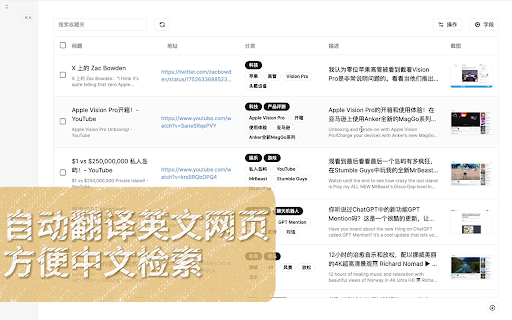

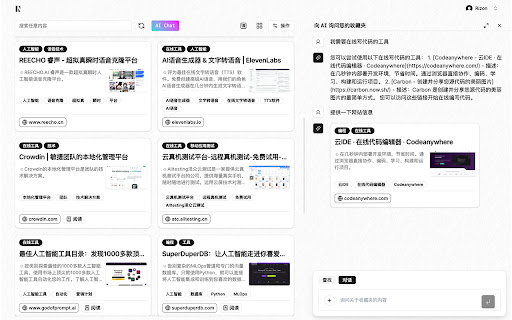

AI零压收藏夹,一键收藏网页。AI智能分类与搜索,即使模糊的记忆也能找到需要的网页 一键收藏你需要的网页,不用焦虑于如何分类整理管理,无需手动整理收藏,AI会自动整理您收藏的网页。 快速检索你过去收藏的页面,不用再因为想不起网页的名字而导致搜索不到,我们的AI会帮你找到你需要的内容。 仓鼠症的福音。 # 快速收藏 点击扩展图标即可一键收藏,无需进行分类管理,ai服务会自动为你分类。 # 英文网站自动翻译 当收藏英文网站时,会自动把网站的标题和描述信息进行翻译。 搜索网站时可以使用中文或英文去搜索,因此当检索某个收藏的网站时不用担心因为想不到当时网站的关键词而找不到网页 # 自动截图 收藏一个网页时,会将当前页面自动截图。查看收藏夹时,可以通过截图快速预览。 # 地址栏快速搜索功能 在地址栏输入jm后按tab键,即可快速搜索收藏夹 # AI自动分类 当您收藏网页时,服务将会使用AI对网页自动进行分类标注,以方便快速查找网页。您可以选择使用自己的ChatGpt的API KEY,也可以选择使用我们提供的AI分类服务,完全取决于您的个人喜好。 # AI智能标签 您可以创建自己的标签,AI将会根据您创建的标签自动将网页分类到对应的标签中。 # 对话您的收藏夹 通过与AI对话,使用自然语言更轻松的查找您的收藏夹 # justmark AI服务 您可以选择使用自己的ChatGpt的API KEY,也可以选择方便的购买使用我们提供的AI分类服务,完全取决于您的个人喜好。

ATO - AI Tab Organizer | Smart Tab Manager
AI tab organizer & smart tab manager. Auto-group tabs by category, last access, or usage. Clean duplicates and search instantly. ATO: AI Tab Organizer & Smart Tab Manager Stop drowning in a sea of tabs. Let AI organize your digital life in seconds. ATO is a next-generation tab organizer designed to turn browser chaos into a structured, high-performance workspace. Using sophisticated AI, ATO doesn't just "group" tabs - it understands your workflow, predicts your needs, and provides a stunning visual "Universe" to manage your browsing with surgical precision. 🧠 SMART AI ORGANIZATION METHODS: ________________________________________ Choose how ATO thinks for you. Whether you want semantic grouping or temporal sorting, ATO adapts to your style: ➤ By Category (AI Semantic Grouping): ATO analyzes page content to create meaningful groups like Research, Shopping, Finance, or Work. It’s the ultimate way to keep related projects together automatically. ➤ By Last Access: Keep your flow current. ATO groups tabs by when you last used them (Recently used, Today, This Week), keeping older tabs neatly tucked away. ➤ By Frequency (Prediction Mode): Harness the power of AI to prioritize the tabs you’re likely to use next based on your current browsing habits. ➤ By Topics (Customized): Take full control of your workspace. Define your own specific categories and set ATO to route every new tab into those exact groups automatically. Perfect for maintaining a strictly organized workflow. And more...! ⚙️ Dynamic Auto-Organizing: ________________________________________ Enable on-the-fly mode and watch ATO group every new tab the moment it is opened. Your browsing stays structured at all times. 🔭 Tab Observer: ________________________________________ Your Browser, Reimagined as a Universe. While ATO handles the heavy lifting of sorting, the Tab Observer provides the "Eagle Eye" view you’ve always needed. It is a fluid, immersive visual command center that bridges the gap between AI automation and manual control. ➤ Spaces & Planets: Each Chrome window is a distinct "Space." Tab groups are represented as procedurally generated "Planets" that grow in size as you add more tabs. ➤ Stars (Tabs): Individual tabs orbit their planets like stars, giving you a clear visual hierarchy of your browsing session. ➤ Tactical Control: Effortlessly drag-and-drop "Stars" to attach them to "Planets" or use the Action Drop Zone to teleport tabs to different windows or delete clutter with a single flick. ➤ Marquee Multi-Select: Click and drag to draw a selection box. Bulk-move dozens of tabs across windows or into groups in seconds. ➤ Live Previews: Hover over any tab in the Tab Observer for a real-time snapshot of the page content before you click. 🧰 ADVANCED TAB MANAGEMENT TOOLS: ________________________________________ Take full command of your digital workspace with a comprehensive suite of professional utilities ➤ Clean Duplicate Tabs: Instantly identify and close redundant tabs to save memory and reduce mental clutter. ➤ Lightning Fast Search: Find any tab across any window instantly with a powerful search tool that highlights your results within the Tab Observer universe. ➤ Rename Tabs: Give tabs custom names for clarity and reorder groups based on your preferred AI method for a consistent workspace. 📦 WHAT's IN THE BOX? ________________________________________ Free – Essential AI organization for everyone: ➤ Smart AI Organization: Use all organization methods to clean your workspace. ➤ 30 Monthly Tokens: Get 30 AI credits every month to organize your tabs on-demand. ➤ Auto-Refills: Your balance automatically refills to 30 tokens every single month. ➤ Complete Tab Toolbox: Full access to duplicate cleaning, lightning-fast search, and tab renaming. ➤ Version Updates: Receive on-screen notifications for new features and performance improvements. ATO Pro – The ultimate "Unlimited" experience: ➤ Unlimited Tokens: Forget the limits - use AI organization as much as you want, whenever you want. ➤ No Refills, No Limits: Total freedom to maintain a perfect workspace 24/7. ➤ Full Tab Observer Access: Unlock the complete visual "Universe" command center to manage tabs with surgical precision.Dynamic Auto-Organization: ➤ ATO groups every new tab the moment you open it, keeping you structured on-the-fly. ➤ Premium Support: Fast-track assistance for your workflow needs. 📝 TECHNICAL TRANSPARANCY & ACCOUNT INFO: ________________________________________ ➤ Authentication: Features like token management and Pro upgrades require a secure login ➤ Notifications: At ATO, we believe in small, consistent improvements. The AI landscape moves fast, and so do we! Every time we launch a new optimization or feature, you’ll see a quick version update notice so you’re always using the latest tech. ➤ Go Pro: Authenticated users can manage their experience and upgrade to ATO Pro via in-app popups or our website. 🚀 WHY CHOOSE ATO? ________________________________________ Unlike traditional tab management extensions that simply hide the mess, ATO solves it. By combining the automation of advanced AI with the visual intuition of the Tab Observer, ATO allows you to stop managing your browser and start focusing on what actually matters. Experience the future of the Chrome tab manager. Say goodbye to tab chaos and let the most advanced browser organizer do the heavy lifting for you. Install ATO today and level up your productivity.

Blazwitcher - 全局模糊搜索
内置极致丝滑的拼音模糊搜索算法,全局检索你的标签页、书签和历史记录并通过快捷键快速切换,且支持 AI 标签分组,提升冲浪效率 Blazwitcher 是一个用于搜索标签,书签和历史,支持模糊拼音搜索和 AI 标签分组。对于那些打开多个选项卡并希望切换正确的选项卡或从历史记录或书签中快速创建新选项卡而不想通过手动寻找的人来说,这也是一个完美的解决方案。 插件已开源,github 地址:https://github.com/cjinhuo/blazwitcher 官网地址:https://blazwitcher.vercel.app # 功能 - 模糊拼音搜索: 支持中英文混合模糊搜索,对国人友好(依赖于[文本搜索引擎](https://github.com/cjinhuo/text-search-engine)) - 首字母拼音搜索 - 域名搜索 - 空格分词搜索 - 直观排序: 搜索结果按照文本搜索引擎返回的权重值和最近使用的时间降序,更快定位目标 - 搜索数据源: - 标签搜索: 搜索你打开的所有Chrome标签 - 书签搜索: 搜索你所有的书签 - 历史查询: 默认检索近 14 天内 1000 条历史记录,可输入 `/s search` 进行配置修改 - 定向搜索:输入 `/t` 可单独搜索已打开的标签页、输入 `/b` 可单独搜索书签、输入 `/h` 可单独搜索历史记录 - 全键盘操作 - 默认通过 `Command+Shift+K`(Window 系统`Ctrl+Shift+K`) 唤醒插件,可输入 `/s keyboard` 进行自定义 - 通过上下键(↑↓)或 Tab 键选择标签内容,按下 enter 键来切换或打开你想要的标签 - 也通过快捷键来 pin、unpin、打开历史记录、打开当前书签位置等等 - AI 标签分组:对上次聚焦窗口下的所有标签页进行智能分组,根据域名、标题名和现有分组情况进行增量智能分组 如何使用 激活 Blazwitcher 扩展的默认快捷键是Mac上的`Command+Shift+K`,Windows上的`Ctrl+Shift+K`。当然,你输入 可输入 `/s keyboard` 进行自定义它以适应你的习惯。 适用人群 那些追求快捷操作和速度的人群,如: 🧑💻 程序员 💻 多任务并行人员 🏄🏻 冲浪

Akii – Free AI Visibility Score & AI Search Analyzer
Free AI Visibility Score for any website. See how AI search engines perceive your brand and discover ranking opportunities. Akii’s AI Visibility Score is the fastest way to understand how leading AI models (ChatGPT, Gemini, Claude, Perplexity, and more) see your brand. With one click, instantly analyze the website you’re currently visiting and uncover how well it performs in AI-driven search. Whether you're an SEO expert, digital marketer, or agency, Akii helps you identify blind spots in your brand's AI visibility — the new frontier of search. Run a full AI visibility audit instantly for the website you're browsing. No login required. See how AI models describe, rank, and recommend your brand across different contexts and queries. Compare how AI models view your competitors — and where they outrank you. 🛠️ 4. Website Optimizer for AI Search Analyze your website’s structure, content, and entity signals to improve your AI search ranking potential. Educate AI search engines at scale by strengthening your brand’s structured identity across the web. 🎯 Who Is This For? If you care about ranking in LLM-powered search engines, this tool is for you. Search has changed. AI models are now the new search engines — and brands must optimize not just for Google, but for AI search ecosystems that power answers, assistants, and chat-based discovery. Akii shows you: - What AI models believe your brand does - Which competitors AI thinks you’re similar to - Whether AI trusts your website - What content AI pulls from to describe you - Where your entity data is broken or missing 🛠️ How To Use This Extension 1. Install the extension 2. Visit any website (yours or a competitor) 3. Click the Akii icon 4. Get a free AI Visibility Score in 2 seconds 5. Explore issues, competitor mentions, and optimization recommendations Install Akii and run your first free AI Visibility Score.

MarkMind
Transform your chaotic bookmarks into organized bliss with AI We rebuilt MarkMind from the ground up. Version 2 brings a completely new interface, support for multiple AI providers, and bulk organization. Same mission: make your bookmarks actually useful again. WHAT'S NEW IN V2 - Support for 4 AI providers: Google Gemini, OpenAI (GPT), Anthropic (Claude), and OpenRouter - Completely redesigned interface built with React - Bulk organize: scan and sort hundreds of bookmarks at once - Smarter folder suggestions based on page content analysis HOW IT WORKS Visit any page, click MarkMind, and hit Organize. The AI reads the page content and suggests the best folder from your existing bookmark structure. You review, accept or decline. That's it. For bulk organization, head to the Organize tab, scan your bookmarks, select the ones you want sorted, and review all suggestions before applying. YOUR BOOKMARKS, YOUR RULES Every suggestion goes through you first. Nothing moves without your approval. MarkMind works with your existing folder structure — it doesn't try to reinvent how you organize things. CHOOSE YOUR AI Pick the provider you already use and trust: - Google Gemini (free tier works great for this) - OpenAI - Anthropic (Claude) - OpenRouter (access to dozens of models) Just bring your own API key and you're good to go. PRIVACY Your bookmarks never leave your browser. Only page titles and URLs are sent to your chosen AI provider for analysis. API keys are stored locally in Chrome. No analytics, no tracking, no accounts. The code is open source on GitHub if you want to verify.
