
jjaokcmmobdagaaehlkjhdbloalhmjdj
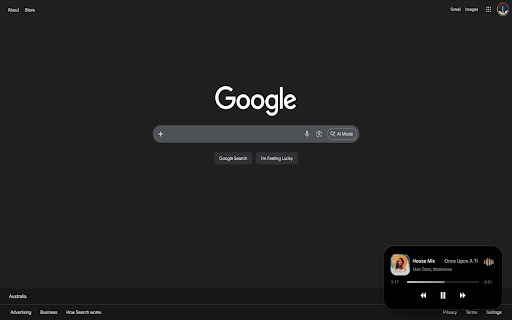

Chrome version of dynamic island for increased productivity. Inspired by Apple's Dynamic Island, Dynamic Chromeland brings a touch of modern design and convenience to your browser. Your media controls stay always within reach, no matter where you are in the browser. Whether you're watching a video or listening to music, you can play, pause, skip or seek with a single glance without searching for the audio tab. The floating island integrates naturally into your browsing experience, offering quick access without distractions. Key Features - Real-time media information display - One-click navigation to the audio source tab - Minimalist, lightweight and responsive design - Tabs stack for easy navigation to multiple audio source tabs - Quick access to play/pause, skip, previous and seek controls - Synchronized floating island visible across tabs and windows How it Works 1. Play audio or video on YouTube, YouTube Music or Spotify 2. Floating island appears in the bottom-right corner of the page 3. Toggle the island using the extension icon or (⌥⇧D / Alt-Shift-D) 4. Click the island to return to the audio source tab 5. Control playback directly from the island 6. Double-click the island or press (⌥⇧F / Alt-Shift-F) to open the audio tabs stack 7. Select any row in the stack to switch to that audio tab What’s New (v1.5.1) - Improved overall performance and experience - Smoother audio waveforms Stay in control of your media — effortlessly. More to come.

New Tab Vision Pro
This app will change the new tab style as Apple's Vision Pro style. If you need more features or find buggy issue, send a email!

GNT: Glass New Tab – iOS Style Dashboard
Smooth iOS/macOS-inspired glass New Tab with Spotlight search and refined customization. Designed and crafted in India. GNT: Glass New Tab – iOS Style Dashboard transforms your Chrome New Tab into a premium glass-style dashboard with Spotlight search, widgets, shortcuts, and privacy-first customization. Turn every new tab into an AI-powered productivity dashboard. Search smarter, switch engines instantly, and stay focused in one clean space. 🎨 Glassmorphism UI (iOS/macOS Style) : Experience a modern frosted glass interface with smooth animations and a premium feel 🔍 Smart Search : Use a Spotlight-style search bar with multi-engine switching and faster access to anything on the web 🌐 Multi-Engine Search : Switch instantly between Google(default), DuckDuckGo, Bing, Brave, and YouTube: all from one search bar 🕒 Clock & Date Widgets : Switch between analog and digital clock styles with clean layouts 👋 Personalized Greeting : Display your name or custom message on your dashboard ⚡ Shortcuts & App Dock : Instant access to your favorite websites, tools, and apps 📝 Notes & To-Do List : Stay productive with built-in lightweight organization tools 🖼️ Wallpaper Customization : Upload your own wallpapers or enable optional auto-refresh backgrounds 🌦️ Weather : Get real-time weather with manual city input or optional GPS access 🌗 Theme Controls : Switch between Light, Dark, or System mode with accent color customization 🔒 Privacy First : Always Your data stays on your device. No compromises. All settings are stored locally in your browser. Optional features connect directly from your device to their providers. 🔍 Search Behavior : - Uses more Enhanced Chrome Search API - Respects your default search engine - Does not modify your search provider 🌍 Built with Care : Crafted with care by Animesh (India) Website: https://animeshpatra.me/ Support Project: https://shorturl.at/PcSl2 Current V: 3.0.0 ⚠️ Important Notice : We are not interested in promotional, marketing, or paid advertising offers for this extension. Please do not contact us regarding such services.

basetab.ai - Customizable AI New Tab
Your browser's new home - organize bookmarks, notes, and widgets in one place basetab.ai – Your Browser's New Home Turn every new tab into a fully customizable productivity dashboard. basetab.ai replaces your browser's default new tab page with a powerful, widget-based workspace where you can organize everything you need — bookmarks, notes, tasks, AI assistants, file storage, integrations, and more — all in one place. Every time you open a new tab, you're greeted with the same blank page or a list of frequently visited sites. basetab.ai transforms that wasted space into a personal command center. No more switching between apps, tabs, or windows to check your calendar, manage your to-dos, chat with AI, or jot down a quick note. Everything lives right where you start — your new tab. basetab.ai comes with a rich set of built-in widgets that you can mix, match, resize, and arrange however you like: • Bookmarks – Save and organize your most-visited links with automatic favicon detection. Three display modes: List, Grid (speed dial), and Compact (chips). Import bookmarks directly from your browser. • Notes – A full rich-text editor right in your new tab. Supports bold, italic, links, code blocks, and more. Multiple tabs let you keep separate documents within a single widget. • To-Do Lists – Track your daily tasks with a clean, simple checklist. Drag-and-drop reordering, completion tracking, and a progress bar to visualize your day. • Kanban Board – Organize projects visually with drag-and-drop columns and cards. Add, rename, and remove columns. Perfect for managing workflows, sprints, or personal projects. • Calendar – A built-in calendar with month, week, and day views. Create, edit, and delete color-coded events with location and time metadata. Configurable week start day. • Pomodoro Timer – Built-in focus timer using the Pomodoro technique. Customizable work and break durations, session counter, audio notifications, and pause/resume controls. • Routines – Plan and track your daily habits and routines. Binary completion or quantity-based tracking with targets. Visualize your consistency with heat maps (weekly/monthly view). Daily auto-reset keeps you accountable. • Search Engine – Quick search from your new tab with 12+ built-in engines. Create custom search engines with URL templates. • News Reader – Aggregate news from 20+ sources and financial feeds. Add any custom RSS/Atom feed URL. Supports subreddit feeds. • Clock – Display the current time with three styles: Digital, Analog, and Minimal. Multiple tabs let you track different timezones — perfect for remote teams and international collaboration. • Weather – Real-time weather conditions and a 4-day forecast for any city. Supports both metric and imperial units with geolocation-based auto-detection. • Claude AI – Chat with Claude directly in your new tab. Three modes: Shortcut (inject prompts into claude.ai), API Key (use your own key), or AI Credits (included with your plan). • ChatGPT – Chat with GPT models. Three modes: Shortcut, API Key, or AI Credits. • Gemini AI – Chat with Gemini directly in your new tab. Shortcut mode injects prompts into gemini.google.com, or use your own API key. • Fal AI – Generate images and access AI models. Bring your own API key for image generation and creative AI tasks. • AI Widget Generator – Describe what you want, and AI builds it for you. Write a prompt and Claude generates a fully self-contained HTML/CSS/JS widget rendered in a secure sandbox. Create custom mini-apps without writing code. • Ticker – Real-time price tracking with three variants: Crypto, Forex, Commodities, US Stocks. • Google Calendar – Connect your Google Calendar with OAuth2. View, create, edit, and delete events directly from your new tab with real-time sync. • Gmail – Read, send, and reply to emails without leaving your new tab. Full Gmail API integration with labels, threading, and message management. • Google Docs – Embed and edit Google Documents directly in a widget. • Google Sheets – Embed and work with Google Spreadsheets inline. • Google Slides – View and edit presentations right from your dashboard. • Google Forms – Build and manage forms without opening a new tab. • Google Vids – Access Google's video creation platform embedded in your workspace. Note on Google Integrations: Google Calendar and Gmail widgets require you to provide your own Google Cloud API credentials (Client ID and Client Secret). This is by design for your privacy — we never store or have access to your credentials. A step-by-step setup guide is provided within each widget. • Whiteboard – A freeform drawing canvas. Sketch diagrams, wireframes, mind maps, or anything visual. Multiple tabs for separate canvases with full undo/redo support. • YouTube – Embed and watch YouTube videos directly in your dashboard. • Spotify – Embed tracks, albums, playlists, podcasts, and artist pages. • Upload File – Upload and manage files directly from your new tab with S3-powered cloud storage. Supports 200+ file types including images, documents, spreadsheets, presentations, design files, audio, video, and archives. Grid and list view modes with file preview. • GitHub – Display your profile, contribution heat map, and repository list with stars, forks, and language info. Drag-and-Drop Grid Layout Every widget can be freely positioned and resized on a flexible grid. Drag widgets where you want them, resize to any dimension, and build a layout that matches your workflow. Your layout is saved automatically and syncs across devices. Create separate workspaces (called "bases") for different contexts — one for work, one for personal projects, one for studying. Switch between them instantly with drag-and-drop tab reordering. Each workspace has its own set of widgets and layout. Invite team members to your workspace via email. Assign roles — Owner, Editor, or Viewer — and collaborate in real time. Manage members, revoke invitations, and control access. Perfect for shared dashboards, team planning boards, and project coordination. Sign in with your account and your workspaces, widgets, and preferences sync seamlessly across all your devices. basetab.ai also works offline — your data is cached locally so your new tab is always ready, even without an internet connection. Changes sync automatically when you reconnect. Personalize your dashboard with three theme modes: clean White, sleek Dark, or a custom Image background. Upload your own background image or pick a custom color with the hex color picker. The UI automatically adapts text contrast based on your chosen background. Many widgets support multiple tabs within a single widget. Keep separate clocks for different timezones, maintain multiple note documents, track weather for several cities, or run parallel AI conversations — all without cluttering your workspace. Your data stays yours. When connecting services like Google Calendar or Gmail, you use your own API credentials. Third-party tokens and data stay in your browser's local storage and are never sent to our servers. Runtime permissions are requested only when needed — no blanket access to your browsing data. Who is basetab.ai for? • Professionals who want a centralized dashboard for daily work • Students managing assignments, schedules, and study notes • Developers who want GitHub stats, code notes, and AI assistants at a glance • Remote workers coordinating across timezones and calendars • Traders and investors tracking crypto, forex, and commodity prices • Content creators managing media, embeds, and creative tools • Productivity enthusiasts who love customizing their workflow • Teams collaborating on shared dashboards and project boards • Anyone tired of a boring, empty new tab page Install the extension, open a new tab, and start adding widgets. It's that simple. No complicated setup, no learning curve. Your new tab just became the most useful page in your browser.

Dynamic Island YouTube Music
Dynamic Island para o YouTube Music em qualquer página. A extensão Dynamic Island para YouTube Music transforma sua experiência musical com um widget flutuante inteligente, inspirado no conceito visual da Dynamic Island. Ela exibe as informações da música atual (capa, título, artista, tempo e progresso) diretamente sobre qualquer página da web — sem que você precise mudar de aba. Com controles integrados de play/pause, próxima/faixa anterior e uma interface fluida, você mantém o foco no que está fazendo enquanto controla sua trilha sonora com estilo e praticidade. Funcionalidades principais: → Exibição flutuante do que está tocando no YouTube Music. → Atualização em tempo real de capa, artista e tempo de reprodução. → Controles interativos de música. → Interface responsiva e personalizável com efeito de cor dinâmica. → Skeleton loader animado enquanto a música carrega.
