
jiobmmmoomjcbopacodijgfghbajbceg

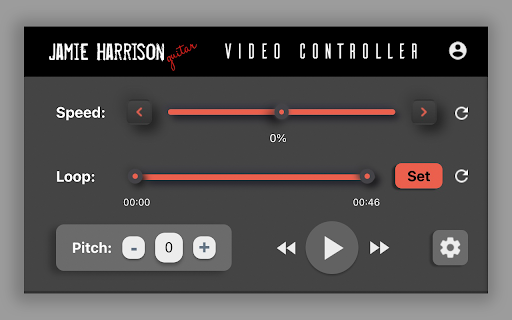

Slow down, speed up, loop, and adjust the pitch of any video online. Integrate with Lick Locker and save all your favorite licks! Slow down, speed up, loop, and adjust the pitch of any video online. Integrate with Lick Locker and save all your favorite licks!

Loom – Screen Recorder & Screen Capture
Record your screen and camera with one click. Share that content in an instant with a link. Loom is the industry leading screen recording tool. Join more than 14 million people across 200,000 companies who use Loom to record their screen, share their thoughts visually, and provide asynchronous feedback. With Loom you can record your screen and instantly get a link to share with anyone. It’s the fastest and easiest way to screen capture and stay connected with your team. Whether you’re screen recording a product demo, giving feedback, or simply sharing your thoughts, Loom makes it simple to stay in the loop with async video. KEY FEATURES 📽️ Record your screen, camera, microphone, and internal audio 💾 Automatically save videos to the cloud and share them instantly with a link 💬 Get notified when someone views, reacts, or comments on your video 😀 Leave time-based comments and emoji reactions 📚 Manage your Loom video library on-the-go and across devices 🔒 Choose who can see your video with security and access controls ⏬ Download recordings to your camera roll 📽️ Screen Recorder 📽️ - Record your screen, camera, or both for free - iOS and Android apps to record your mobile phone - Record in 720p, 1080p, 1440p, or 4k HD - Add flair to your video with camera frames, backgrounds, and camera effects like blurring 💾 Video Hosting 💾 - Store your videos inside of Loom HQ - Upload Zoom and Google Meet recordings directly into Loom to search and find later - Create hashtags to keep track of important videos 🪄 Share With A Link 🪄 - Our recordings finish so fast that we had to file multiple patents - Anyone in the world can watch your screen recording for free - Share your videos to LinkedIn, Twitter, or publish to the Google Search index 🗣️ Drive Engagement 🗣️ - Use comments and emoji reactions to boost engagement - Respond with your own Loom in the comments to create a video message thread - Loom videos automatically display in Slack and Microsoft Teams ⏱️ Meeting Replacement ⏱️ - Send a Loom instead of having another standup meeting - Record a presentation with Loom and send it to your audience ahead of time - Screen record your next weekly update to add rich visual context and your own personal touch TRUSTED BY THE BEST Over 14 million people across 200,000 companies use Loom to record, share, and review asynchronous video. From HubSpot, to Atlassian, to Netflix, Loom is the screen recording and collaboration tool of choice for top companies. EVERYTHING YOU NEED AND MORE Using Loom, you can collaborate with your team, add time-stamped comments and reactions to those videos, and save videos you’ve recorded to your device. Now, you can spend less time crafting the perfect email between meetings, and say it with video using Loom. ABOUT LOOM Loom is the leading video communication platform for async work. Engineered for simplicity and speed, you can record, watch, and share videos to move work forward whether you're at your desk or on the move. LOOM IN THE NEWS "Why are we all trapped in enterprise chat apps if we talk 6X faster than we type, and our brain processes visual info 60,000X faster than text?...now is the time for Loom." – TechCrunch "It fills this gap between writing an email and taking the time to have a meeting or conference...it's rare to have something that's low friction and high impact, while also adding personal connection." – Forbes “Asynchronous video is catching on fast, and Loom thinks it's going to change the way we work. And maybe do everything else, too.” – Protocol

Video Speed Controller – Speed Up & Increase Video speed!
Easily adjust the playback speed with a user-friendly interface. Easily adjust the playback speed with a user-friendly interface. Transform your viewing experience with the ultimate Video Speed Controller! This powerful extension lets you effortlessly speed up video playback and increase video speed to match your pace. Enjoy a seamless, customizable video experience on all your favorite platforms with features such as: - Versatile Performance: Perfect for online lectures, movies, tutorials, and more. - Seamless Integration: Works flawlessly on YouTube, Netflix, and countless other video sites. - Upgrade your browser today and take full control of your video playback speed—watch more, wait less, and enjoy every moment faster!

YouTube Sleep Timer, Loop & Speed Control
Set a YouTube sleep timer, loop music or videos, and control playback speed easily. Take control of your viewing experience! Master your viewing experience with our all-in-one YouTube sleep timer extension. If you've ever wondered "does YouTube have a sleep timer?" or needed a reliable way to fall asleep peacefully to your favorite playlists, you've found the perfect solution. Beyond relaxation, our tool enhances your daily productivity. It acts as a robust YouTube speed control extension for those asking "why can't I change the playback speed on YouTube?", and features a built-in YouTube video looper to effortlessly keep your favorite tracks on repeat. Introducing a mindful way to manage your entertainment. This extension is meticulously tailored for users who enjoy falling asleep to calming videos or listening to sleep music on YouTube without worrying about autoplay running through the night. 🌙 The Ultimate YouTube Sleep Timer for Relaxation Transform your bedtime routine into a peaceful experience. Our YouTube music sleep timer ensures that your device doesn't stay active longer than necessary, saving both bandwidth and energy. ◆ Personalized Bedtime: Easily learn how to set a sleep timer on YouTube to automatically pause your favorite chill-out playlists. ◆ YouTube Sleeping Music: Perfect for those who use YouTube sleep music or ambient sounds to drift off. No more waking up to loud, unwanted videos. ◆ Energy Efficient: By preventing videos from playing unnoticed, you act as a smart digital citizen, preserving your laptop's battery life. ⏱️ Versatile Timer Presets for Every Occasion Why settle for a simple clock when you can have a dedicated YouTube alarm clock and timer system? Choose from our optimized presets: ➤ 5-Minute YouTube Timer: Ideal for quick power naps or short meditation sessions. ➤ 10-Minute YouTube Timer: Perfect for a brief relaxation break during work. ➤ 15-Minute YouTube Timer: Our most popular setting for a standard pre-sleep routine. ➤ Custom 15-Minute YouTube Timer: Need more time? Set a custom duration for long-form documentaries or study marathons. 🎵 Master the Loop: Seamless Music & Study Sessions Discover the convenience of a YouTube video looper. Whether you need a looper on YouTube for study beats or want to keep a specific track on repeat, our "YouTube loop" feature makes it effortless. 1. How to loop a YouTube video: Simply toggle the loop button to keep any content playing continuously. 2. Looping YouTube Music: Maintain the vibe without manual intervention. Perfect for background music or learning a new instrument. 3. YouTube Video Looping: Ideal for "how-to" tutorials where you need to watch a specific segment repeatedly to master a skill. ⚡ Advanced YouTube Speed Control Extension Stop struggling with issues where YouTube playback speed is not working due to an adblocker. Our extension provides direct, reliable control over your watching habits. 1️⃣ Precision Speed Adjustment: Wondering how to speed up YouTube videos or how to change the speed on YouTube? Use our intuitive slider to find your perfect pace. 2️⃣ Fix Common Issues: If you’ve ever asked "why can't I adjust the speed on YouTube?", our tool bypasses common UI bugs and conflicts with other extensions. 3️⃣ Productivity Boost: Speed up educational lectures or slow down language lessons to catch every word. 🛠️ How to leverage this extension for your lifestyle: • Focus: Use the 15-minute timer for YouTube to implement the Pomodoro technique for deep work. • Education: Master "how do you loop a YouTube video" to repeat complex tutorial steps. • Comfort: Find out "what is a sleep timer on YouTube" and set it to your favorite sleeping music for a worry-free night. ⌛Can you set a sleep timer on YouTube? 🔹Yes! Our extension integrates directly with your browser, allowing you to set a timer in just two clicks. 🧸 What does a sleep timer do on YouTube? 🔹It monitors your playback and automatically pauses the video after a set duration, preventing the "Next Video" autoplay feature from keeping you awake. 🔁 How do you loop videos on YouTube for music? 🔹Activate the YouTube music looper mode in the extension menu to keep any song or background ambiance playing on an infinite loop. ✨Why can't I adjust playback speed on YouTube? 🔹This is often caused by browser cache or adblocker interference. Our YouTube speed controller extension provides a dedicated overlay to ensure you always have control. Take control of your watching habits today! Install the extension now to save energy, boost your productivity, and finally enjoy a peaceful night's sleep without interruptions.

FiveLoop
Control your Videos with a MIDI-Foot-Contoller! Set Loops, Adjust the Speed, Pitch-Shift, Play/Pause and Forward/Rewind. What´s new? - Fixed compatibility with coachy.net learning platform - Fixed fullscreen bug for some websites Are you learning thru online video tutorials and always wanted to be able to slow the video down or loop certain parts of it? Then FiveLoop is just what you are looking for! Set a loop and let the app repeat certain parts of the video. Adjust the tempo of the video in 5% steps. Transpose in halftone steps pitch shifting. Play/Pause and forward or rewind. You can also use any MIDI-Controller or Bluetooth-Keyboard (keystrokes). Simply connect the to your phone or tablet and assign the keys to the buttons. FiveLoop is the perfect tool for anybody who is learning to play an instrument (e.g. guitar) thru videos. The only data that is read and stored is which MIDI Switch should control which function. This is stored in the local storage of your chrome browser. No other or personal data is collected or stored. Write me if you have any questions or requests for other video platforms. mail@duechtel.com
