
jigbajcickecllhfcpdfcaobdmpcdbnh
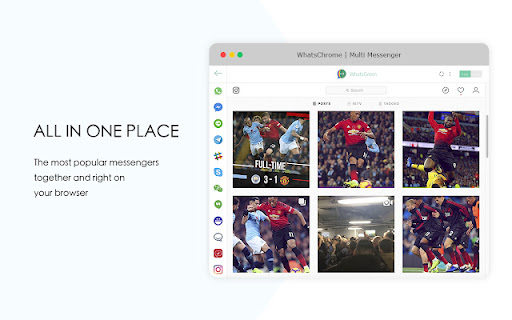
We gather all messenger in one app. Opens WhatsApp in the browser just in 1 click as well as other chats App for Whatsapp and Messenger access is a fast way to send and read messages from most popular chats that you use every day. During your surfing the web and opening other web pages, simply click to the extension button and window chat will be show on the current page. It is an irreplaceable assistant with: - Support desktop notifications, so you will be always notified about new messages even when you aren’t checking the web page. - Fast Launch for communication websites

Contact Saver for WhatsApp - Export & Backup
Export your WhatsApp chat and group contacts in one click. 💡 Features ✓ Export contacts from chat history ✓ Export contacts from the user’s address book ✓ Export contacts from groups ✓ Export as XLSX/CSV/VCard ⚙️ Get Started 1. After successfully installing the plugin, reopen WhatsApp Web 2. Open the plugin and click on "Export" 🔒 Data Privacy Your data privacy is our top priority. All data processing occurs locally on your device, ensuring that your collected data never passes through our servers and remains secure. ⚠️ Disclaimer WHATSAPP is a trademark of WhatsApp LLC. Contact Saver for WhatsApp is not affiliated with, endorsed, sponsored, or otherwise related to WhatsApp LLC, Meta Platforms, Inc., or any of their affiliates or subsidiaries.

WhatsApp Translator
Use WhatsApp Translator to translate messages with one click. Enjoy seamless translation on WhatsApp with auto-translate feature. 🌍 WhatsApp Translator – Your Essential Chat Translation Tool Say goodbye to language barriers in WhatsApp Web! With this handy Chrome extension, you can effortlessly understand messages in other languages, chat smoothly across borders, and enhance communication in real time. Whether you're traveling, collaborating globally, or just talking to someone who speaks a different tongue, this tool is the perfect solution. This powerful translator extension integrates directly into WhatsApp Web, offering intuitive controls and smart functionality that make multilingual conversations easy and efficient. ✅ Key Features of WhatsApp Translator 1️⃣ One-Click Manual Translation – Hover over any message and click the dedicated button to instantly see it in your language. 2️⃣ Automatic Chat Mode – Enable real-time translation for all incoming messages without lifting a finger. 3️⃣ Outgoing Message Support – Write your message, preview how it will appear in another language, and send it confidently. 4️⃣ Flexible Language Selection – Choose your preferred input and output languages with ease. 5️⃣ Seamless WhatsApp Web Integration – No need for external tools or switching tabs. 🧩 How to Use the WhatsApp Translator Extension ➤ Open WhatsApp Web in your Chrome browser ➤ Go to any chat ➤ In the chat header, click the new control added by the extension ➤ Enable chat translation and select your preferred languages ➤ Hover over any message to reveal the translate button ➤ Click to translate manually or turn on auto-translate mode Wondering how to understand messages in English or another language directly within the chat? This extension makes it simple and intuitive with just a few clicks. 🎯 This App is Perfect For ... ▸ Travelers chatting with locals ▸ Remote teams with multilingual members ▸ Friends and families around the world ▸ Online sellers and buyers across countries ▸ Language learners improving their skills ❓ Frequently Asked Questions 🔹 Does WhatsApp support auto translation? Not natively, but with this extension, you can activate that functionality easily. 🔹 Can I enable translations directly in my browser? Yes! The extension adds everything you need to the web version. 🔹 How do I translate on without copying text? Just hover over the message and click the translate button – it’s that easy! 🔹 Does WhatsApp have translation? Native application does not, but this extension gives you the full translate feature you've been missing. 🔹 How to turn on translate in WhatsApp? Use the extension control in the chat header to enable and configure translations. 🔹 How do I interpret messages without copying text? Just hover and click — the rest is automatic. 🔹 Is outgoing message support available? Absolutely. You can preview and adjust your message before sending it. 🔹 Is my privacy protected? Yes. We prioritize your security — no messages are stored, tracked, or shared. All processing is handled securely to keep your conversations private. 📈 Popular Use Cases for WhatsApp Translator • Professionals communicating with international clients • Students using chats to reinforce language learning • Educators reaching parents in their native languages in WhatsApp • Support teams assisting global users • Anyone needing real-time multilingual chat help 🚀 A Must-Have Chrome Add-on for Global Conversations ✔ Quick setup ✔ User-friendly interface ✔ Fully customizable ✔ Ideal for anyone working across languages Take full control of your messages with instant language support. Bridge communication gaps and connect confidently — no matter where your conversation takes you. ❤️ Why Users Love Our WhatsApp Translator App This extension is designed with simplicity and efficiency in mind. Whether you're messaging casually or working across cultures, it helps you stay focused on the conversation, not the tools. With a clean interface, customizable settings, and smooth integration, it feels like a natural part of your daily workflow — not an add-on. 👉 Install now and start chatting without limits 🌍💬 Disclaimer: WhatsApp is a trademark of its respective owner(s), registered in various countries. This extension is an independent project and is not affiliated with, endorsed by, or sponsored by WhatsApp Inc. or its parent company. The use of the name is solely for descriptive purposes related to compatibility and intended functionality.

Privacy Extension for WhatsApp Privacy
Instantly blur WhatsApp messages, media, names, and previews. Protect your chats and lock the app with a password. Instantly blur WhatsApp messages, media, names, and previews. Protect your chats and lock the app with a password. To enhance privacy in shared spaces, a WhatsApp™ Web privacy extension blurs your messages until you hover over them. Your messages and other content will only appear when you hover your cursor over them. How to hide messages? You can toggle different settings on the WhatsApp privacy extension to meet your personal needs. Privacy & screen lock Screen lock: password protection, plus auto lock when WhatsApp Web stays idle for a time you choose. Blur messages inside the current chat. Blur last message previews in the chat list on the left. Blur media previews and media gallery separately from plain text. Blur the message input box so drafts and what you type stay private. Blur profile pictures and group / contact names. Fine-tuned reveal behavior: optional no transition delay for snappier blur/unblur, and “unblur all when hovering the app” when you want everything visible at once instead of item by item. Hover to display specific content as needed. WhatsApp Web enhancements (optional toggles) Reactions-style “like” on messages, pin chats shortcut, custom chat wallpaper (upload and apply from the panel). Contact info helpers: optional contact info icon, keep contact info open, and start a chat with numbers that are not saved in your contacts (with phone + country code). Online contacts notifications when enabled. Business tools (in-panel tabs) Broadcasting: send to contacts, groups, labels, or countries; spacing between sends; schedule or repeat; import targets from a list. Smart replies: keyword-triggered auto replies tied to message templates (text / file / vCard), with rules such as allowed days, delays, optional group replies, mark read / archive after reply, and more. Scheduled messaging: timezone-aware delayed sends managed from a list. Click-to-chat link generator: prefilled message, country code, and easy sharing. Webhooks (outgoing): send structured message events to your endpoint (up to 5 webhooks). Export / import extension-related settings for backup and migration. Data export & statistics Export contacts and chat-derived data to XLSX, CSV, or TXT, with filters such as all contacts, all chats, specific groups, labels, or countries, and selectable fields. Statistics overview for phone contacts, all chats, personal vs group chats, and broadcasts. Interface Built-in multi-language selector in the overlay (e.g. English, Indonesian, Portuguese, Spanish, German, French, Arabic, Chinese, and more as you ship them). LEGAL WhatsApp is a trademark of WhatsApp Inc. registered in the U.S. and other countries. WAPlus is an independent project and has no relationship to WhatsApp.

WhatsContact - WA Contacts Extractor & Exporter
Easily Extract & Export WhatsApp Contacts and download into multiple formats WhatsContact - Whatsap Contacts Extractor & Exporter is a powerful and easy-to-use extension that helps you backup and manage your whatsapp contacts quickly. Why Choose Our Extension? 🔒 Privacy-First: We don't collect any personal data. We only extract and export contacts already stored on your device. ⚡ Fast & Free Support: Get quick and reliable help whenever you need it. 🚀 Save Time and Effort: Extract, filter, and export contacts in bulk in just a few clicks. 🎨 Beautiful UI: A clean, easy-to-use interface that ensures a smooth experience. 📂 Extract Contacts: Extract from chats, groups, countries, labels 💾 Export Data: Export to CSV, XLSX, JSON, HTML, or Markdown formats for secure backup. 🔍 Advanced Filters: Filter by contact type, message type, and account type to streamline your data. 🌙 Auto Dark Mode: Automatically adjusts to dark mode based on your WhatsApp Web settings. 📱 Personal Users: Easily back up and organize both saved and unsaved contacts, including direct downloads of unknown numbers. 💼 Business Users: Export contacts in bulk for professional use and manage client data more efficiently. 🌍 International Users: Extract contacts based on countries for regional communication. 👥 Group Admins: Manage and download contacts of group members, both saved and unsaved, for better organization. WhatsApp is a trademark of WhatsApp Inc., registered in the U.S. and other countries. This extension has no relationship with WhatsApp or WhatsApp Inc.
