
jiamhcfmlhjecdkbjehhggpikklgcbfk
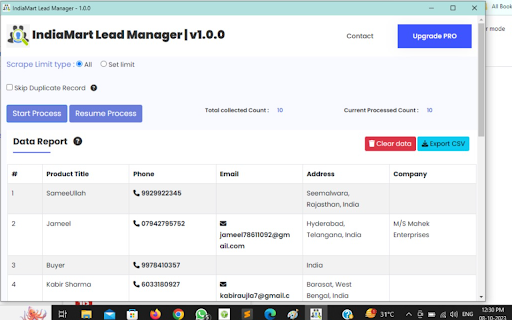


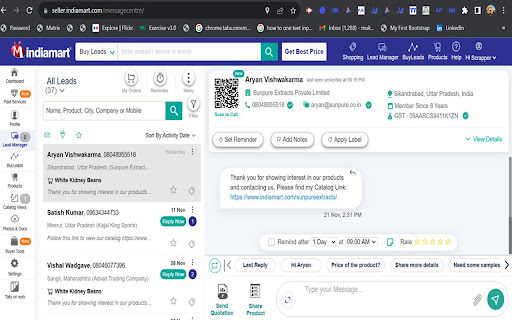
IndiaMART Lead Manager to export buyer & inquiry leads, filter results, and download historic customer data easily fast online now IndiaMART Lead Manager is a Chrome extension designed to help businesses manage and export buyer inquiries and customer lead data from their own account in a structured and efficient way. This extension is created for users who regularly receive buyer inquiries and want an organized method to download, review, and analyze their lead information without manual copy-paste. It works directly inside the browser and uses only data that is visible to the logged-in user. Purpose of the Extension Handling a large number of buyer inquiries manually can be time-consuming and error-prone. This extension simplifies the process by allowing users to export inquiry and lead details in bulk, helping sales and business teams stay organized and responsive. The tool is intended for legitimate business use and does not access or collect any information beyond what the user can already view in their account. The extension supports exporting historic inquiry records, including buyer and customer leads from up to the past 12 months. This enables businesses to maintain a complete inquiry history and make better use of older leads that may still be valuable. With historic export support, users can: Reconnect with earlier inquiries Key Features and Capabilities Export buyer and inquiry records in bulk Collect seller–buyer inquiry details from the dashboard Organize lead data for follow-ups and tracking Reduce manual data handling and entry errors The extension focuses on clarity and usability, allowing users to manage inquiry data more efficiently. Designed for Business, Sales, and Marketing Teams Businesses planning outreach and reporting By automating the export process, teams can spend more time responding to inquiries and improving conversions instead of managing spreadsheets manually. Simple Setup and Easy Usage The extension is designed to be easy to use and requires no technical knowledge. Runs directly in the browser Works inside the existing account interface Export lead data with just a few clicks Users can start using the extension immediately after installation. Extracted inquiry and lead data can be downloaded in commonly used formats such as: These formats allow easy integration with CRM systems, spreadsheets, or internal reporting tools. Data Privacy and Responsible Use User privacy and responsible usage are a core focus of this extension. Works only with data accessible to the logged-in user All processing happens locally in the browser The extension operates transparently and respects platform usage boundaries. For questions, feedback, or assistance related to this extension, contact: info.scrappertool@gmail.com This Chrome extension is not endorsed, affiliated with, authorized, sponsored, or certified by IndiaMART InterMESH Ltd. It is an independent tool created to help users manage and export data from their own account.

RPM JD Data Scrapper
Scrape the business data information from JD search page results JD Data Extractor Software allow to get data from justdial business listing. This is the updated working justdial scraper. The Justdial Data Extractor is a specialized software tool designed to extract and collect data from the Just Dial platform. It automates the process of gathering information from the website, such as business listings, contact details, customer reviews, ratings, and more. This data is extracted in a structured format, making it easier to analyze, sort, and utilize for various business purposes. DISCLAIMER: This Chrome plugin is not endorsed or certified by justdial Inc and is merely an unofficial enhancement and automation tool that works with JD for Web. The privacy of the users is important to us. We don’t broadcast, sell, share or distribute any user collected data. The extension was designed to keep privacy of our users in mind. For more information, read:

IM - IndiaMart Easy Web Instant Data Scraper and Extractor
IM - IndiaMart Easy Web Instant Data Scraper and Extractor, extracts data from web pages and exports it as Excel or CSV files. Introducing the IndiaMart Scraper Extension - your go-to tool for streamlining your business operations, sourcing, and market research on IndiaMart, the leading B2B marketplace. With this versatile extension, you'll be able to extract valuable data from IndiaMart listings effortlessly, helping you make more informed decisions, save time, and stay ahead of the competition. 1. **Seamless Data Extraction**: Extract product and supplier data, including titles, prices, descriptions, contact details, and more with a single click. 2. **Customized Filters**: Tailor your search parameters to find the exact products and suppliers you need for your business. 3. **Bulk Data Export**: Download extracted data in various formats (CSV, Excel, etc.) for analysis and integration with your business systems. 4. **Price Monitoring**: Keep track of price changes and market trends to make informed purchasing decisions. 5. **Real-time Updates**: Stay in the loop with automatic data updates to ensure your information is always current. 6. **One-Click Contact**: Easily reach out to suppliers directly from the extension to streamline communication. 7. **Saved Searches**: Save your favorite searches for quick access and repeated use. 8. **Enhanced Productivity**: Cut down on manual data entry and focus on growing your business. - **Sourcing Professionals**: Streamline your procurement processes and source products efficiently. - **Business Owners**: Make data-driven decisions and expand your product offerings. - **Market Researchers**: Gain valuable insights into market trends and competitors. - **Entrepreneurs**: Save time and resources while establishing or growing your business. - **Anyone on IndiaMart**: Whether you're a seasoned user or new to the platform, this extension is a game-changer. 1. Click "Add to Chrome" to install the IndiaMart Scraper Extension. 2. Log in to your IndiaMart account. 3. Navigate to a search results page or a product listing. 4. Click the extension icon in your browser to start extracting data. **Privacy and Security**: Rest assured, your data's security and privacy are our top priorities. This extension only accesses publicly available data on IndiaMart, and your login credentials are never stored or shared.

ABC IM Data Extractor
IM - ABC IndiaMart Easy Web Instant Data Scraper and Extractor, extracts data from web pages and exports it as Excel or CSV files. Introducing the IM Scraper Extension - your go-to tool for streamlining your business operations, sourcing, and market research on IM, the leading B2B marketplace. With this versatile extension, you'll be able to extract valuable data from IM listings effortlessly, helping you make more informed decisions, save time, and stay ahead of the competition. Key Features Search across any local business category Nationwide coverage within India Multilingual support for diverse user needs Direct extraction of leads into Excel files 24/7 technical support for seamless usage Automatic download/save of leads Important Note: The IM Data Extractor is an independent app and is not affiliated with the official IndiaMart website.

SellerMart Scraper Tool – Scrape Seller Leads
The sellermart scraper to extract seller leads, product data, and business information from SellerMart listings. The SellerMart Scraper Tool is a Chrome extension designed to extract publicly available business and seller information from the SellerMart marketplace. The sellermart scraper helps users collect structured data from SellerMart product listings, seller profiles, and search result pages with minimal effort. This tool is built for users who want to collect seller leads, product data, or business information from SellerMart without manual copy-paste work. If you are searching for a sellermart scraper tool, sellermart data scraper, seller lead extractor, or a tool to scrape SellerMart seller leads, this extension is designed for those needs. What the SellerMart Scraper Can Extract The sellermart scraper allows users to extract publicly available information such as: • Seller or company name • Business address • Contact details where available • Product names and categories • Product pricing • Product descriptions • Seller profile URLs • Ratings and reviews where available Users can export only the data fields they need in a clean and structured format. SellerMart Scraper Tool for Seller and Product Research The sellermart scraper supports data extraction across multiple categories and industries listed on SellerMart. With this tool, users can: • Search sellers by keyword or category • Collect seller and product data at scale • Analyze listings across industries • Build datasets for lead generation or research This makes it useful for sales teams, marketers, and researchers working with SellerMart data. The tool extracts data directly from SellerMart search result pages, product pages, and seller profile pages. With the sellermart scraper, users can: • Scrape multiple pages automatically • Extract seller leads in bulk • Reduce repetitive manual work • Save time during data collection The tool is optimized to work efficiently with minimal errors. The sellermart scraper is designed to be user friendly. • No programming or technical knowledge required • Simple and clean interface • Works directly inside the browser Users only need to open SellerMart, apply their search filters, and run the extension. The extracted data collected using the sellermart scraper can be exported in multiple formats: This makes it easy to use the data for CRM imports, reporting, market research, or outreach campaigns. Who Can Use the SellerMart Scraper Tool This tool is useful for: • Business owners • Sales and lead generation teams • Marketing professionals • Market researchers and analysts • Entrepreneurs and startups Anyone who works with seller data or product listings from SellerMart can benefit from the sellermart scraper. Privacy and Safe Usage • Extracts only publicly available data from SellerMart • Does not bypass logins, paywalls, or restricted systems • All data is processed locally on the user’s computer • No user data is collected, stored, or shared For any issues related to the SellerMart Scraper Tool Extension, contact: info.scrappertool@gmail.com All extracted data is processed only on your local computer. No data passes through our servers. No one else can see what you export. This Chrome extension is not endorsed, affiliated with, authorized, sponsored, or certified by SellerMart or its associated entities. It is an independent automation tool designed to work with SellerMart pages opened in the user’s own browser.
