
jhfipkkpcgphdbjebljindagdajcgelp
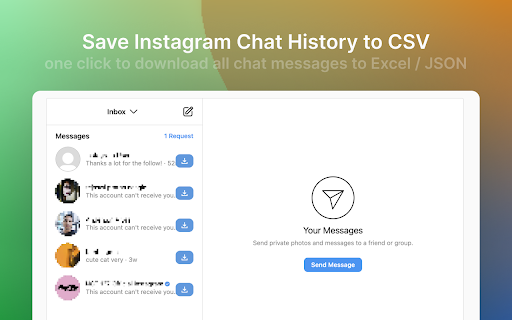
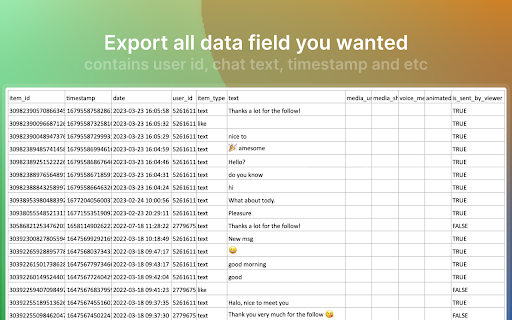
IGChatsExporter to export Instagram chat history, download DM (direct message) list, save as Excel and CSV file. ✓ Export your Instagram chat messages. ✓ Save and download Instagram direct messages in CSV/EXCEL/JSON format. Your data is processed locally and never passes through our web server, ensuring the privacy of your exported information. FAQ https://igchatsexporter.extensionsfox.com/ If you have any questions, please keep in touch via help@extensionsfox.com.

Free WA Chat Export - Download WA Number to Excel/CSV/VCard - WAExport
Export WA chat with media to HTML, save group number & download contact to Excel. Local, Secure, Private. Zero data collected. 🔒We promise never to collect any user data, 100% privacy and security guaranteed. 🌟 Powerful WA Export Features 1. Advanced WA Group Number Export Batch Download WA Group Number from all or selected groups. Includes smart filtering to exclude Admins and exports rich data (Group Name, Public Display Name, Business Status). 2. Comprehensive Chat List Export Extract WA Number from your entire history. Use Country Filters to specific Download WA Number lists (e.g., +1, +86). Includes analytics like "Is Blocked", "Last Message Date", and "Unread Chats". 3. Flexible Contact Saving Efficiently Save WA Contact and Save WA Number. Keep your lists clean by filtering out existing contacts and focusing on new leads. 4. All Major File Formats Support WA Number to Excel (CRM ready), WA Contacts to CSV, and WA Contacts to VCard/VCF for easy import to iOS/Android. 【NEW!】 Ultimate WA Chat Export Tool Looking for the best way to export WA chat history? Our latest update brings a powerful and secure way to export your messages directly from your browser. Whether for business records, legal evidence, or personal archiving, we've got you covered. 🔥 Key Features: ● Export WA chat to Excel, HTML, or CSV: Choose the perfect format for your data. Excel and CSV are ideal for data analysis, while HTML provides a beautiful, readable offline interface. ● Export WA chat with media: Don't lose your valuable files! Seamlessly export images, videos, and documents attached to your conversations. ● Custom Date Range: Only need specific messages? Filter and export chats between specific dates to save time and storage. ● Safe & Fast Export Modes: Choose 'Safe Mode' to minimize account risks and ensure stable data extraction, or 'Fast Mode' for lightning-speed processing. ● Target Specific Chats: Easily select and export individual group or private conversations without exporting your entire inbox. 🎯 Who is this WA Export Tool for? ● Marketers: Download WA phone number lists for campaigns. ● Sales: Save WA Contact details to Excel for lead management. ● Analysts: Analyze activity with fields like "Last Message Date". ● Users: Easily Backup WA Number and save lists to PC. 💡 Why Choose This Extension? Native WA Web lacks a bulk WA Export function. Manually saving a WA Group Member or copying numbers is tedious and time-consuming. This tool bridges that gap. It is the most complete WA Contact Export utility that allows you to extract WA contact details with precision. Stop wasting time—automate your WA Group Number extraction and WA Number to Excel conversion today. We make WA Export simple, secure, and free. Whether for backup or marketing, use this tool to Download WA Group Number lists and extract WA contact details effortlessly. 📝Privacy Note: WAExport respects your privacy. We do not collect personal information or violate WhatsApp's terms of service. We do not request any authorization to user personal data. The extension works solely with the data already available on your device. 🔒 Disclaimer This extension is an independent project and is not affiliated with WhatsApp Inc. "WhatsApp" is a registered trademark of WhatsApp Inc. All WhatsApp Export and WhatsApp Number Export operations are processed locally on your device for 100% privacy and security.

Instagram Chat Backup - Export DMs in HTML with Media
Backup & export Instagram DMs as HTML files with photos, videos & media. Download your full chat history in one click. Instagram Chat Backup lets you export your Instagram DMs as clean, beautifully formatted HTML files — with all photos, videos, and shared media fully preserved. It's the easiest way to backup, download, and archive your Instagram chat history directly from Chrome. Unlike plain text exports, this extension saves your conversations as HTML files that look just like your actual Instagram inbox. Shared images, videos, voice messages, and other media are included — so you get a true, complete backup of every conversation. - Export Instagram DMs as rich HTML files with full formatting - All media preserved — photos, videos, reels, voice messages, and shared posts - Supports individual and group conversations - One-click backup — no technical knowledge required - Works directly within Instagram's web interface - Privacy-first: everything stays on your device, nothing uploaded to external servers - Lightweight — installs in seconds with zero performance impact 1. Install the extension from the Chrome Web Store 2. Open Instagram in Chrome and go to your DMs 3. Select any conversation you want to save 4. Click "Backup" — your chat is exported as an HTML file with all media 5. Open the file in any browser to view your conversation exactly as it appeared Perfect For: - Saving important business or client conversations - Archiving sentimental messages and shared memories - Keeping records before deleting or deactivating your account - Backing up group chat history with all shared media intact - Legal or compliance documentation How to backup Instagram chat? -> Simply install the extension, open any DM conversation, and click backup. Your messages and media are saved instantly as an HTML file. How to export Instagram chat with media? -> This extension exports your full conversation — text, images, videos, and attachments — into a single HTML file you can open in any browser. How to download Instagram chat? -> One click downloads your entire conversation history to your device. No third-party apps, no data leaving your computer. Stop risking the loss of important conversations. Download Instagram Chat Backup today and keep your DMs safe — with every photo, video, and message preserved exactly as you remember them.

IG Exporter & Scraper: Export Instagram Comments data to list
Extract Instagram comments. Pick into CSV and Excel formats. IG Exporter & Scraper is a powerful Google Chrome extension and scraping tool for gathering Instagram comments. Export your data effortlessly into CSV and Excel formats. Perfect for analytics, content management, and social media strategies. Use this best-in-class online service to scrape data from Instagram for free, making it the ideal web scraping tool! ▬▬▬▬▬▬▬ How to Use ▬▬▬▬▬▬▬ 1. Click Ins Tools - Ins Comments Export Tool icon, which is on browser toolbar, then open IGTools popup page via IGTools Net 2. Click "Export Instagram Data" button, an IGTools option page will be opened. 3. Input a valid IG post URL 4. Click "Start export" button, and our IG Tools will run automatically. After this processing is finished, you can download IG comments to CSV or Excel. ▬▬▬▬▬▬▬ Features ▬▬▬▬▬▬▬ ● Export IG comments with one click by extension ● Export up to 50K IG comments ● CSV and Excel formats support ● Handles IG rate limit errors ● Processing in one click via IGTools net ▬▬▬▬▬▬▬▬ Security ▬▬▬▬▬▬ ● The extension neither ask for your IG password, nor any of your data including IG user information, story, visit history, posts, and social relationships. ● IG enforces IG rate limit, i.e. limit on the number of requests. The rate limit is not public information and varies depending on your IP address. ▬▬▬▬▬▬▬▬ How it works in IG Follower Export tool ▬▬▬▬▬▬ ● After every time you get 50 comments the extension goes to Cool down minimum 10 seconds (you can change it in settings tab).

InstaComments Extractor - Export IG
Export Instagram comments from posts and reels to CSV or Excel. Download comment data, usernames, and replies for analysis. FREE WITH UNLIMITED EXPORTS - No subscription required! The easiest way to export Instagram comments to Excel or CSV. InstaComments Extractor lets you download comments from any Instagram post or reel in seconds. No coding, no scraping tools, no manual copy-paste work. How it works: 1. Open any Instagram post or reel 2. Click the extension icon 3. Export to CSV or Excel (XLS) instantly Perfect for: • Social media managers analyzing engagement • Brands tracking campaign feedback • Marketers running giveaways and contests • Researchers collecting Instagram data • Influencers backing up their comment sections • Anyone who needs Instagram comments in a spreadsheet What you get in your export: • Usernames and profile info • Full comment text with emojis preserved • Reply threads and nested comments • Timestamps • Works with any language Why choose InstaComments Extractor? ✓ Works on posts AND reels ✓ Handles large comment sections ✓ Clean, organized spreadsheet output ✓ No Instagram login required in the extension ✓ Fast and lightweight Stop wasting time copying comments one by one. Export hundreds of Instagram comments with a single click.
