
jhdkcdeofefgninacndnpficfocpcacp
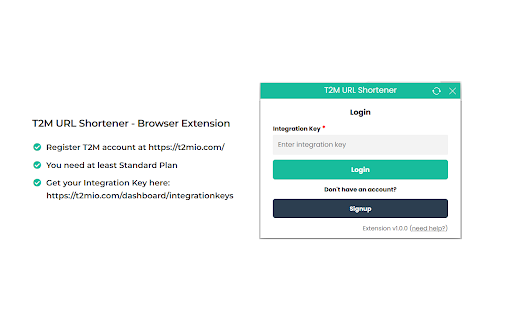

T2M is all-in-one URL shortening platform with branded links, QR codes and clicks tracking with detailed analytics. T2M URL Shortener browser extension for all of your url shortening and link management requirements. 1. Install the extension 2. Register account at https://t2mio.com/ 3. Once you logged into your T2M account, get your Integration Key from https://t2mio.com/dashboard/integrationkeys

Free link shortener goo.su
Create a free short analytics URL with one click of Goo.su. Install the link reduction plugin in your browser The free GOO.SU long link shortening service allows you to shorten a long URL with one click, saving it in your personal account, where you can view statistics on clicks and visits to your page. Just install the extension in your browser and click on the icon on the desired page. Done, link shortened.

URL Shortener by Rebrandly
Free and easy URL shortener to create short links in one click! Create short links easily with our convenient and user-friendly URL shortener! With the Rebrandly Chrome extension, you can shorten URLs just seconds, all for free. The process is simple, as you can shorten URLs directly from the page you’re on. If you want to create custom branded links, sign up for a paid plan. - Feature Highlights: - Shorten any link in one click - Generate QR codes - Manage UTM parameters - Track link clicks - Customize short URLs with your domain name - Customize short URLs with keywords - Share directly to social media platforms Visit Rebrandly.com for more details about our URL shortener.

Url Shortener for Google Chrome™
Use Url Shortener for Google Chrome™ to create short URL and shorten hyperlink for sharing and manage shortened links. 🥱 Are you tired of constantly searching for a simple tool to shorten links now that goo.gl is shutting down? You can finally stop searching and start using our Url Shortener service to shorten hyperlinks. 🔗Introducing Url Shortener, your ultimate tool for transforming long hyperlinks into concise, shareable links. This extension is perfect for: ➤ Marketers who frequently share url ➤ Social media enthusiasts looking for efficiency ➤ IT specialists who work with a lot of website ➤ Friends who used shorten url for Google Photos ➤ Anyone who values streamlined link management 🌟 With our app you can easily manage your links and enhance your online presence. 🏞️ Our url shortener for google services offers a seamless way to shorten urls directly from your browser. With just a few clicks, you can convert lengthy website addresses into short URLs that are easy to share and track. This not only makes your links look cleaner but also improves the overall user experience. 🔥 Here are some of the standout features of service: 1️⃣ Instant URL shortening: Quickly transform any website url into a short link with minimal effort. 2️⃣ Customizable links: Use the custom URL shortener feature to personalize your links. 3️⃣ Copy to Clipboard: Automatically copy the shorten link to the clipboard for instant use.. 4️⃣ Quick Access: Easily accessible from the Chrome toolbar, enabling instantaneous link shortener. 5️⃣ Compatibility: Short links can be used across various platforms, enhancing the sharing on any channels. 🧭 If you're wondering how to shorten a hyperlink, the process is simple. Just install the our Url Shortener Chrome Extension, navigate to the page you want to shorten, and click the extension icon. In seconds, you'll have a small hyperlink ready to share. 📁 The extension also supports google Docs URL shortener functionality, allowing you to easily share documents with colleagues and collaborators. No more copying and pasting long links into emails or chat messages. Just click, shorten, and share. 🎯 Here's a quick guide on how to make the most of extension: ✅ Install the extension from the Chrome Web Store. ✅ Click the extension icon in your browser toolbar. ✅ Paste the URL you want to shorten or use the current page link. ✅ Customize your link if desired. ✅ Copy the shorten link and share it wherever you like. 🧠 The Url Shortener extension is not just a tool; it's a comprehensive solution for anyone who needs to manage and share links efficiently. Whether you're using it as a tiny url creator, a short link generator, or a web address shortener, you'll find it invaluable for both personal and professional use. 📶 With the URL Shorteneer, you can streamline your digital communications and ensure that your hyperlinks are always easy to access and share. Whether you're looking to shorten my url or create a custom URL shortener, this extension provides the tools you need to succeed. 👀There are many shorten hyperlink services such as Bitly, Rebrandly, Dub, BL.INK, Short.io, InShortUrl, and many others but how do they differ from our link shortener service? The key difference is that our simple URL shortener service is a one-click solution. 💬 Frequently Asked Questions ❓ How do I install url shortener? 💡 To install visit the Chrome Web Store, search Url Shortener for Google Chrome™, and click "Add to Chrome". ❓ Can I customize the shorten hyperlink I create with this extension? 💡 Yes, you can customize your short links using the custom URL shortner feature. This allows you to personalize your links, making them more memorable and aligned with your branding. ❓ Does this extension work with Google Photos and Docs? 💡 Absolutely! The extension offers features for creating a shortener URL Google Services, making it easy to share photos and documents with others. 🏖️With Url Shortener, effortlessly convert lengthy website url into sleek, manageable links in just a one click, making sharing and organizing your online content easier than ever. 🚀 In conclusion, the urk shortner is your go-to tool for all things related to link shortening. From creating shorten url to managing your link shortener needs, this extension offers everything you need in one convenient package. Try it today and experience the difference a well-managed link can make. 🚧Disclaimer: This extension is independently developed and not created by Google. All copyrights are owned by their respective holders. Google does not endorse or sponsor this Chrome extension. URL Shortener for Google Chrome™ is not owned, licensed, or affiliated with Google Inc.

SEO Analyzer: One-Click Website Audit
Quickly access your website's SEO metrics. Analyze titles, tags, links, headings, and more for a complete overview. Want to know how your site is performing in search results? Our 𝗦𝗘𝗢 𝗔𝗻𝗮𝗹𝘆𝘇𝗲𝗿 is a powerful SEO optimization checker that gives you instant insights into your website’s performance. With this website page SEO checker, you can run a complete SEO on-page analysis and identify areas for improvement in seconds. ✅ 𝗧𝗶𝘁𝗹𝗲 & 𝗟𝗲𝗻𝗴𝘁𝗵 𝗖𝗵𝗲𝗰𝗸 – Ensure your page title is optimized and within the ideal length for better visibility. ✅ 𝗠𝗲𝘁𝗮 𝗗𝗲𝘀𝗰𝗿𝗶𝗽𝘁𝗶𝗼𝗻 𝗥𝗲𝘃𝗶𝗲𝘄 – Analyze your description for engagement, length, and click-through improvements. ✅ 𝗨𝗥𝗟 & 𝗖𝗮𝗻𝗼𝗻𝗶𝗰𝗮𝗹 𝗧𝗮𝗴𝘀 – Verify main and canonical URLs to follow SEO best practices. ✅ 𝗠𝗲𝘁𝗮 𝗥𝗼𝗯𝗼𝘁𝘀 𝗖𝗼𝗻𝘁𝗿𝗼𝗹 – Check robots tags to manage crawling and indexing efficiently. ✅ 𝗛𝗲𝗮𝗱𝗲𝗿𝘀 𝗢𝘃𝗲𝗿𝘃𝗶𝗲𝘄 (𝗛𝟭–𝗛𝟲) – Get a clear breakdown of your headings for structured on-page SEO analysis. ✅ 𝗜𝗺𝗮𝗴𝗲 𝗖𝗼𝘂𝗻𝘁 & 𝗔𝗟𝗧 𝗧𝗮𝗴𝘀 – Find missing ALT attributes to improve SEO and accessibility. ✅ 𝗟𝗶𝗻𝗸 𝗔𝗻𝗮𝗹𝘆𝘀𝗶𝘀 – Review internal and external links for better navigation and authority flow. ✅ 𝗢𝗽𝗲𝗻 𝗚𝗿𝗮𝗽𝗵 & 𝗧𝘄𝗶𝘁𝘁𝗲𝗿 𝗗𝗮𝘁𝗮 – Optimize your content for social sharing and visibility. ✅ 𝗥𝗼𝗯𝗼𝘁𝘀.𝘁𝘅𝘁 & 𝗦𝗶𝘁𝗲𝗺𝗮𝗽.𝘅𝗺𝗹 – Confirm essential files for proper search engine indexing. 💡 With this free SEO checker, you’ll uncover hidden issues, fix technical gaps, and optimize your website for higher rankings. The SEO analyzer is perfect for webmasters, marketers, and businesses looking to maximize visibility and improve performance.
