
jhcjpmnikljjacpclfgcdbcemhfojkeb
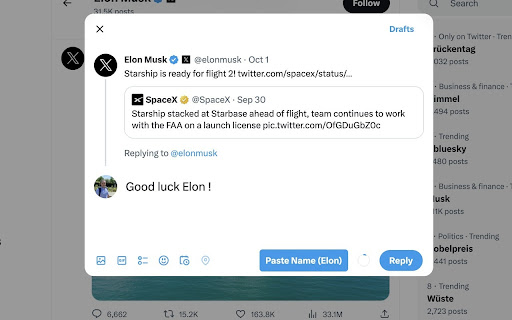


NameInserter is a free, open-source Chrome Extension that instantly adds the first name of a person you are replying to. NameInserter adds their name as you reply on X.com. Simple and useful. Why put names? If you call your followers by name, they will like you more. Build more quality connections by using the extension. Why use this? You can put the names manually. But why doing so if you have a computer? Let the machine do the boring job. How much time will it save me? Here is the math: - 5 seconds per reply - 20 replies per day - 20 days per month - 33 mins per month = 6.6 hours per year - 396 hours of your entire life

Continue Without Supporting
Browser extension that auto-clicks on "continue without supporting"/similar phrases when given a popup about disabling ad blocking. A browser extension that auto-clicks on "continue without supporting" or similar phrases when given a popup about disabling ad blocking. You can now spend less time trying to find the small continue text and more time actually using the website!

Younet: Personalized AI to write & respond
Write & Respond Anywhere with Personalized AI model. Introducing Younet chrome extension, a personalized copilot anywhere you need to write or respond! ➤ What is it? Younet is a personalized AI technology that empowers you to write or respond contextually relevant drafts, responses, ideas, and more instantly across any CRM, Email, Text Form, Google Docs, Help Desk, and various other platforms. With this extension you may connect your created AI model and always have it by your side. You'll have the ultimate assistant to tackle complex questions and tasks. Whether you need help writing emails, reading articles, or conducting smart searches, Younet AI is here to assist you. ➤ How to start? Here are some quick start tips: 1. Install the extension and click on it to Login. 2. Once you logged-in, you can now use @younet command to activate extension, the simply ask what you need to write. 3. Select any text or a question on the page you want to receive a response and click Reply with Younet or right mouse click then Reply with Younet. 4. In Gmail it’s fully integrated to use native buttons directly in the email to respond. Experience the power or AI, and take your productivity to new heights. Get started today! ➤ Is it free to use? Yes, current version of Chrome extension and all capabilities of the platform are free to use but require approval by Younet. ➤ Terms and Conditions By installing the extension, you agree to and acknowledge: www.younet.ai/terms-and-conditions www.younet.ai/terms-and-conditions#privacy-policy

Apache KIE™ Serverless Workflow Editor for GitHub
Visualize and edit Serverless Workflow files using a graphical editor on GitHub Visualize and edit Serverless Workflow files using a graphical viewer and a custom Monaco editor on GitHub. This Chrome Extension augments GitHub and provides a brand new way to handle your Serverless Workflow files directly on the GitHub interface. With the extension installed, you visualize your workflow with a graphical viewer, helping you to have a better experience and edit your Serverless Workflow files with an enhanced editor with powerful features, which will boost your productivity. The same applies to visualizing your assets on Pull Request reviews! Some Open Source projects were vital for the development of this extension, and we would like to thank all of them, with highlights to: - CNCF Serverless Workflow SDK Typescript: for workflow parsing; - Mermaid: for workflow rendering and visualization; - Apicurio: for our service catalog integration; Apache KIE (incubating) is an effort undergoing incubation at The Apache Software Foundation (ASF), sponsored by the name of Apache Incubator. Incubation is required of all newly accepted projects until a further review indicates that the infrastructure, communications, and decision making process have stabilized in a manner consistent with other successful ASF projects. While incubation status is not necessarily a reflection of the completeness or stability of the code, it does indicate that the project has yet to be fully endorsed by the ASF. Some of the incubating project’s releases may not be fully compliant with ASF policy. For example, releases may have incomplete or un-reviewed licensing conditions. What follows is a list of known issues the project is currently aware of (note that this list, by definition, is likely to be incomplete): - Hibernate, an LGPL project, is being used. Hibernate is in the process of relicensing to ASL v2 - Some files, particularly test files, and those not supporting comments, may be missing the ASF Licensing Header - - Hibernate, an LGPL project, is being used. Hibernate is in the process of relicensing to ASL v2 - Some files, particularly test files, and those not supporting comments, may be missing the ASF Licensing Header If you are planning to incorporate this work into your product/project, please be aware that you will need to conduct a thorough licensing review to determine the overall implications of including this work. For the current status of this project through the Apache Incubator visit: https://incubator.apache.org/projects/kie.html

Bitbaguette
A browser extension extending Bitbucket's interface with useful features Bitbucket's user interface for Pull Requests lacks certain features that the Bitbaguette browser extension adds: * Restrict maximum display size of embedded screenshots, so that the layout of the PR description and comment threads do not get destroyed anymore * Allow to collapse (partial) comments * Provide overview of number of replies and number of linked tasks for each comment (sub-)thread * Provide a image comparison tool whenever raw image files are modified within the PR
