
jhbiecoblcbaogeaegobidbeaimoiohn
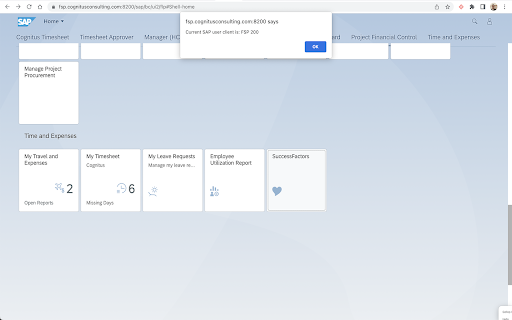
Retrieve the session SAP Fiori Client This extension allows you to view the current SAP session client for a Fiori App.

Fiori Launchpad Helper
Speed up SAP Fiori work with launchpad shortcuts, bookmarks, OData testing, app lookup, and debug tools. Fiori Launchpad Helper is a productivity extension for SAP Fiori users who work across multiple systems, users, and apps every day. It reduces repetitive steps by making launchpad access faster, simplifying system and user switching, and giving you quick access to the tools you use most often. Built for SAP developers, functional consultants, testers, support teams, and power users, the extension brings common Fiori tasks into one place so you can move faster across development, test, and production environments. ⭐ WHAT YOU CAN DO 🚀 Open SAP Fiori Launchpads quickly from the extension popup. 🔄 Save multiple systems and user profiles locally for faster switching between environments. ⭐ Bookmark frequently used Fiori apps for quick navigation. 🔎 Look up standard SAP Fiori app details, including versions and technical information. 🧪 Test OData services with support for methods, headers, query options, request body, authentication, and formatted responses. 🔗 Decode existing Fiori intent URLs or build new deep links from semantic object, action, and parameters. 🛠️ Use Debug Fiori tools for debug parameters, UI5 inspection, cache actions, and quick support shortcuts. 📚 Open curated SAP Fiori, UI5, and support resources directly from the extension. If you regularly move between SAP environments, test users, launchpad apps, and service endpoints, repetitive login, navigation, and testing steps can slow down your day. Fiori Launchpad Helper keeps those actions close at hand, making common SAP Fiori workflows faster, simpler, and easier to repeat. 👥 WHO IT IS FOR • SAP developers • Functional consultants • Testers and QA teams • Support and operations teams • Power users working across multiple SAP systems 🔒 PRIVACY AND SECURITY Your configuration data and bookmarks are stored locally in the browser on your device. The extension does not use a vendor-operated backend to collect, track, or store your data. Some features interact with the active SAP page or your configured systems to provide launch, debug, and testing workflows. Enterprise browser policies or internal network restrictions may limit extension behavior on corporate domains. Check with your IT team if a feature is unavailable in your environment. SAP Fiori and SAP UI5 are trademarks of SAP. Fiori Launchpad Helper is an independent productivity tool and is not affiliated with, endorsed by, or sponsored by SAP.

UI5 Deprecated Control Checker
Scan SAP UI5 pages for deprecated controls. Quickly detect deprecated SAP UI5 controls in any web application with a single click. This extension helps developers and SAP consultants identify outdated UI5 components when reviewing, debugging, or upgrading SAP Fiori apps. Highlights deprecated UI5 controls directly on the page. Compatible with the latest UI5 versions. Built on Manifest V3 for improved performance and security. Simple, lightweight, and non-intrusive. 🚀 Why install it? Upgrading SAP UI5 versions? This tool saves hours of manual inspection by instantly flagging deprecated controls during runtime. Perfect for clean-up tasks, audits, or migration planning.

GitHub Clone in VS Code
Adds a 'Clone in VS Code' button to GitHub repositories as if it were a native feature for instant one-click cloning. Clone GitHub Repos in VS Code — Instantly Skip the copy-paste-terminal hassle. This extension adds a "Clone in VS Code" button to every GitHub repo so you can open projects in Visual Studio Code with 1 click. 🔗 Works with public, private & org repos you can access 🧩 Feels like a native GitHub feature — seamlessly integrated into the "Code" menu 👩💻 Perfect for: Students & learners cloning code for study ⚙️ Works on: Chrome, Edge, Brave, Opera, and all Chromium-based browsers. GitHub account (for private repos) Save time, stay in flow, and code faster. Install now and supercharge your GitHub workflow.

SAP Customer Data Cloud toolkit
Enhance your workflow with the SAP Customer Data Cloud Toolkit for Google Chrome™. Streamline repetitive tasks and apply industry best practices to boost quality, productivity, and overall well-being. This extension integrates seamlessly with SAP Customer Data Cloud, offering new functionalities and enhancing existing ones for a more efficient experience. Key Features: • Copy Configuration Extended: Drastically reduces the effort of copying configurations from 1 site to many. It also includes more features than the regular Copy Configuration as: all Site Policies, SMS and Email Templates, CAPTCHA, RBA rules, the full Schema, webSDK, Extensions, Dataflows, Communication Topics, and Consent Statements. • Export / Import of SMS and Email Templates in bulk: Effortlessly manage the import and export of SMS and Email templates with a single click. Minimize human error and save valuable time while increasing efficiency. • Site Deployer integrated with Copy Configuration Extended: Allows the creation of complex site structures with customized configurations from existing sites leveraging best practices, all facilitated by the Copy Configuration Extended feature. • UI Builder: Enhance code readability and organization with the ability to format JavaScript code using the "Prettify" button within the UI Builder. • Import Data: Easily automate the import of accounts into SAP CDC. Generate CSV files based on selected schema fields for either lite or full accounts, and import them in one action, eliminating the need for developing a dataflow. • Version Control: Enhances flexibility and control by enabling CDC configuration management and tracking via Github. Users can back up, monitor, and restore configurations, analyze changes, identify behavioural shifts, and revert to earlier versions if necessary Note: To fully utilize the SAP Customer Data Cloud Toolkit with your business data, you must be an SAP Customer Data Cloud user with mobile services enabled by your IT department. Initially, you may explore the app using sample data.
