
jgfinojmgnacddcenkebajahocjfakam
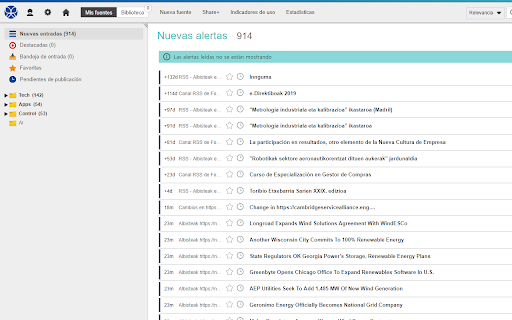
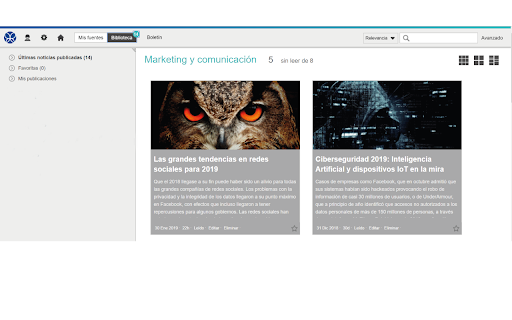
Innguma handy features for Information Factory Handy features for Intelsuite users. Innguma is a Competitive Intelligence tool focused on gathering and monitoring information from any website. Our platform requires a subscription. We have different types according to the needs of each type of user. You can find more information about each of them or request a demo account by contacting us through our website https://www.innguma.com/en/contact. Once you have the credentials of an account on our platform https://factory.intelsuite.es and have logged into it, you can add information sources to your user's inbox on the platform using the extension. The extension allows you to recognize RSS links on pages that have them and add them as sources of information to the user`s sources catalog. Add websites to your inbox or bookmark them to read later, and share website addresses with other users of the https://factory.intelsuite.es. platform.

Kee - Password Manager
Kee adds private, secure and easy password management features which save time and keep your private data more secure. Save time, sign in easily to websites and avoid the hassle of forgotten password resets. Protect yourself and people you know from the nightmare of your accounts being hacked. ➤ Secure and automatic sign in to all your favourite websites ➤ Protect your personal and financial data by letting Kee create and remember high security passwords for you ➤ Your passwords stay under your control, protected by the most popular and thoroughly tested open source secure password storage system ➤ Open source with no adverts Kee offers an easy and cheap password management solution via the Kee Vault service. This is available for a free trial period with no credit card required. If you decide that's not for you, the add-on can instead work with the free KeePass Password Safe 2 software and we offer step by step instructions for how to install and configure that to work on your Windows machine (and it can also be made to work on Mac and Linux with a bit more effort, with multiple guides existing to help in that endeavour) Kee has been the most highly rated Mozilla Firefox password management extension for nearly 10 years! We have recently changed our icon to coincide with the launch of the Chrome version of the extension and the announcement of the Kee Vault password manager service. You can look forward to even more improvements this year and join the discussion on the community forum at https://forum.kee.pm/ to let us know what features you'd most like to see developed next. If you would like to try Kee and it is not working for you, please use the help resources at https://forum.kee.pm/t/help-and-support/24 since requests for support within review comments will remain un-noticed for a year or longer. You should pay particular attention to the full detailed installation instructions at https://forum.kee.pm/t/installing-kee-instructions/23, the getting started tutorial at https://tutorial-addon.kee.pm/ and any advice at the top of that page. Kee needs a variety of permissions to deliver it's functionality to you. We maintain a page that details these permissions and why we require them at https://www.kee.pm/extension-permissions/. The built-in Chrome password manager will no longer prompt you to save passwords after you install this add-on. Any existing data will not be affected but you are strongly advised to delete any stored passwords from your Chrome password store in order to increase the security of your personal data and to avoid possible confusion in future.

EndNote Click
The official EndNote browser extension. Access millions of research paper PDFs in one click on Web of Science, Meta, PubMed, arXiv, Scopus and thousands more academic websites. Save time navigating paywalls, logins and redirects. EndNote Click helps you get to your full-text PDFs faster by securely connecting you to your library’s journal subscriptions and open access content. Once you have the PDF, you can easily export it to your favourite reference management tool or download it to your desktop. EndNote Click integrates with Mendeley, EndNote, Dropbox and Zotero Get started in two minutes and find out why researchers at thousands of universities are already using EndNote Click. Try it for yourself. Please check with your librarian or IT department for recommendations regarding the use of browser plugins.

Inoreader: Read-later and RSS extension
Save articles for later and keep up with your favorite feeds. Discover, preview, and follow RSS feeds while organizing your content. With Inoreader, information comes to you the minute it’s available. Follow your favorite websites, social media feeds, podcasts, blogs, and newsletters – all in one place. Save articles for later, discover inspiring content, and make your time online more meaningful and productive. Enhance your workflow with the Inoreader browser extension without leaving your tab: • Save web pages to read or revisit later. • Annotate texts directly in your browser. • Monitor your unread counter at a glance. • View feeds and tags with recent updates. • Detect and follow RSS feeds effortlessly. • Preview RSS channels in a clean format. • Send articles to Team channels. Inoreader is a trusted RSS and news reader, recognized by professionals and casual users worldwide for its powerful features and intuitive design. It’s a one-stop solution for discovering, organizing, and sharing content online. Access Inoreader on inoreader.com or stay connected with our mobile apps for iOS and Android. Here’s what you get with Inoreader’s Free plan: • One hub for everything: Follow websites, Google News alerts, Reddit feeds, podcasts, blogs, and more. • Real-time updates: Get new content as soon as it’s published without relying on algorithms. • Distraction-free reading: Enjoy articles in a clean, ad-free environment. • Personalized experience: Choose from different themes, layouts, sorting, and grouping options to fit your preferences. • Smart organization: Keep your feeds and articles tidy with folders and tags. • Active reading tools: Highlight, annotate, and take notes while reading. • Content discovery: Explore curated sources and trending articles on different topics. • Save and archive content: Collect web pages and articles to read later. • Article search: Find items quickly across your feeds, folders, and tags. Take your experience to the next level with Inoreader Pro: • Advanced automation: Apply custom filters and rules for precise content curation. • Monitoring feeds: Track specific keywords or phrases in 30 languages. • Web feeds: Follow websites without native RSS support. • Track changes: Get notified for updates to any webpage. • Social feeds: Follow Facebook pages and Telegram channels; sync YouTube subscriptions. • Email newsletters: Receive newsletters in Inoreader without cluttering your inbox. • Offline access: Catch up with the latest news on the go with mobile offline mode. • Public article search: Discover content from all publicly available sources in Inoreader. • Article translation: Instantly translate content into 30 languages. • Text-to-speech: Listen to articles in 30 languages. • Audio player: Create playlists and enjoy podcasts in the background while multitasking. …and so much more! We’re constantly adding features and improving based on user feedback. Got a question or an idea? We’d love to hear from you. Reach out at support@inoreader.com.

RSS Subscription Extension (by Google)
Adds one-click subscription to your toolbar. This extension auto-detects RSS feeds on the page you are reading and upon finding one will display an RSS icon in the Omnibox, allowing you to click on it to preview the feed content and subscribe using your favorite feed reader. The extension comes with a few feed readers predefined (Newsblur, My Yahoo, Feedly, Inoreader, The Old Reader) but also allows you to add any web-based feed reader of your choice to the list. What's new in version 2.2.8? + Updated to extension manifest version 3. + Changed the Feed link in Preview page to Copy feed url to clipboard. What's new in version 2.2.5? + This version contains security fixes. + Replaced deprecated Bloglines RSS service with Newsblur. What's new in version 2.2.2? + Doesn't run in the background all the time, only when in use. + Updated to not use a soon-to-be-deprecated API. What's new in version 2.2.1? + Removed Google Reader and iGoogle from the list of default feed readers. What's new in version 2.1? + This extension is now available in over 40 languages. + If you see localization problems, let us know: http://crbug.com/37233 Changelist: + Navigating to feed pages directly now takes you to the subscription page (instead of showing XML). + Found a feed where this doesn't happen? Let us know: http://crbug.com/32967 + Added an Options page for configuring feed readers. + Added an option to skip the feed preview page when subscribing. + Added a link to the preview page for those wanting to copy the direct feed link (look for the [ Feed ] link in the blue bar). + Added support for multiple feeds per page.
