
jgfeifpakohnblfnjdpigclinhbkocja
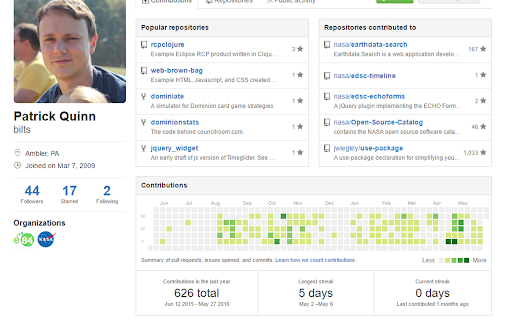
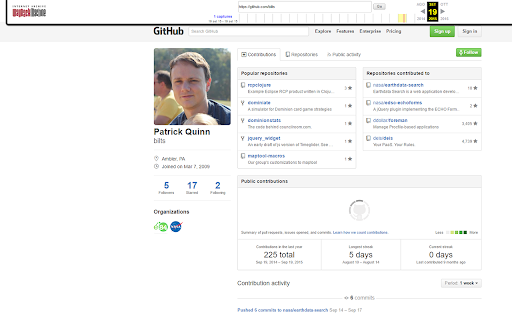
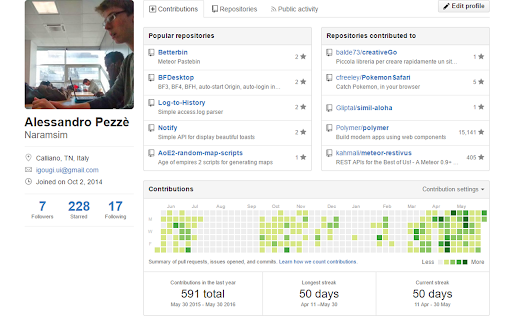
Re-builds former current and longest streaks on Github profiles Since May 2016 Github does not provide anymore your current streak and your longest streak of contributions. Read it here: https://github.com/blog/2173-more-contributions-on-your-profile If you want it back, like it was, just install this extension

Enhanced GitHub
Display repo size, size of each file, download link and option to copy file contents Extension that provides useful features on top of GitHub Website. 1. Displays repo size. 2. Displays each file size in every active branch (not applicable for folder / symlink) 3. Show download link for each individual file (not applicable for folder / symlink) 4. Copy file's contents directly to Clipboard (just won't work for markdown files) 5. Download file 7. Coming soon...please suggest by opening an issue on https://github.com/softvar/enhanced-github/issues Enhanced GitHub Chrome Extension doesn't collect/share/care about your data at all. Asks for GitHub Access Token only for private repos and if Rate Limiting is your concern. 1. "*://*.github.com/*" - for running on github.com domain. 2. storage - for storing GitHub access token on your local system. GitHub Access token is required for private repos and for handling API rate-limiting issues. 3. webRequest - to support GitHub being a single-page-application now. 4. webNavigation - to support GitHub being a single-page-application now. Read the detailed blog to support SPA and for requesting permissions #3 and #4 - https://medium.com/@softvar/making-chrome-extension-smart-by-supporting-spa-websites-1f76593637e8 * Note: From v1.0.0 onwards - Click on download icon/button while pressing Alt / Cmd(for Mac)/ Ctrl(for Windows) because GitHub has stopped downloading of files directly. * From v3.0.0 onwards, this extension wants webRequest permission so that it can properly handle SPA behavior of GitHub website. * From v4.0.0 onwards, it support GitHub New Design. Please check the detailed CHANGELOG - https://github.com/softvar/enhanced-github/blob/master/CHANGELOG.md OPEN-SOURCED and LICENSE: For more updates, please stay tuned! For any queries/issues - open an issue on https://github.com/softvar/enhanced-github/issues For any query, drop me an email at varun2902@gmail.com

Lovely forks
An extension to help you notice notable forks of GitHub projects. Sometimes on GitHub, projects are abandoned by the original authors and the development continues on a fork. However, the original repository is often not updated to let new-comers see that. I have many times wasted effort on making a pull-request or installing old buggy versions of projects when the community had already moved to a fork. To make matters worse, the old projects usually have higher search-engine traffic and a lot more stars than the forks. This makes the forks even harder to find. This extension tries to remedy that by adding a subscript under the name of the repository on the Github page of all projects with a link to the most notable fork (i.e. the fork with the most stars), if such a fork exists.

GitHub Code Folding
Code folding - the ability to selectively hide and display sections of a code - is an invaluable feature in many text editors and IDEs. Now, developers can utilize that same style code-folding while poring over source code on the web in GitHub. Works for any type of indentation, spaces or tabs. v0.1.0 - remove jQuery dependency - use event page instead of permanent background

File Icons for GitHub and GitLab
A simple browser tool changes file's icon on GitHub, GitLab, gitea and gogs. On GitHub, no matter what kind of file is, their icons are all same. However, in your fancy editor, there are some packages which give every filetype an unique icon. Therefore, I build a simple extension to replace original file icon with filetype-specific icons. This improves visual recognition on GitHub, GitLab, etc. Hope you like it! **This extension is not a project of GitHub or any company**
