
jgeonblahchgiadgojdjilffklaihalj
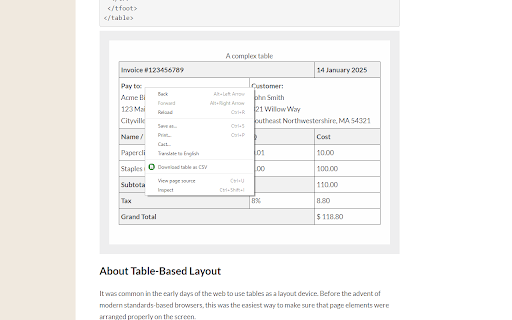

Right click on the table, then select 'Download table as CSV' from the context menu. Alternatively you can click the icon and then click on the table to download The extension downloads the HTML tables in MS Excel style CSV format. It will save as TSV if tabs are selected as the delimiter. Images will be show in the CSV file as the source URL. Inputs and text-areas will be indicated in the CSV file with a '(i)' Support for UTF-8 with BOM - You can toggle this in the extensions popup. Can change the delimiter in the extension popup.

Table Capture
Copies HTML tables to the clipboard or exports them to Microsoft Excel, CSV, Google Sheets, Office 365, etc. Table Capture gives you the ability to easily capture HTML tables for use in a spreadsheet, whether using Microsoft Excel, Office 365, Open Office, Google Sheets, etc. Features: • Copy tables to the clipboard with the proper row & column separators • Export to Google Sheets • Batch export tables to the clipboard, Excel & Google Sheets • Capture tables (or any repeating items on a website) • Exports of up to 250 rows Table Capture Pro features (requires annual subscription): • Download tables directly as an Excel spreadsheet or as a CSV file • Capture multi-page tables and tables that load as you scroll • Copy tables to the clipboard as Markdown • Screenshot tables (save as PNG images) • Export tables to Office 365 • Create "Recipes" for handling tables on specific websites • Export tables from PDF files (locally and from the web) Table Capture Cloud features (requires subscription): • Real-time sync to Google Sheets • Magic Columns: AI-based column parsing • Table Talk: Ask ChatGPT free-form questions about your data! • Ollama Integration: Use a local LLM for your advanced data processing needs Support & Testing: support@georgemike.com • Please test the extension on the tables provided here: https://www.georgemike.com/tables/test/

Table Download
Download HTML tables from pages in spreadsheet format (XLS). Users can also copy HTML tables and paste them into the spreadsheet application without losing the table format. The data is copied in raw HTML format, and a warning will be displayed while opening the downloaded file. Users need not be concerned, as HTML code is sanitized using the DOMPurify library. DOMPurify will strip out everything that contains dangerous HTML and thereby prevent XSS attacks and other nastiness. Permissions Requested Scripting and Active Tab: required to inject JavaScript code into the webpage of the active tab, which is only activated when the extension icon is clicked. Table Download extension is Open Source. If you want to contribute to this project or encounter any issues please visit: https://github.com/arunelias/table-download

HTML Table to Markdown
Convert an HTML Table to Markdown for easy export. This extension provides a simple way to export an HTML table in Markdown format. Simply select the table you'd like to export by right-clicking and choosing Inspect, then open the Table to Markdown tab and hit Convert! This extension can handle a wide variety of HTML tables, including tables with missing cells, tables without headers, and tables with cells that span multiple rows and columns. Read the full README and see examples on the GitHub page at https://github.com/kbravh/table-to-markdown.

Table Exporter - Scrape & Extract Data to Excel, Sheet, CSV & JSON
Automatically detect and extract tables data from any website. Export HTML tables to Excel, CSV, JSON, or Clipboard in one click. Table Exporter is a fast and easy browser extension that lets you extract and export any HTML table from any webpage in just one click. Perfect for anyone working with data from dashboards, reports, analytics tools, research pages, admin systems, or business reports. No manual copying, no formatting issues, and no extra tools required. The extension automatically detects all tables on the page and allows you to export them as CSV, XLS, or Copy. If a webpage has multiple tables, you can choose which one you want. For users working with complete datasets, Table Exporter can also **extract and keep hyperlinks inside table cells**, ensuring you don’t lose important reference URLs such as product pages, document links, resource pages, or tracking information. 📍Export Any Webpage Table ✅ Automatically detects and extracts data from HTML tables. 📍 Export to CSV, XLS, JSON or Copy & Past ✅Compatible with Excel, Google Sheets, BI tools, and reporting systems. 🧩 Works with Multiple Tables on a Page ✅Export one table or all tables with a single click. 🔗 Extract Hyperlinks from Table Cells ✅Preserve important URLs and references in your exported data. ⚡ No Copy-Paste Needed ✅Clean and structured data without manual work or formatting. 👨🎓 Ideal for All Types of Users Great for students, researchers, data analysts, SEO specialists, developers, testers, and business professionals. 🧠 Simple and Easy to Use Lightweight interface with instant one-click exporting. 🎯 Who Is Table Exporter For? Students gathering research data Data analysts extracting online reports SEO professionals collecting SERP or competitor tables Developers testing content or UI output Business users preparing spreadsheets or presentations Content creators organizing online information Anyone who needs fast and accurate data extraction 🚀 So what are you waiting for? Install it now and start exporting tables in seconds!
