
jgccdpfmkjkajafggknidaemjmomophp
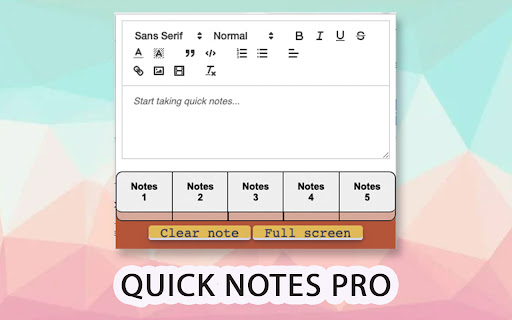


Take notes quickly from the browser with rich text, save images, videos, make lists or save your code with highlight functionality! Take notes quickly and easily in your browser! Copy and save text with rich formatting, save images, videos, code with highlight formatting and much more! New Version released! -New Themes: Customize the extension as you like! Click the settings button in the upper right corner and select the theme you like best. -New JSON formatter: Copy-paste your unformatted Json in the editor, click on the { } button and then you will get the Json formatted in code block with highlights! -Rich text editor, copy and paste texts and keep the original format. -Autosave. -Multi tab with up to 5 notes simultaneously. -Save images and videos. -Privacy: All your data is saved in your computer, not in the cloud. -Resizable window and full screen mode -Save code blocks with highlight formatting with the most common languages. -Clean and pretty interface. -Easy and very useful. -Toolbar with many options to format your texts

RecSnap - Screen Recorder with Audio & Webcam
Record your screen, voice, or webcam in sharp detail. RecSnap makes screen recording smooth, simple, and reliable. RecSnap is a smart screen recorder for browser that lets you record screen, audio, and webcam without extra setup or tools. Whether you're looking for a screen recorder with audio, a way to record screen on Windows or Mac, or a lightweight browser screen recorder, RecSnap helps you capture it all — quickly and clearly. 🖥️ What can you record: - Your full screen, browser tabs, or application windows - System sound, mic, or both - Webcam footage or voice-only narration - Screen recorder for browser with audio and webcam - Works on PC, Mac, and Chromebook - No sign-up, no watermark - Smooth visuals and sharp sound - All recordings saved directly to your device - Record tutorials, how-to videos, or demos - Screen record meetings, walkthroughs, or training - Create explainer videos or product showcases - Capture video calls with voice - Use as a Google screen recorder or for screen recording on Chromebook 🔑 Why RecSnap? It's private, fast, and easy to use — built for creators, educators, remote workers, and anyone needing a solid screen recording tool. 🚀 Try RecSnap today and start screen recording in just one click.

Easy Summaries
AI-powered summaries for any webpage, article, YouTube video, or PDF. Save hours. Get the key points in seconds. Summerize.ai uses advanced AI to summarize any webpage, article, research paper, YouTube video, or PDF — in under 10 seconds. Built for people who value their time. 🎯 Who is this for? 💼 Busy professionals drowning in articles and reports 🎓 Students and researchers cutting through dense content 📰 News junkies who want the story, not the scroll 🔬 Anyone who wants to read smarter, not longer ✨ Key Features 🧠 Instant AI Summaries One click. Any page. Get a sharp, structured summary in seconds — no fluff, just the essential points. 📌 Floating Side Panel Summerize stays out of your way until you need it. A sleek side panel appears as you scroll, giving you instant access without breaking your flow. 🔑 Keyword Selection & Navigation Tap any keyword in your summary to jump directly to that section of the page. Find what matters fast. 📋 Copy Results in One Click Copy your full summary or keywords instantly — paste into notes, emails, or docs without friction. 📂 Improved History Tab Your past summaries are synced to the cloud and accessible from any device. Search, browse, and revisit with a clean card layout. Click any card to go back to the source. 🎨 Improved Output Structure Summaries are now formatted for readability — headers, bullet points, and sections that match the type of content you're reading. 🤖 Content-Aware AI The AI adapts its style based on what you're reading — articles, documentation, research papers, blog posts — for more accurate, relevant results. 🎵 YouTube & PDF Support Works on YouTube videos and PDF documents. Not just webpages. ⭐ Premium Go unlimited. Subscribe directly from the extension via Stripe. No caps, no interruptions. 📌 Floating side panel — Summerize follows you as you scroll for instant access 🔑 Keyword selection & in-page navigation — jump to any section from the summary 📋 Copy results button — one-click copy for summaries and keywords 📂 Improved history page — better layout, faster search, cleaner cards 🎨 Improved output structure — summaries now formatted with clear sections and hierarchy 🔐 Authentication fix — resolved sign-in issues affecting some users 📋 Version History 💳 Premium subscription via Stripe — subscribe directly from the extension ☁️ Cloud-synced history — access your summaries across all devices 🔍 Search your past summaries from the history tab 🤖 Content-aware AI — adapts summarization style to content type 👍👎 Feedback on every summary — help us improve ⚡ Faster backend response times v1.32 🔊 Audio mode — listen to your summaries Upgraded to GPT-4 for improved accuracy v1.20 🌙 Dark mode ▶️ YouTube video summaries Keywords and highlights split into separate options v1.12 📄 PDF support added 🔒 Privacy We never store the content of pages you summarize. Full details at summerize.ai/privacy-policy.

ScreenApp - Record and take AI notes of meetings, videos, calls & lectures
Easily record your screen and audio with ScreenApp. Take AI Notes and summaries of any recording. ScreenApp. Transcribe audio and screen content right from your browser or any URL. Perfect for capturing notes and summaries from lectures, meetings, webinars, podcasts, and beyond. What it does: - Records and uploads to the cloud instantly - Turns audio and video into text. - Works seamlessly in your browser: no downloads needed. - Pulls in content from web links. - Simplifies note-taking from any source. - Creates concise summaries effortlessly. Why you’ll love it: - Saves time with instant transcription. - Keeps everything organized in one place. - Makes sharing a breeze. How it works: 1. Add ScreenApp to your browser. 2. Start Recording 3. Save and process with AI 4. Chat and Summarize

Handy Screenshot - Full Page Screen Capture
Take screenshots of web pages with ease. Capture, edit, annotate and save them as PNG / JPG / WEBP formats. An easy, free and full-featured screenshot tool that lets you screen capture, annotate and edit screenshot. Full page screen capture supported, as well as capturing entire display. We try to make it super easy for you to capture viewport, capture entire page, crop, annotate, save as PNG / JPG / WEBP / PDF, copy to clipboard. 🤩 You will love: ◉ Easy and user-friendly interface ◉ Custom keyboard Shortcuts: separate shortcuts for 1. capture full page 2. capture visible area 3. select area ◉ Capture screenshot for selected area / visible area / whole page ◉ Annotate your screenshot with our powerful yet the most easy-to-use built-in image editor ◉ Name your screenshot before saving as best quality, high-resolution screenshots, PDF, PNG, JPG, and WEBP formats ◉ Upload your screenshots to Google Drive, and it remembers the folders you've used ◉ Send the screenshot to your AI chatbox like ChatGPT / Claude / Gemini ✨ Features of our built-in screenshot editor: ◉ Cropping ◉ Texts ◉ Shapes: arrows, rectangles, circles ◉ Free draw: pencil or highligher ◉ Blur: to hide sensitive info on screen ◉ Counters: for steps / order ◉ Magnifier: highlight details with zoomed-in callouts ◉ Beautiful gradient background: to take your screenshots to next level 🚀 PRO Features (New) PRO license is a one-time purchase - no subscription. It unlocks more control and a faster editing workflow: ◉ Annotation presets: save and reuse your favorite styles (colors, shapes, crop, background) ◉ Layer manager: easily organize, reorder, and manage elements on your screenshot ◉ History (undo & redo): go back and forth through your edits with confidence ◉ Fixed-size capture: capture screenshots with precise, consistent dimensions One more thing: * The other products made by ohhandy.com are also listed in a dropdown in screenshot editor page (editor.html)
