
jgabolakboecklnmocdljjcdkkhjigck

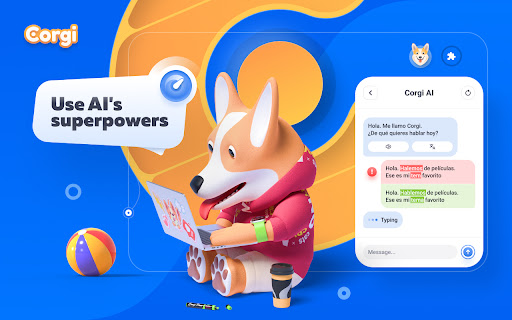
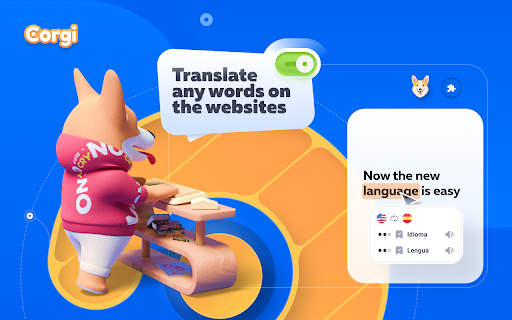
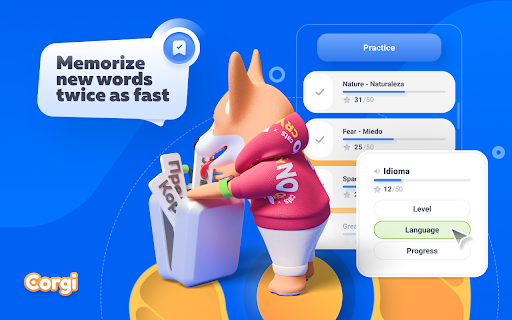
Our small team consists of enthusiasts living in different countries and time zones. We started the Corgi project as a hobby to help people overcome language barriers and learn new languages. We are constantly working on improving the extension and adding new functionality. Recently, we've started a partnership with PlasticBank to make our modest contribution to clean plastic from the world's oceans. You can see the whole version history in the settings of our extension and see that we have done a lot of work and we are not going to stop there. - Corgi AI. Your personalized foreign language teacher based on ChatGPT. At the moment you can chat with him on any topic or ask him to explain grammar rules. He will also correct your messages if you made a mistake somewhere. In future updates we plan to add voice chatting, thematic chats (for example, checking at the airport or ordering coffee), detailed explanation of mistakes and many more useful features - Translation of words and sentences. Corgi works as a normal translator as well. You can translate sentences on websites or individual words. Corgi will offer several translation options and filter them by popularity. - Word Trainer. You can add any words you want to learn and memorize them in the special word trainer that we have added to Corgi. For each correct answer you will be awarded 5 points, when you reach 100, the word will go to the studied. Don't forget to open the extension periodically and learn the words. Even 5 minutes a day can yield results over the long haul - Learn words in context. This feature is turned off by default, but you can enable it in the extension settings. In this case, Corgi will analyze words on the sites you visit and if it comes across a word you've added to study, it will highlight it. When you hover over that word, you will have to select the correct translation option. This will help you learn words more efficiently while you are just surfing the internet. P.S. Corgi does not have access to your browsing history or enter any data. We value your privacy and do not collect or store any data other than the words you add to the study. At the moment we support learning several languages including English, Spanish, French, German, Italian, Russian and Spanish. But this list is constantly expanding. Thank you for reading and learning a little more about Corgi! We will be very happy to have your feedback and reviews, as it motivates us a lot to keep working on the extension and make it better and better with every update.

TeaserFast
C помощью этого расширения вы можете зарабатывать реальные деньги за просмотр рекламы. Вывод денег на Payeer и Webmoney. Расширение периодически показывает рекламные Тизеры и рекламные сообщения с предложением просмотра сайта, пока вы пользуетесь браузером. За просмотр рекламы мы платим деньги, которые вы можете вывести на кошельки Payeer и Webmoney. Подробности на сайте - https://teaserfast.ru/earn/

Socpublic.com
Enjoy work with Socpublic!

Surfe.be — the extension with which you earn
Get paid for the time you spend on the Internet! Have you ever considered how much time you spend pointlessly surfing sites? Many users spend 3-6 hours on this daily, but this time can be monetized profitably. We suggest you install the Surfe.be extension and receive money for every minute spent on the Internet! === How do you earn with Surfe.be? Our extension randomly displays small banner ads at the bottom of any sites you visit. For each banner shown, you will receive up to 90% of the price paid by the advertiser. With the Surfe.be extension, you can make money in 4 ways: - surfing the Internet on any sites; - viewing the websites of advertisers; - viewing promotional videos; - earnings on affiliate program. Install the extension and earn the first money today - it's simple, even a schoolboy will understand! === Benefits of earning with the extension Surfe.be # Works on all browsers # You can install the Surfe.be extension in Chrome, Opera, Firefox, and Yandex # Instant withdrawal from $ 0.03 # Withdrawal of funds occurs within 1 minute and is already available from $ 0.03 # Multiply revenue by 2 # Upon reaching the rating of "100", payment for completing tasks will double # AdBlock does not affect work # You can view ads without disabling ad blockers in the browser # Anyone can earn # This method of earning on the Internet is suitable for users of any age and gender # Convenient withdrawal of funds # You can withdraw money to Payeer, WebMoney, Qiwi and Yoomoney wallets 1. Install Surfe.be in your browser - to do this, click on the "Install" button at the top of this page. 2. Go to Surfe.be, go through the registration process and log in. 3. Now you can earn with the Surfe.be extension by browsing your favorite sites. Money will be credited to your account on Surfe.be and are available for withdrawal at any time! If you want to earn 10 to 20 times more, go to Surfe.be website and perform paid tasks (watching videos and websites) or invite new users to the system using your referral link and get from 5 to 10% of the sum of each withdrawal or recharge! Install the extension for the Surfe.be browser and get paid for the time, spent on the Internet or for completing simple tasks! To install the extension, click the "Install" button at the top of this page :) Please email us: info@surfe.be or write to the form on the website: https://surfe.be/help We will answer your request within 24 hours!

QR Code
Generate and Scan QR Code. This extension help you generate QR code for links and text, while supporting scan QR code through context menus, local files and webcam. All functions execute locally on your browser, no data send to server. 1. When you click the extension icon, it shows you QR code for current page URL. And you can change input and download QR code. There are two buttons at the bottom for custom generating and scanning QR code in a new page. For generating QR code, you can: • Input any URL or text • Adjust margin • Adjust size • Adjust error correction • Download as png or svg file. • Copy to clipboard. For scanning QR code, it supports: • Scan an image by it's URL • Select or drag and drop a local image file • Scan with camera 2. Through context menus on web page, you can: • Scan QR Code From Images • Generate QR Code for Page Link • Generate QR Code for Selected Text • Generate QR Code for Link Address • Generate QR Code for Media(image, audio and video) Address In addition, it also supports scanning other barcode types on the latest macOS or Chrome OS. For example, on macOS, it supports the recognition of these types of barcodes: "aztec", "code_128", "code_39", "code_93", "data_matrix", "ean_13", "ean_8", "itf", "pdf417", "qr_code" and "upc_e ".
