
jfkpmcnebiamnbbkpmmldomjijiahmbd


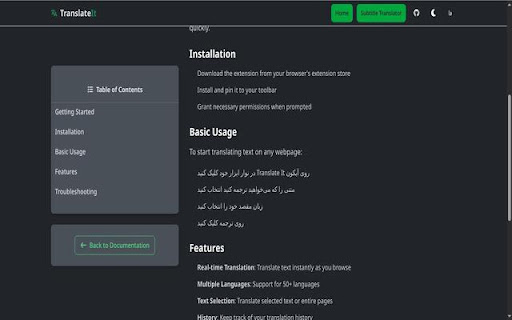

Translate It! - The Ultimate Translation Toolkit No more switching tabs. Translate smarter with the most advanced and secure intelligent translation ecosystem. Tired of clunky translators that break page layouts or hit rate limits? Translate It! is engineered with a "zero-pressure" philosophy, optimized to run seamlessly without taxing system resources or bloating RAM—even with dozens of tabs active. It brings a high-performance, modular translation engine directly into your workflow, providing a surgical and fluid experience for research, chatting, or browsing. - 10+ AI & Standard Providers: Choose between Gemini, OpenAI, DeepL, Microsoft and more. - 70% Token Savings: Use our unique Economy Mode to pack more text into every request, slashing your AI API costs. - Zero-Pressure Engineering: Optimized for low-footprint operation. Keep dozens of tabs open without worrying about RAM bloat or system slowdowns. - Privacy First OCR: Translate text from images, videos, and PDFs using our Offline OCR engine. Your visual data never leaves your browser. - Progressive Streaming: Don't wait! Large paragraphs are rendered in real-time as they arrive, providing a fluid, zero lag experience. ✓ Key Features at Your Fingertips - Instant Selection: Select text and get a clean translation box right where you are. - Screen Capture (Visual Translation): Highlight any area on your screen—even inside videos or images to extract and translate text instantly. - Element Mode: Click any UI element to translate it inline while keeping the layout intact. - Whole Page Translation: Auto-translate entire web-pages with smart lazy-loading and infinite scroll support. Perfect for long articles or social media feeds. - Mouse Hover (Instant Glance): Hover over any text while holding a modifier key (like Ctrl) to see an instant translation in a sleek tooltip. Supports Word, Sentence, and Container scopes. - Desktop/Mobile FAB: A multipurpose, drag-gable floating hub that gives you instant access to OCR, Page Translation, and Element Mode. - Translate While Typing (Ctrl + /): Type in any field and translate your message before hitting send. Perfect for international messaging. - Mobile Ergonomics: Enjoy a native-like experience on mobile browsers (Firefox Android/Kiwi) with our thumb-friendly bottom sheet. - Turbo vs. Economy Slider: Take full control! Choose Turbo Mode for lightning-fast UI or Economy Mode for maximum stability and cost-efficiency. ✓ Pro Tools for Power Users - Smart Dictionary: See definitions, synonyms, and usage examples for any word. - Text to Speech: Listen to translations in high-quality audio. - History & Export: Keep track of your translations and export them whenever you need. Includes 100+ languages: English, Farsi (Persian), Japanese, French, German, Chinese, Arabic, Hindi, Korean, Russian, Spanish, Turkish, and many more. - No Tracking: We don't store or share your data. - Direct Connection: Your text goes directly from your browser to the API of your choice. - Open Source: Fully transparent development on GitHub. ✨ Level up your browsing experience. Install Translate It! today.

LTR-RTL
This extension allows you to change web page text direction. This extension allows you to change the web page text direction. This is useful when you are viewing right to left text such as Hebrew or Arabic in an application that displays from left to right. Note 1: If one or both of the shortcuts don't work, it means that something else is mapped to them. Chrome allows you to remap extension shortcuts, and you can remap the shortcuts to something that isn't in use. Alternatively, the extension adds an item to the Chrome right click menu, which you can use to switch text direction instead of the shortcuts. Note 2: The language direction will only change for HTML elements that don't have a specified language direction.

Widgetify
Transform your new tab into a smart dashboard with Widgetify! Get currency rates, crypto prices, weather & more.

Dideo
Dideo gives you the ability to play and watch your favorite and desired YouTube videos all over the web very simple and with no restriction.

Auto RTL/LTR Switcher
Automatically switch text direction based on input language and allow toggling page font (Vazirmatn) and direction. This extension automatically adjusts text direction based on the input language. Many web forms default to left-to-right, which can hinder typing and readability for languages like Persian. As you type, if the extension detects Persian characters, it switches the direction to right-to-left; otherwise, it stays left-to-right. Toggle Font: Switch the page font to Vazirmatn (from Google Fonts) and back to the default with a single click. Toggle Direction: Manually change the entire page's direction (RTL/LTR) by clicking the extension icon.
