
jffaincojneohpjbdcgpifncikidbpdg
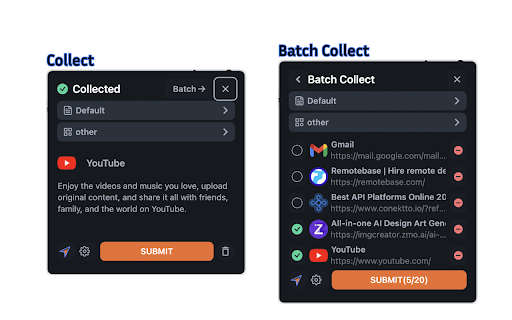
Collect bookmarks easily with just one click. Introducing our innovative bookmark collector - With just one click, you can effortlessly collect bookmarks. How to Use: 1. Sign up or log in. 2. Click the extension button on any website, or press Ctrl+E (Command+E on Mac). We recommend pinning the extension icon for easier access. Only http:// or https:// website can be collected, others are not supported.

Apiary - Web Highlighter & Annotator
Highlight and take notes directly on what you read online and instantly share them with friends and colleagues. Easily highlight and take notes on what you read online and then easily save them for later and share them with friends and colleagues in one click. Apiary is a free to try chrome extension based product that allows you to easily highlight and take notes on what you read online. After you have annotated something online it will be saved to your Apiary account where you can then organize in any way you like with our folder system. You can than easily share directly from the website where you took the notes or from your Apiary account later on with anyone you want. Just highlight and get a shareable link you can send to anyone with one click. When using Apiary on a website or email online you have two options. You can choose to just highlight some text or you can highlight and add a comment to that highlight. Allowing you to save and share you favorite parts and current thoughts while reading it with others. You can view your annotations live by clicking the chrome extension and having the Apiary sidebar appear showing all the highlights and notes you have made on that page. Or you can view them later in your Apiary account where we save all the contents of what you were reading and the highlights and notes you took. Allowing you to get the full context of whatever you were taking notes on. Annotate, save, and share what you read online instantly today. ----------------------------------------- Key Features: Web and Email Highlighting Take Notes On What You Read Online Apiary Account Access With Organization Systems Quick and Easy Shareable Notes Private Notes That Only You Can See Automatically Saving Notes ------------------------------------------- How To Use: In order to use the Apiary Chrome Extension you will need an account with Apiary. Please visit www.myapiary.io to create an account today. 1) Create An Account On Apiary (www.myapiary.io) 2) Download Chrome Extension 3) Sign Into Chrome Extension w/ Your Apiary Account 4) Select Text (Left Click & Drag) You Wish To Annotate 5) Click On Apiary Popup To Either Highlight Or Take Note On Selected Text 6) Delete An Annotation By Clicking On A Highlight And clicking Delete Icon 7) Share Your Notes For A Page By Clicking The Apiary Share Button On Bottom Left Corner Of Window 8) View A Note By Either Visiting Your Apiary Account Or By Clicking View On A Currently Annotated Web Page ------------------------------------ Pro Tips: 1) Make Sure You Are Logged Into Apiary Chrome Extension If You Are Having Issues Annotating 2) Organize Your Notes Into Folders On Apiary To Easily Find Notes Later 3) Share Your Notes With Friends By Clicking Share Button And Sending Link To Friends. --------------------------- Got Feedback? Please reach out to us at support@myapiary.io If you find bugs please let us know at https://forms.gle/rHvoLZwaXfVcbAMJ7. If you have a feature request please let us know at https://forms.gle/vguFD2Rxi2FCsSQi8. By installing the extension, you agree to Apiary's Terms of Service, Privacy Policy, and Community Guidelines (which can be found here: https://www.myapiary.io/term-services and https://www.myapiary.io/privacy-policy)

Quick Tab Suspender
Handy offline tool to suspend tabs and boost your performance quickly. Every tab suspended would be activated or refresh once you click it. Install the SessionPaw to see the magic visually. It's a part of SessionPaw's FreeApps, for more info or apps, please check https://sessionpaw.com. 🐈🐾🐾🐾

TestFiltering+
TestFiltering+ automatically monitors your internet connection to ensure your filter is correctly blocking illegal/harmful content We work with specific partners to host test URL's on various lists and have test pages hosted where they will be blocked. This service was setup in response to the introduction of statutory guidance for schools in the UK about appropriate levels of filtering and monitoring of school internet connections. The UK Safer Internet Centre first published its filtering and monitoring definitions in 2016 to help both schools and providers understand what should be considered as ‘appropriate’.

BBR Helper
This provides some advanced stats (game score, simple player rating and game box plus-minus) on multiple pages for NBA, WNBA, G-League, international leagues and college basketball. Including: - average stats by season on the player page - average stats by playoff series on the player page - average stats by player on the team_season page - average stats by player on the team_player page - average stats by player on the season_player page - single game/half/quarter stats by player on the game_boxscore page - single game and average stats on the gamelog and split pages - top 5 and top 20 average stats players on the season page - top 20 average stats players on the team_season page - top 20 average stats seasons rankings on the player page - top 50 career stats rankings on the player page - multiple stats rankings on the leader page - player awards column on team season page gBPM = (-0.55 * fga + 1.04 * fg3 + 1.39 * fg - 0.25 * fta + 0.79 *ft + 0.17 * orb + 0.27 * drb + 0.24 * (trb - orb - drb) + 1.34 * stl + 0.43 * ast + 0.64 * blk - 0.34 * pf - 0.95 * tov) / g """ , where orb is treated as 0.3 * trb and drb is treated as 0.7 * trb approximately when stats are not complete in early years.
