
jfeofgolbklfnkjdogghbmbgnonkgace
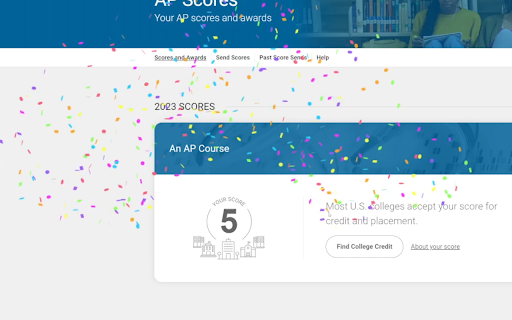
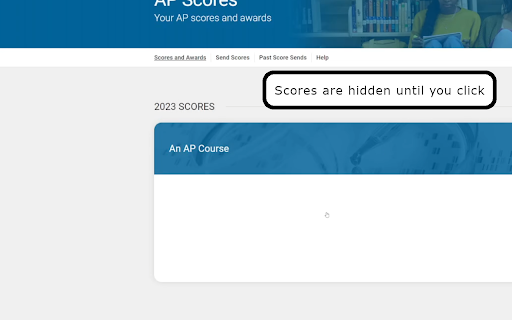
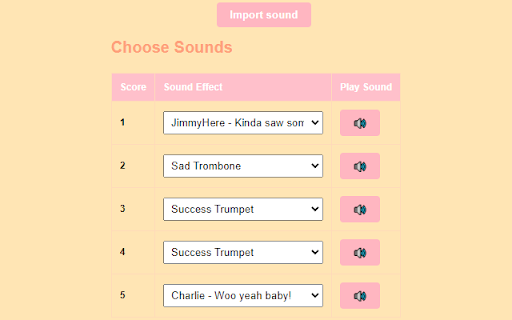

Hides AP® Exam scores on the College Board website until clicked on, plays sounds, & displays confetti if they're passing. You spend hundreds of hours in classes and even more doing the homework, yet your reward for taking an AP® Exam is a single digit. Even worse, once you go to your scores page it shows them all at once, which is very anticlimactic. Introducing AP® Score Hider. With this extension, all of your exam scores are hidden until you click on box containing the score. If you get a 3, 4, or 5, confetti blasts off. The higher the score, the more confetti. A highly requested feature was sound effects upon revealing a score, so we have that too. On the options page, which opens upon installation or clicking the icon, you can customize which sound effect plays for each score, 1-5. We've provided some defaults, but you can either disable sound effects or add your own via a URL or a direct file upload (which never gets uploaded to the internet). This extension only runs on the webpage for viewing scores, we can't see your password or any other sensitive info, and we don't keep track of your scores. It just hides the scores until they're clicked on, plus the bonus features of confetti and sound effects. AP® is a trademark registered by the College Board, which is not affiliated with, and does not endorse, this product.

Tasks for Canvas – now supporting Blackboard, D2L Brightspace
A better to-do list sidebar for Canvas, Blackboard, and D2L Brightspace. NEW: Extension now supports Blackboard and D2L Brightspace as well! NEW: Keep your streak alive by submitting assignments before their due date! NEW: Sync your Gradescope assignments directly to Tasks for Canvas! Ever had trouble finding your weekly assignments? Wish you had a nice progress bar to motivate you to complete everything? Then this extension is for you! The Tasks browser extension for Canvas™ updates the Canvas dashboard sidebar with a convenient todo list to show all of your weekly assignments and track your progress throughout the week. The sidebar includes: - A colorful chart with various rings color coded by course. As you complete your assignments throughout the week, the rings will show your progress! - A better to-do list of all active assignments that are counted in the rings. Each task item has the name, course, type, due date, point value, and link for the assignment. - A list of recent class announcements - The option to create custom task items - The option to filter assignments by course - The option to view rings and assignments from past and future weeks - The option to view completed or incomplete assignments -The option to manually mark assignments as complete This extension also contains an options page accessible from the sidebar where you can customize various aspects of the extension. Notes - Works in Card View, List View, Recent Activity View, and on course pages! - Only courses that have active assignments will be shown - All active assignments that have no submissions and are ungraded are displayed in the to-do list (the section titled 'Unfinished'). - 0-point assignments (i.e. extra credit) are shown in the to-do list but are not counted in the rings. 1.5.0 (3/11/25) - Streak feature! - Reverted rolling view, added option for new rolling view 1.4.0 (1/7/25) - Support for Blackboard and D2L Brightspace! - 24-hour clock option - Three day view option - Configurable list length 1.3.8 (3/11/24) - New Gradescope integration: automatically sync Gradescope assignments to Tasks for Canvas! - Fixed assignment grades not being rounded 1.3.7 (2/2/24) - Fixed dates overlapping course name in list view for some users - Added tooltips for buttons 1.3.3 (1/8/24) - Add links to custom tasks - Display grades on completed tab - Instructor mode improvements - Settings changes are immediately reflected in the extension - Colors now update immediately with dashboard cards - Assignments graded zero points don't count as complete - Smoother animations 1.3.2 (10/13/23) - Fixed announcements making rings show up for classes without assignments 1.3.1 (10/12/23) - For instructors, each individual ungraded submission now adds up in rings - Fixed assignments not showing up in rings 1.3.0 (9/23/23) - Redesigned tab bar - New section for class announcements 1.2.9 (7/2/23) - Removed outdated options from options page 1.2.7 (5/1/23) - Fixed problem with classes not respecting the chosen theme color - Fixed sidebar not showing when mixed with other extensions 1.2.5 (2/11/22) - Create recurring tasks that repeat every week - Ungraded assignments now show up as a task for teachers and TAs! - Redesigned task icons - Fixed error with quizzes not showing up in task list (apologies for inconveniences this may have caused!) 1.2.4 (1/21/22) - Enhanced dark mode support - Fixed error with tasks unable to be marked complete - Fixed course name overflowing dropdown when creating a new task 1.2.3 (1/7/22) - Updated animations and chart graphic - Option to choose a custom theme color - Enabled on all Canvas sites now - Fixed sidebar stuck in the middle of the screen on large screen sizes 1.2.2 (11/29/22) - Added more schools to list - Updated branding and assets - New welcome page on download 1.2.0 (8/29/22) - Fixed previous and next week arrows not appearing - Faster load times - Sidebar now loads even when no assignments exist in the account - Create custom task items - Revert completed tasks back to unfinished - Tasks marked complete are synced across devices - Option to use a “rolling period” where only tasks due on or after the current day are shown - Confetti! 1.1.0 (9/21/21) - Better compatibility with dark mode extensions - Fixed assignments with no point value displaying as "null" - Fixed next and previous buttons being clickable before load - Assignments can now be manually marked as complete by clicking the x button - New completed items list to view finished assignments and their grading status - Chunked assignment list based on due date (today, tomorrow, etc.), option in settings to enable/disable - Option to show/hide locked assignments - Button to go to settings page from the sidebar - Redesigned settings page ui - New loading animation 1.0.7 (8/30/21) - Downgrade manifest to v2 to be compatible with older versions of Chrome, including those on many school devices. 1.0.6 (8/22/21) - Support for all .edu and some other URLs - Less intrusive loading animation when navigating between weeks - 100kb (38%) size reduction - Minor fixes/optimizations 1.0.5 (3/28/21) - Fixed quiz icon not appearing for LTI quiz assignments 1.0.4 (3/7/21) - Fixed issue that occurred when there were assignments from courses not on the dashboard 1.0.2 (2/25/21) - Selecting a course from the dropdown now highlights its ring and hides all other rings - Minor fixes 1.0.1 (2/23/21) - Support for Recent Activity View - Only courses with active assignments are now shown in the chart (old behavior is still available in options) - Minor fixes Tasks for Canvas™ is an unofficial extension that is unaffiliated with Instructure's Canvas LMS. It is not endorsed or supported officially by any party other than myself. Please use the developer contact information in the Chrome Web Store for support. This extension uses browser storage to save your chosen preferences from the extension's options page. It does not collect or share user data and only communicates with the official, secure Canvas API supported by Instructure.

ACT® Score Hider
Hides ACT® scores until clicked on, plays sounds, and displays confetti After months of studying and hours spent taking the ACT®, all you get on results day is a wall of numbers shown instantly on one page. That can feel overwhelming or anticlimactic. ACT® Score Hider changes that experience by hiding your scores until you choose to reveal them, one at a time. When you click on a hidden score, it appears with optional sound effects and a burst of confetti if it meets your target range. Higher scores can trigger more dramatic animations. You're in control of the reveal: - Customize sound effects for different score ranges - Adjust confetti intensity based on your results - Use keyboard shortcuts or the extension popup to hide/reveal all scores Privacy Everything happens locally in your browser. We never see your scores, your login, or your data. It simply masks the numbers until you're ready. This extension is completely open source and available at https://github.com/NobiDevs/ACT-Score-Hider ACT® is a trademark registered by ACT, Inc., which is not affiliated with, and does not endorse, this product.

Revision History: Writing Process Visibility for Google Docs & Slides
Built for teachers: See how students write, not just what they wrote. View the writing process in Google Docs & Slides. Revision History helps 200k+ teachers see students' writing process in Google Docs and Slides - especially useful in the AI age. Track authentic writing development and guide meaningful revisions while ensuring academic integrity. Key Features: ✍️ Complete Writing Timeline: Track editing sessions, time spent writing, and revision patterns in Google Docs & Google Slides. 🎥 Video Replay: Watch documents being written from start to finish with large paste/deletion moments highlighted 📋 Copy/Paste Detection: See what content was pasted from external sources 🏫 Google Classroom Integration: Works seamlessly with submitted assignments, so long as they were written in Docs. 🔍 Enhanced Video Navigation: Important paste/deletion events now highlighted with icons for quick access 💡 Unusual Writing Pattern Detection: Identify atypical writing patterns that may benefit from additional guidance (these patterns are NOT evidence of any specific behavior and may have perfectly reasonable explanations) 📑 Multi-document tab detection: See writing analytics that occur within an individual Google document tab. 🔑 Google SSO 👥 User contribution breakdown in Video Replay This version includes RH for Google Slides Beta release as well as Teacher Tools for Google Docs Beta (Writing Report Download & Docs Templates) Perfect for writing instruction, formative assessment, and supporting authentic student work. We’re designed for with privacy in mind: Revision History collects ZERO document or student data collection. All revision analysis occurs locally. Contact us for details. With 200k+ educators now using Revision History, we've introduced Plus subscriptions to unlock unlimited document analysis and fund ongoing support and improvements. Free tier includes analysis of 150 unique documents per month. We never imagined so many educators would use our product. We're grateful, to say the least. Works with any document created in Google Docs, including those submitted through Google Classroom. Draftback, Originality.ai, Process Feedback, and Grammarly Authorship all work in Docs only. Revision History works in Docs & Slides -- and provides Summary Stats, Unusual Writing Flags, PDF Report Downloads, and much more. Please email info@revisionhistory.com with any questions.

GPTZero: AI Detection & Writing Replay
Bring AI detection, citation checks, live essay feedback, and writing replays directly into Google Docs and your workflow. The GPTZero Extension is the best solution for enhancing critical thinking and human writing, as recently featured in The New Yorker, New York Times, and Harvard Business Review. The new Google Document experience is custom built for teachers, students, and researchers. It includes four new powerful features: (1) Live AI detection checks instantly as you write (2) Customizable feedback and writing comments in Google Docs (3) Writing video replay and report, with a new typing pattern analysis (4) Bibliography, citation, and a research-focused fact check GPTZero’s Writing Replay brings your Google Docs writing process to life, showing exactly how a piece was written, edited, and pasted. Now supporting multiple editors, switch to see how different writers contributed to the final document. ➤ What makes the GPTZero Writing Report different? Unlike other writing replay solutions like Draftback, Brisk Replay, Grammarly Authorship, or Turnitin Clarity, the GPTZero Writing Report includes: • Multi-user detection: See how much each writer contributed by percentage. • Instant replay: Fast-loading, high-resolution writing playback. • Activity insight: Identify frequent edits, pastes, and writing bursts. • Human vs. AI analysis: Built-in AI detection flags large pastes and unnatural text. • Typing pattern insights: Our proprietary algorithm uncovers human typing behaviors. • Security: Enterprise grade data security and privacy, SOC2, and FERPA compliance. ➤ How does GPTZero writing and typing analysis work? GPTZero’s first-of-its-kind natural typing analysis constantly runs AI detection on large copy-pastes, and layers a proprietary algorithm trained on millions of documents that identifies human typing and natural editing patterns. ➤ What is GPTZero Bibliography and Source Check Check writing for AI-hallucinated and inaccurate bibliographies, uncited claims, and plagiarism. Then receive suggestions to improve sources and citations. Fully customize giving feedback by uploading a rubric and assignment details and specifying the focus. Feedback is live-drafted directly into Google Docs comments for convenience. Thousands of educators have added GPTZero directly into their syllabus as an assistant for students during their writing process. [5m read] From Catching to Coaching, How One Professor Added GPTZero to the Classroom: https://gptzero.me/news/from-catching-to-coaching-how-one-professor-added-gptzero-to-the-classroom/ GPTZero is committed to supporting classroom teaching. This summer, 3500+ educators participated in our Teaching Responsibly with AI webinar series. We’re also the official AI adoption partner for the American Federation of Teachers, and work closely with graduate schools of teaching including the University of Virginia and Penn State to co-develop GPTZero Writing Process tools for modern writing pedagogy.
