
jfbkgdlalcnnecgpinfonecfjjjfeeca
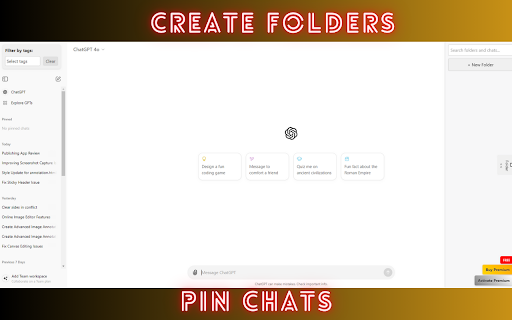
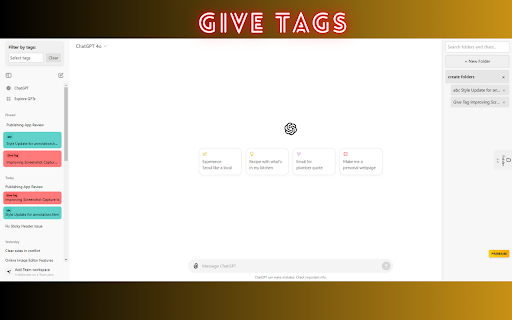

Powerful management tools for your ChatGPT interactions: pin chats, tag them, and organize them into folders for quick access. GPT Power Manager Supercharge your ChatGPT experience with advanced organization and management tools. Key Features: Custom Tagging: Easily categorize and find your ChatGPT conversations Chat Pinning: Keep important chats readily accessible Color Coding: Visually organize your chats for quick recognition Folder Management: Create folders to group related conversations Intuitive Interface: Seamlessly integrate these powerful features into your ChatGPT workflow GPT Power Manager is the ultimate tool for power users, researchers, and anyone looking to maximize their productivity with ChatGPT. Take control of your AI conversations and unlock the full potential of your chat history. Streamline your workflow, find information faster, and never lose track of important discussions again. Download GPT Power Manager and transform the way you interact with ChatGPT!

DeclutterGPT - Bulk Delete & Archive Chats
Easily bulk select, delete, and archive ChatGPT conversations. Declutter your ChatGPT history in just a few clicks! Tired of scrolling through endless ChatGPT conversations just to delete or archive them one by one? DeclutterGPT is the ultimate Chrome extension designed to make your ChatGPT experience faster and more efficient. 🔥 Why DeclutterGPT? Save Time – Delete or archive multiple conversations in seconds instead of clicking each one manually. Stay Organized – Keep your chat history clean and clutter-free. User-Friendly – Simple, intuitive interface with easy selection checkboxes. ⚡ Key Features ✅ Bulk Delete – Select and delete multiple chats with one click. ✅ Bulk Archive – Move chats to archive without deleting them permanently. ✅ Preview Chats – Review your chats before deleting or archiving them. ✅ Infinite Scrolling Support – Works seamlessly with large chat lists. ✅ Progress Bar & Count – Real-time updates on your bulk actions. 🔧 How It Works 1️⃣ Open ChatGPT and click on the DeclutterGPT extension. 2️⃣ Click “Add Checkboxes” to enable selection next to each chat. 3️⃣ Select the chats you want to delete or archive. 4️⃣ Click “Bulk Delete” or “Bulk Archive” and watch the magic happen! 💡 Who is DeclutterGPT for? ✅ ChatGPT power users with hundreds of chats. ✅ Productivity-focused users who want a clean chat history. ✅ Developers & researchers managing frequent AI interactions.

OneClick ChatGPT – Advanced ChatGPT Toolbox
Add powerful tools to ChatGPT: bulk delete & archive, branches, split view, and chat lock — all integrated into the native interface OneClick ChatGPT – The ultimate toolkit to boost ChatGPT 🚀 OneClick ChatGPT is the essential extension for all power users of ChatGPT. It adds powerful and perfectly integrated features designed to improve your productivity, organize your conversations, and unlock new uses! 1️⃣ Multi-selection & Bulk Delete Delete multiple conversations in a single click. No need to delete your chats one by one anymore: save precious time every day. 2️⃣ Bulk Archiving Same principle, but for archiving. Neatly organize your history and find your important discussions more easily. 3️⃣ ChatGPT Dual Window (Split Screen) Display two chats side by side in a single window. Ideal for comparing answers, working on two versions of a text, coding on one side and documenting on the other. A highly requested feature that OneClick finally brings. 4️⃣ Branch Creation (Multi-scenario) Transform any response into a new discussion branch in a second window. Compare ideas, explore multiple outcomes, and test different approaches in parallel. 5️⃣ Chat Locking with Password Protect your sensitive discussions with a secure locking system. Ideal for professional conversations, sensitive data, confidential projects, or personal notes. Only you can open locked chats. ⚙️ A Complete Configuration Popup (NEW) Activate only the features you need: • Bulk Deletion and Archiving • Split Screen • Branch Creation • Chat Locking • … and more to come A clear, customizable, fast, and intuitive interface. ✨ User Experience Designed for ChatGPT • Design 100% consistent with the native interface • Convenient toolbar icon • Fast and fluid actions • Features activated directly within your interface OneClick ChatGPT fully respects your privacy: • No data collection • No tracking, no monitoring • No external servers • Local operation, only in your browser • Minimal permissions, limited to the chat.openai.com domain • Huge time saver • Increased productivity • Clean and organized history • Clearer, cleaner, faster work • Improved and more efficient interface • Enhanced security with chat locking • Ideal for ChatGPT power users Perfect for: students, developers, creators, writers, researchers, freelancers, teams… In short: everyone who uses ChatGPT daily. 1. Install the extension 2. Click on the OneClick ChatGPT icon in the toolbar 3. Activate the desired features from the popup 4. Enjoy an improved ChatGPT experience immediately

GPT Scroll Bookmark
Pinpoint important sections in ChatGPT and navigate them instantly. Stop scrolling endlessly! Organise and navigate through your ChatGPT conversations with ease. Save time and stay productive by marking important points in long chats and instantly jumping back to them. Key Features: • Add markers (checkpoints) to any point in your ChatGPT conversations for quick reference. • Instantly teleport to saved bookmarks, no more endless scrolling. • Markers are saved per conversation. • Choose your preferred marker colour and toggle all labels for quick identification. Privacy & Permissions: • This extension only uses the storage permission to save markers. • Works exclusively on chatgpt.com/*. • No personal data is collected. Bookmarks are stored locally. What’s New: 10th Aug 2025 – Added “Show/Hide All Marker Labels” toggle, bug fixes. 8th Sep 2025 – Fixed bookmark drift issue when elements expanded/collapsed. Special thanks to Georg for reporting! Support: For feedback or bug reports, contact: sooyoungj11211@gmail.com

ChatGPT Organizer & Workspace – Prompts, Chats & Sidebar
Organize ChatGPT chats, prompts, and workflows in a powerful sidebar workspace. Faster, cleaner, and built for serious AI users. Stop losing important conversations and prompts. AI Workspace Pro transforms ChatGPT into a clean, organized workspace where everything is easy to find, reuse, and manage. • Organize chats into folders and workspaces • Save and reuse prompts instantly • Work faster with a clean, modern sidebar • Handle long conversations without lag • See your entire ChatGPT conversation as a visual tree • Instantly understand the structure of long chats • Branch off at any point without losing context • Explore ideas and tangents without breaking your flow • Jump back to any part of the conversation in one click • Organize chats into folders and categories • Create separate workspaces for different projects • Add notes directly to conversations • Use tags to structure everything • Save, organize, and reuse prompts • Access prompts instantly using / • Track and improve your prompt history • Build multi-step AI workflows • Automatically pass outputs between prompts • Ideal for content creation, research, and analysis ⚡ BUILT FOR PERFORMANCE • Smooth scrolling in long conversations • Automatic thread optimization • Designed for heavy ChatGPT usage • Search across chats, prompts, and notes • Lightning-fast results • Works even with large datasets • Text highlighting with navigation • Keyboard shortcuts • Token counter • Smart copy tools • Quick message navigation • View all generated images in one place • Tag and organize visuals • Bulk download • Jump back to source conversations Works with: • All core features are free • Upgrade to Pro for unlimited prompts, folders, and workflows 👥 BUILT FOR Developers, freelancers, researchers, and power users who rely on ChatGPT daily.
