
jfbcpdmcnihebmkafegjmodbpdeklkik
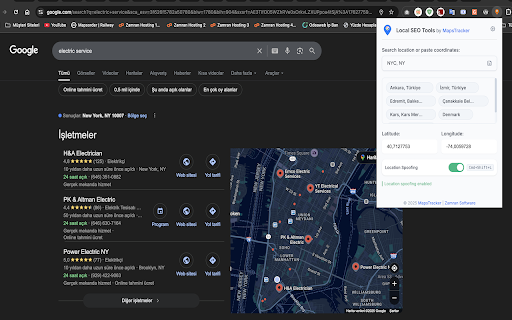

MapsTracker Location - Fake GPS for Maps & Search. Check local SEO rankings in any place without being there. MapsTracker Location — Google Rank Tracker with Geolocation Spoofing Fake your GPS location to check Google rankings from any place and track results easily. 🔍 What This Extension Does ✅ Fake GPS Location — Instantly change your browser’s geolocation for Google Search and Maps ✅ Track Local SEO Rankings — View real Google SERPs from any city in the world ✅ Test Google Maps Listings — See local business results as if you’re physically there ✅ Analyze Competitor Rankings — Check how your competitors rank across different locations ✅ One-Click Toggle — Simple on/off switch with keyboard shortcut (Ctrl+Shift+L) 💼 Perfect For 🔒 Privacy-First — No IP changes, only geolocation spoofing 📊 Accurate Data — Real Google results, not proxy-based guesses ⚡ Instant Results — No VPN delays or connection issues 🎯 Precise Control — Enter exact coordinates or select from preset locations 🧭 No Tracking — All data stays securely on your device Install MapsTracker Location - Fake GPS Location for Maps & Search Set your desired fake GPS coordinates See results exactly as if you were in that location Track rankings and analyze local SEO performance with ease This extension only affects Google Search and Google Maps geolocation. It does not change your IP address or impact other websites. 🚀 Transform Your Local SEO Strategy With MapsTracker Location, get authentic, location-based Google ranking data — from anywhere in the world. Start optimizing smarter today. Download now and explore real search results from any city, instantly.

Geolocation Simulator
Geolocation Simulator is a developer tool that lets you test location-based web applications by simulating GPS coordinates along a custom route. - Import GeoJSON files with LineString geometry - Paste GeoJSON directly from clipboard - Interactive map preview with MapLibre GL JS - Play, Pause, Stop, and Restart controls - Adjustable speed from 0.5x to 5x - Overrides navigator.geolocation API - Side panel mode for persistent access (Chrome 114+) The extension intercepts calls to navigator.geolocation.getCurrentPosition() and watchPosition(), returning simulated coordinates from your imported route instead of your real location. PERFECT FOR - Testing location-aware web applications - Developing delivery or logistics apps - QA testing geofencing features - Demonstrating location-based features - Learning about the Geolocation API Import any valid GeoJSON Feature with LineString geometry. Coordinates follow the GeoJSON standard: [longitude, latitude] in WGS84. All processing happens locally in your browser. No location data is sent to external servers. The extension only activates when you enable the Override toggle.

Change My Geolocation
Change your geolocation in two clicks (Location Guard) Easily change your geolocation and protect your privacy Change your geographic location to any coordinates you choose with ease. This extension lets you control your browser’s geolocation data, helping you stay private and test location-based services. Simply open the extension settings and enter the latitude and longitude of your desired location (by default, it’s set to Greenwich, UK). Then reload the page and verify your new location using any geolocation test tool. In addition to latitude and longitude, you can customize other geolocation parameters directly in the settings for more advanced control. The toolbar icon works as an ON/OFF switch: 🟢 Green — extension is active ⚪ Grey — extension is disabled

Location Guard (V3)
Hide your geographic location from websites. Hide your geographic location from websites. Modern browsers such as Google Chrome can tell websites where you're located in order to provide location-aware functionality. Your geographic location obtained via JavaScript is often highly accurate, which can be a violation of your privacy. This extension allows enjoying geolocation applications while protecting your privacy, by reporting a fake location to websites, after adding a certain amount of "noise" to the real one. The noise is randomly selected in a way that protects the real location from being accurately inferred. There's also an option to use a fixed location, instead of adding noise to the real one. IMPORTANT: Location Guard protects against JavaScript-based geolocation (which has very high accuracy), NOT IP-based geolocation (which typically has low accuracy). If a website detects your coarse location from your IP address, then use a VPN, Location Guard is not meant to solve this problem. To report an issue with Location Guard please use the following page: https://github.com/mrfanii/Location-Guard-V3/issues

Fake GPS
模擬 GPS 位置的 Chrome 插件,可以自定義經緯度並儲存多個地址 🛡️ Fake GPS - 隱私保護工具 🔒 保護您的位置隱私 在數位時代,位置隱私是每個人的基本權利。Fake GPS 是一款專為隱私保護而設計的 Chrome 瀏覽器擴展,讓您完全掌控自己的地理位置資訊。 --- ✨ 核心功能 🎯 智能位置控制 * 自定義任意經緯度座標 * 一鍵開關 GPS 偽造功能 * 支援多種座標格式輸入 💾 地址管理 * 保存常用位置 * 快速切換預設地點 * 本地儲存,確保隱私 🌐 全面相容性 * 支援所有網站和網頁應用 * 自動注入保護腳本 * 即時生效,無需重載頁面 --- 🛡️ 隱私保護應用場景 * 社交媒體隱私:防止社交平台追蹤您的真實位置 * 地理限制繞過:存取不同地區的內容和服務 * 廣告追蹤阻止:避免基於位置的精準廣告投放 * 工作與生活分離:遠端工作時保護家庭位置 * 旅行安全:在陌生環境中隱藏真實位置 --- 🔧 技術特色 * 零權限侵犯:不收集任何個人數據 * 本地運行:所有數據保存在本地設備 * 開源透明:代碼公開,接受社群審查 * 輕量高效:最小化系統資源占用 * 即插即用:安裝後立即可用 --- 🚀 使用說明 1. 安裝擴展:載入到 Chrome 瀏覽器 2. 輸入座標:設定您想要的位置 3. 啟用保護:開啟 GPS 偽造開關 4. 享受隱私:瀏覽網頁時保持位置隱私 --- ⚖️ 使用聲明 本工具僅供合法的隱私保護用途使用。 請遵守當地法律法規,不得用於非法活動。 用戶需對使用行為承擔責任。 --- 👨💻 開發者 Developed by Yu Lin Chou GitHub: https://github.com/xup6m6fu04 --- 🔐 您的隱私,您的選擇。Fake GPS 讓位置隱私保護變得簡單。
