
jfaclingjhpenmjnlcgiagihabfbilcb

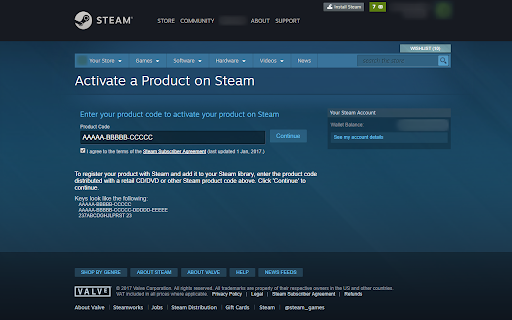

Use the right-click menu to activate selected steam key Provides a simple and convenient way to activate Steam Keys by simply selecting/mark them and then activating them via Right-Click Context Menu. The Extension uses the newly available Steam Key Web activation and is fully automated (SSA_Auto_Accept etc.). Simply select/mark a Steam Key, Right-Click and click on 'Activate Steam Key' in the Context Menu. Users already needs to be logged in on Steam Web Page to work properly. v1.3 - Migrated to Mv3 - Fixed Extension Icon transparency - Optimized everything to avoid any future timing issues v1.2.2 - Changed the Auto SSA checkbox Method to be compatible with SteamDB Extension - Added flexible fix for timing issues to Auto SSA checkbox Function v1.2.1 - Removed permission for tabs because doesn't need to be requested to work v1.2 - Selection(Key) is now URLencoded for binary safety v1.1 - Added pattern check for Steam Key to allow users to manual correct certain keys - Automatically remove all white spaces from key selection

AutoJoin for SteamGifts
Extension adds some features to SteamGifts.com: • Infinite scroll (giveaways load dynamically as you scroll) • Button to Join or Leave giveaway on the main page • Improved hiding giveaway: no need to confirm and reload page • Hide all DLC giveaways • Night Theme And some other features Github page: https://github.com/ge-ku/AutoJoin-for-SteamGifts

Open in Steam
An extension to open a Steam website page directly in the Steam client via a simple button Tired of having to login on the Steam website all the time? This is where OIS can help you! The ability to open Steam web pages pages in the Steam desktop client isn't as easy as it could be, so here's to an easier way. A simple button will appear on most Steam webpages which when clicked will reopen that exact page, just in the Steam desktop client. I'm just a guy who loves to write code. I'm only human, so there will likely be bugs somewhere. If you find any bugs, please report them to me (preferably on this project's Github issues page) with details of it and the page you were on at the time if relevant: https://github.com/PurplProto/OIS/issues

Steamlevels Steam Enhancer
Autocraft Steam Badges & Steam Gems! Features to come: - Manage trades & friend invites - Upload animated artwork & invisible characters - See when someone is actually Online/Away from their Steam profile We are not affiliated with Valve, Steam or any of their partners. The Steam Data we use is from the Steam Web API and is provided on "as-is" terms. Made by King and Nacho with

Steam Booster Packs Profit Finder
Profitably exchange your gems for booster packs from your collection of games Our Extension helps you see the sale price of booster packs from your Steam library for profit or to recoup some or all of the cost of a purchased game. Extension functions: * The "Profit" and "Fast Profit" buttons sort booster packs by price relative to gem value by profit * "Profit" shows the best starting prices for the sale * "Fast Profit" shows the best request prices for an instant sale * Sorting by: name, gems, price and request * Displaying a color scale on prices to show the profitability of crafting booster packs * Displays the remaining time until the next booster pack is received when hovering over it (new booster pack become available for exchange every 24 hours) Get the most out of your game library!
