
jejhemiikekplpikpakpcidnehjedcfh
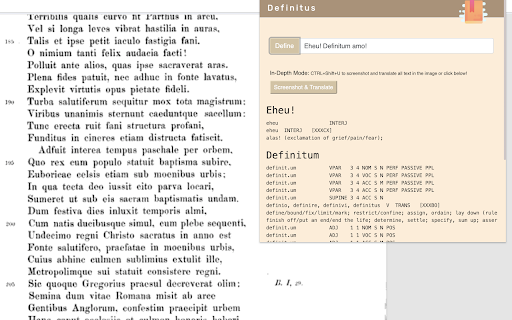


"Alas! If there was a Chrome Extension to define Latin words, I would have finished writing the Aeneid." - Virgil's last words For millennia, Latin scholars have faced a ruinous obstacle: they've had to switch between two Chrome tabs to look up definitions. No longer—Definitus aids you in translating Latin text. Pulling data from Whittaker's Words, Definitus can be used as a pop up window for on the fly definitions. Or, if the going gets tough, activate In-Depth Mode to extract the Latin from your webpage, enable hover-able translations, and define any word on command. Fortitudo facilis; scientia difficilis est. This Extension is free and open-source. It costs us up to $10 a month to keep our OCR (text extraction from image) server running, so if you'd like to support the extension please feel free to Venmo a couple dollars to @Jamie-Gabbay-1 with the note "Definitus." Thanks!

Latin Word Lookup
Double-click Latin words for local Whitaker and Wiktionary lookup without leaving the page. Latin Word Lookup, formerly Latin Wiktionary Lookup, now includes local Whitaker lookup as the default mode. This major update adds generated dictionary and morphology data derived from William Whitaker's WORDS, so common Latin forms can be analyzed directly in the popup without leaving the page. The original Wiktionary lookup mode is still available and can be selected from the same popup when you want Wiktionary's article-style entries and inflection pages. Highlights: - Local Whitaker-based Latin dictionary and morphology lookup - Wiktionary lookup still available as an alternate mode - Double-click lookup directly on the page you are reading - Improved display for nouns, adjectives, pronouns, verbs, participles, gerunds, gerundives, supines, and irregular forms - No account, no analytics, and no browsing-history collection Latin Word Lookup is a lightweight reading aid for Latin texts in your browser. When you double-click a Latin word, the extension opens a compact in-page popup with dictionary and morphology results, letting you keep your place instead of switching tabs or opening a separate dictionary. The default Whitaker mode uses local packaged data derived from William Whitaker's WORDS. It is designed for quick reading support: identify dictionary headwords, see grammatical information for inflected forms, and compare possible analyses when a form is ambiguous. The optional Wiktionary mode remains available for readers who want Wiktionary's entries. You can switch between Whitaker and Wiktionary directly in the popup. Privacy and data use: - No sign-in is required. - No analytics are included. - The extension does not collect browsing history. - The extension reads the word you double-click or select in order to show the lookup popup. - Whitaker lookup runs from local packaged data. - Wiktionary mode contacts en.wiktionary.org only when Wiktionary lookup is used. Attribution: Local Whitaker lookup uses generated data derived from William Whitaker's WORDS, created by Colonel William A. Whitaker (USAF, Retired), under the permissive WORDS license. Wiktionary results are fetched from Wiktionary and remain subject to Wiktionary's license and terms. This extension is independent and is not affiliated with, endorsed by, or produced by Wiktionary, the Wikimedia Foundation, William Whitaker's estate, or the maintainers of Whitaker's WORDS. Note: Whitaker results are intended as a reading aid and may contain parsing or morphology errors; for important readings, please verify with a trusted dictionary or grammar.

TalentScore
Hiring internationally? TalentScore makes recruiting much easier with metrics about the quality of a LinkedIn profile. Hiring internationally? TalentScore makes recruiting much easier with metrics about the quality of a LinkedIn profile. Install the plugin, then navigate to a LinkedIn profile to see insights about the academic background, companies worked for, English proficiency and resume quality.

LSJ Ancient Greek Lookup
Look up on lsj.gr, multiple Ancient Greek and Latin dictionaries with ALT+double click on a word. Look up multiple, multilingual, bidirectional, Ancient Greek and Latin dictionaries on lsj.gr by selecting a word and: ① using ALT+double click on a word (or instead of ALT you can use CTRL or SHIFT, see options); ② selecting a word/phrase, right clicking and then clicking on the "LSJ" context menu item; ③ selecting text and then clicking on the extension icon. Clicking on the extension icon takes you to the lsj.gr site. Lexicographic content in: English, Ancient Greek, Modern Greek, German, French, Spanish, Russian, Dutch, Latin, Chinese and terminological content in over 5000 languages, for example a Greek word with translations in different languages, i.e. the "Translations" section at the end of the word https://lsj.gr/wiki/hýdōr

Beautiful Hieroglyphs
Replace wikihiero images with beautiful alternatives. Replaces images that look like they are from wikihiero usage with higher quality alternatives. Fonts provided are based on the tuxscribe glyphs found here: https://www.qsl.net/5/5b4az/, with some colour correction to better match historical usage, as well as the New Gardiner font found here: https://mjn.host.cs.st-andrews.ac.uk/egyptian/fonts/newgardiner.html The images are packaged inside of the extension, so there are no additional network overheads from using it. 63 of the images are not currently replaced, These remaining edge cases will be fixed in future releases. This extension is based on work by Neoklis Kyriazis and modifies the results of work by Guillaume Blanchard, both of whom are thanked for their contributions towards the beautiful rendition of Ancient Egyptian writing.
