
jeggnpdlnbocmdalbikmfpokecfnicni
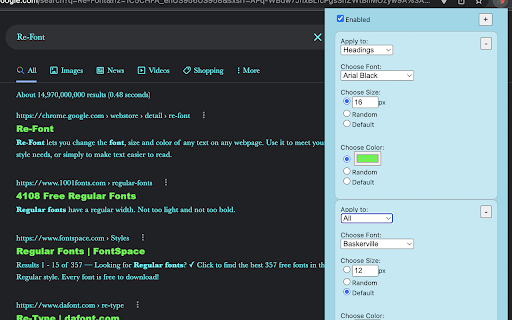


Re-Font lets you change the font, size and color of text on any webpage. Use it to meet your style needs, or simply to make text easier to read. You can even randomize the color and size to spice things up! It's easy, fast and works right in the corner of your browser. Download Re-Font today! Add your own custom fonts by clicking "Add Font" in the font selector. You can type in your own font or even add a link to one on the internet (Google fonts work best!) if it's not installed on your computer. Create bookmarklets with your styles to send to friends, regardless of whether they have Re-Font installed. Note from developer: I am a student and made this for fun. If you find any bugs feel free to let me know or contribute to the code on GitHub. Any support is much appreciated!

Font Replacer
This converts all fonts on your website into a pleasing web font.

Font Changer Extension
Assist Neurodivergent individuals with accessibility The Font Changer Extension is a tool that helps neurodivergent individuals improve accessibility on the web by allowing them to change the font formatting on any webpage. With a simple drop-down menu, you can choose from three specially designed fonts that are known to be more readable and easier on the eyes for those with dyslexia or other learning differences. To use the extension, simply install it from the Chrome Web Store and click the extension icon in your browser's toolbar. A menu will appear with a list of available fonts to choose from. Simply select the font you want to use and the extension will automatically apply it to the webpage you are currently viewing. It's that easy! To download the fonts to your computer, follow these steps: Download the Font Changer Extension from the Chrome Web Store. Ensure that each of the three fonts: OpenDyslexic, Calibri, and Arial Unicode MS are downloaded on your computer. I have included the URL for OpenDyslexic (https://opendyslexic.org/), feel free to download the others from any font download site you prefer, I have added sites for each. For Windows type, "Font" into your search bar, and go into Font Settings. Then drag and drop the unzipped fonts to add them. Once the fonts are installed, you can use them in any application on your computer, not just in the Font Changer Extension. We hope you find the Font Changer Extension to be a useful tool for improving accessibility on the web. If you have any feedback or suggestions, please don't hesitate to let me know.

change all UI fonts
Changes all the UI font to a user-given font. Transform the appearance of any website by changing all fonts to your preferred typeface. Simply enter your desired font name in the extension options and watch as all text across the web adopts your chosen style. **Key Features:** - Apply custom fonts to all websites instantly - Exclude specific sites from font changes - Sync settings across all your devices - Built with modern Manifest V3 for reliability **How to Use:** 1. Click the extension icon and enter your font name (e.g., "Consolas", "Arial") 2. Save your preference and refresh any webpage 3. Use the exclusion feature to keep certain sites unchanged **Note:** This extension changes all text fonts, including icon fonts (like Font Awesome), which may display as squares. Perfect for simple websites and personal customization. Please leave your feedback. Thank you.

System Font Everywhere
Use system font on the web Use this extension to apply System Fonts to the internet. Use San Francisco on macOS and Segoe UI on Windows 10 for the best legibility when you need to read, or on other sites with unfavorable font choices.
