
jeelobjbpeimpnpefmemddenhdgegmld
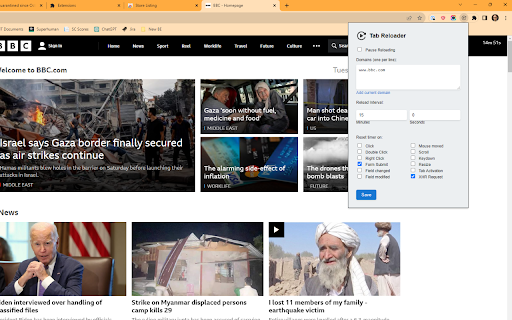
Reloads pages or clicks elements regularly to avoid session timeouts, with storage monitoring This extension allows you to reload pages at regular intervals, or click on HTML elements to keep the website session alive. You need to list the allowed domains for the extension to kick into action. When enabled you will se a timer on the top-right corner of the screen, that will count down until reload.

Auto Refresh Plus
Auto Refresh Plus automatically refresh and reload any page or tab after a specified number of seconds Auto Refresh Chrome Extension: This browser extension allows users to refresh a webpage automatically at specified intervals. It helps to save time and stay updated with dynamic content without manual intervention. The user can set the refresh frequency and customize the extension as per their requirements. The extension has a user-friendly interface and is easy to use. It can help improve productivity and efficiency while browsing the web. Enhance your workflow and increase productivity with this top-ranked, easy-to-use Auto Refresh Extension for Google Chrome. Improve your web browsing experience and stay up to date with dynamic content without the need for manual intervention. How it Works: 1. Open the popup and enter the time interval, at which the page has to refresh. 2. Then start the auto refresh. 3. Now the page refreshes at the entered time interval, until you stop or close the page. **We only collect the bare minimum of data required to give you the best user experience. Your data will be only used for optimizing functionality and will not be shared with third parties. Checkout our privacy policy to learn more. IMPORTANT: We do not collect any personally identifiable information**

Tab Session Manager
Save and restore your browser sessions. Never lose your tabs again. Tab Session Manager is the most complete browser session manager for Chrome. Save your open tabs as named sessions and restore them with one click — perfect for switching between projects, research, and workflows without losing a single tab. CORE FEATURES • Save current window as a named session with one click • Restore full sessions instantly — opens all tabs in a new window • Auto-backup sessions on a configurable schedule (default every 30 min) • Retention policy — automatically removes old backups beyond your limit • Pin important sessions to keep them at the top • Search sessions with full-text indexer across names, URLs, and tags • Import sessions from JSON — perfect for sharing or migrating TAB UTILITIES • Duplicate tab detector — find and close duplicate tabs across all windows • Tab analytics — real-time tab count, unique domain tracking, history • Session health checker — validates all stored sessions are restorable STORAGE MANAGEMENT • Storage quota monitor — warns before you hit Chrome's 5MB storage limit • Configurable retention — auto-delete backups older than N days • Per-session statistics and restore history KEYBOARD SHORTCUTS • Alt+Shift+S — Save current session instantly • Right-click any page → Save tab to session PERFECT FOR • Developers switching between multiple projects • Researchers managing topic-specific tab sets • Students organizing study sessions • Anyone who works with 10+ tabs daily

Auto Refresh & Page Monitor
Refresh pages automatically. Auto refresh and page monitor with specified time intervals. Reload all tabs. Auto Refresh is a browser extension that automatically refreshes and reloads any page or tab after a specified number of seconds. Just enter the number of seconds between page refreshes and click the "Start" button. The best thing about this page renovate extension is that there is no setup required - it is easy and simple to use, install it and let your idle pages be auto reloaded. Just choose the time you want Page refresh will do its magic. Save unlimited manual preferences per domain or web page. Default time intervals in 5 Sec, 10 Sec, 15 Sec, 5 Min, 10 Min, and 15 Min. Set auto refresh in seconds, minutes, and hours. Single click anywhere on the webpage to stop auto-reload. Display a visual timer on the webpage. Hard refresh to clear cache & cookies Advanced options for automatic page refresh: - Clear cache on every automatic page refresh - Search for text on automatically updated pages - Display notifications - Saving the selected parameters on the page - Automatic clicking on a button or link on page refresh - Display of update counter, time of last and next update Auto Refresh Page Plus comes in handy to any user who needs to perform automatic web page refresh at certain times efficiently. It also provides content detection support, which is useful when monitoring content included in a dynamic web page. Page Monitor This powerful feature allows you to monitor a webpage and look for any changes in it. You can monitor your changes in the web page's visual or source code. You can monitor website changes in three ways. Why are you need this refresh page? - In time interval, there are two types current and manual. Both types work the same. You can add multiple web pages in the manual and allow all features. - You can select the time by simply clicking the timer's checkbox and manually setting the hour, minute, or second to auto-refresh any pages. - If you want to stop the auto-refresh after X numbers like 05, 10, or 15 refreshes, you can do this with the Auto Refresh extension. - Check the visual time when your web page will refresh by setting a visual timer for any web page. - A hard refresh clears your webpage cache data. The Auto refresh list shows all webpages list you have set for the Tab Auto Refresh. Also, you can pause or start any webpage refresh directly through auto refresh list features. If what you want an extension that automatically reloads and refreshes web pages in the simplest way, this is what you need.

Auto Page Refresh
Tab auto refresh. Refresh pages automatically. Auto refresh and page monitor with specified time intervals fixed or random . Finally a page refresh that works. Reload any page with just a few clicks. Page refresh works on any website. Auto-refresh (auto-reload) your idle pages on a selected interval. Are there times when you want a page(tab) in your browser to auto-refresh? Do want your page/tab content to be always updated. Now that is easy - Page-refresh will reload your pages and tabs for you. It is very easy and super simple - just set the time interval that you want to auto refresh your pages or tabs and the Page-refresh extension will auto reload the pages. The best thing about this page refresh extension is that there is no setup required - it is easy and simple to use, install it and let your idle pages be auto reloaded. Just choose the time you want Page-refresh will do its magic. If what you want an extension that automatically reloads and refreshes web pages in the simplest way, this is what you need.
