
jeclcjjigdciopekchmbinejambglgpb


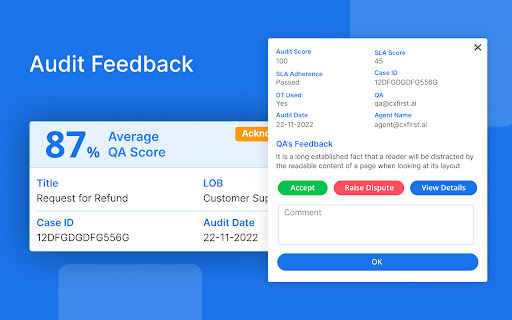
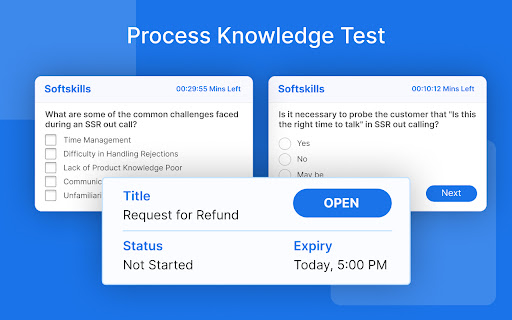

CxFirst solution is designed to make the life of customer-facing agents easier by providing them with all the necessary tools to… CxFirst solution is designed to make the life of customer-facing agents easier by providing them with all the necessary tools to increase customer satisfaction. By enabling agents to make faster and better decisions when solving customer issues, they can reduce average handling time (AHT) and increase customer satisfaction (CSAT). Our simple extension is just one click away, allowing you to reduce your dependency on manual processes and improve overall efficiency. We believe that our solution can help you take your business to the next level by delivering exceptional customer experiences and driving customer loyalty. So why wait? Contact us today to learn more about how we can help you achieve your goals.

hiper.cards - bookmarker, highlighter, tab manager
An app for managing tabs and bookmarks, sharing them, and highlighting text on the pages you visit. hiper.cards is an extension app that allows you to (1) bookmark web pages to read later, highlight text on those pages, and take notes, (2) manage your tabs, (3) save your browsing history, and (4) share bookmarks and highlights. Interacting with hiper.cards (formerly called vulog) - The pop-up - Press the app icon at the top of your browser and the hiper.cards pop-up appears. So you can bookmark the page you are on, take notes and view your inbox. You can also click on a link to view your bookmarks in a browser tab, and choose your highlighting color and edit mode. (You may first need to pin the button by pressing the extension icon) - Browser tab: View and search your bookmarks, or filter to see what you have bookmarked. (Use link under the popup.) - The webpage-box: Press CNTRL S (Mac: CMD S) on any web page and you will see a small box on the top right of the page where you can bookmark and take notes, and also change your highlighting options and edit mode. (see below) Press escape to close the web-page box. - Right-Click: When you highlight text, you can right click on it to highlight the text. If you right click on a web page link, you also have a choice to add it to your inbox for later reading. - 'Power Mode': If you turn on Power Mode (from the pop-up or webpage-box), then your cursor will turn into a giant highlighter and you can highlight text. When you press on a link in Power Mode, you get the option of adding it to you inbox (which means you don't have to go through the right-click menu) Highlighting text: You can highlight parts of any web page in different colours. Use the highlight palette in the pop-up or webpage-box to choose your highlight colour. For easier highlighting, turn on edit mode. Bookmarking: You can add any page to your favourites or your inbox using the pop-up or webpage-box. The 'inbox' tab in your pop-up automatically shows all the items marked with inbox, and not marked with archive. From there you can also see all your bookmarks in a browser tab. Data storage: Your bookmarks and browser history is kept in the chrome's local storage, which has limited space. After some weeks (or months depending on usage), hiper.cards automatically deletes older items. Privacy and CEPS hiper.cards doesn't send any of your data to any outside servers, and you can always delete your data from the "Settings" tab. If you want to store your data on your own server you will need to set up a Personal Data Store. hoper/cards was built to be able to accept CEPS-compatible data stores. (See here for more details https://www.salmanff.com/ppage/2020-3-15-Why-CEPS-Matters ) Having your data sit on your personal data store also means that you can publish your bookmarks and highlights and notes, and to share your bookemarks with your contacts. Acknowledgements Highlighting functionality was largely copied from Jérôme Parent-Lévesque. https://github.com/jeromepl/highlighter Rendering function (dgelements.js) was inspired by David Gilbertson (who never expected someone to actually implement his idea I think.) https://medium.com/hackernoon/how-i-converted-my-react-app-to-vanillajs-and-whether-or-not-it-was-a-terrible-idea-4b14b1b2faff

AuthentiSci
Allows scoring of media articles by the research community AuthentiSci helps you check the science behind the headlines. See expert reviews and scores on online media content directly in your browser. Scientists from around the world contribute through our website and extension, offering their insights on the strength of evidence, clarity of explanation, and potential bias. By connecting readers with researchers, AuthentiSci makes it easier to spot misconceptions and understand what scientific discoveries really mean.

Wordle Companion
Enhance your Wordle experience with helpful hints and solutions. View past and upcoming Wordle answers by selecting different dates. Wordle Helper Extension This simple Wordle helper extension is designed to enhance your Wordle experience by offering solutions and hints for the daily puzzle. You can explore Wordle challenges from up to five days before or ahead within the current month. Hints are also available—get a helpful clue without revealing the full answer. You can even check solutions instantly for learning or practice purposes.

OpenText Core SCA Select Extension
Open Source Select will help developers find and use the right open source and reduce friction between organisations and developers Open Source Select helps you find and use policy compliant and great open-source for any development project. The OpenText Core SCA Select Extension is a free plugin created with developers in mind, enabling you to check the health metrics and license information of an open source project at a glance. If you need more granular data, the extension can lead you to Open Source Select for more detailed information. The three types of metrics you can examine are: Community - How healthy the community around a project is. Popularity - Is it used by many? Is the usage declining? Security - How well does the maintainers apply security best practices. The extension now supports Start Left Policies. This lets you immediately see if the open source you are browsing is compliant with your company’s open source policy, without the need to import and scan code with Software Composition Analysis tools and common source code repositories and package registries such as GitHub, pypi, npmjs, nuget and many others are supported.
