
jecgdighihjinebnpcbjlkkfcikhnljb
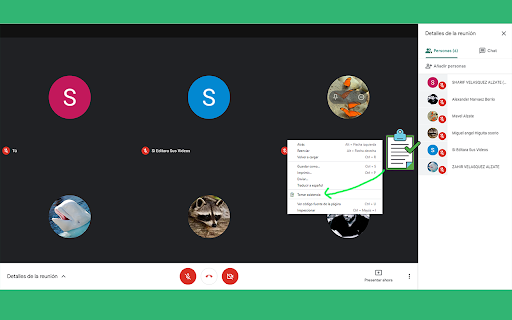
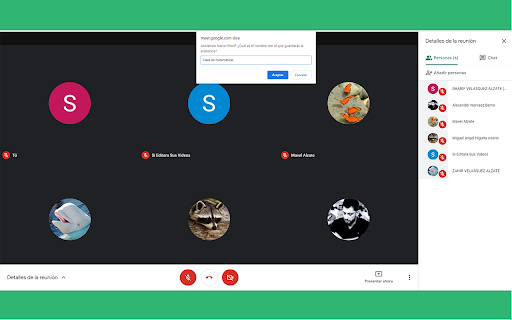
La forma más fácil de tomar la asistencia en tus reuniones de meet, permitiendote descargarla como un archivo Una extensión que te permite tomar la asistencia de una manera fácil en tus reuniones de meet, exportándolas como un archivo csv (para hojas de cálculo) o txt (archivo de texto). Permite introducir un nombre para el archivo, así podrás identificarlo más fácil. Además entrega un reporte del total de asistentes, evitando el registro de asistentes duplicados. Además, hemos de recalcar que NO HAY LIMITE DE PARTICIPANTES, de hecho, hemos tenido usuarios que nos dicen que han estado en reuniones de hasta 250 participantes, y todo ha ido muy bien! Ideal para los maestros, directivos y todas las personas que deseen tomar lista de asistencia en reuniones, clases o encuentros virtuales. Actualizaciones: * Actualmente, la extensión funciona perfectamente con el nuevo diseño de Google Meet

Meet Attendance Tracker - Your Smart Meeting Attendance Assistant
Automatically save and manage your Google Meet attendance. Easily view history, analyze data, and export to CSV/JSON with one click. Are you still struggling with manually tracking participants in your Google Meet sessions? The Meet Attendance Tracker extension will completely revolutionize your meeting experience! With a single click to install, it automatically and securely records the attendance for every meeting, allowing you to focus on the content, not the tedious task of roll-calling. Explore the Key Features: 🔹 Comprehensive Dashboard: Once installed, you'll have a clean and intuitive dashboard that centralizes all key data: Total Meetings: Easily track all the meetings you've recorded. Total Participants: Understand the total number of unique individuals who have joined your meetings. Average Participants: Quickly get the average size of your meetings. Average Meeting Duration: Analyze the average length of your sessions to optimize efficiency. 🔹 Detailed Meeting History: Automatically saves a detailed record of every meeting. You can review at any time: Meeting ID, precise start & end times, and total duration. A complete participant list, clearly showing who attended. Record creation time, ensuring data accuracy and traceability. 🔹 Powerful Search: Need to find a specific meeting or check someone's attendance? Simply enter the meeting ID or participant's name in the search box to quickly filter through all relevant records in seconds. 🔹 Easy Data Export: Effortlessly export your attendance data into universal formats to meet various reporting and analysis needs: Export to CSV: Convenient for data processing and chart creation in Excel or Google Sheets. Export to JSON: Ideal for developers or users who need to integrate the data into other systems. Exported data is comprehensive, including meeting ID, timestamps, and detailed participant information. 🔹 Top Participants Leaderboard: Want to know who your most active and engaged members are? The "Top Participants" feature provides: A ranked list of participants by the number of meetings attended and total duration of participation. An excellent tool for teachers to assess student engagement or for team managers to understand member commitment. 🔹 Secure & Private: We know how valuable your data is. All meeting and attendance records are 100% securely stored on your local computer and are never uploaded to any external servers. Your privacy is fully protected, and you have complete control over your data. Perfect For: Teachers & Educators: Easily record student attendance for online classes, saying goodbye to manual roll calls. Project Managers & Team Leads: Accurately track participants in team meetings, providing data support for project management. Event Organizers: Keep an accurate list of attendees for your online webinars, lectures, or networking events. Any User who needs a reliable, automated attendance tracking tool for Google Meet. Install Meet Attendance Tracker today and make your meeting management simpler, more efficient, and more secure than ever before.

Attendance for Google Meet™
Records Google Meet™ attendance and exports to Google Sheets™. Are you a teacher who has had trouble taking attendance in this new virtual environment? Have you run into trouble trying to keep track of students coming in and out of Google Meets? If this is you, then you have come to the right extension! Taking attendance on Google Meet can be a cumbersome process, so we have made everything simple for you. With Attendance for Google Meet, recording attendance is as easy as a few clicks. This extension supports a variety of unique features: - an intuitive user interface that integrates seamlessly with the Google Meet UI - allows the user to create and store multiple class lists - presents a list of the students with intuitive symbols that show whether they are present, absent, previously present but left (e.g. due to technical difficulties), or present but not on your attendance list - easy editing of students in a class - one-click export to Google Sheets Our automatically generated spreadsheets have separate sheets for each of your classes. Once you hit export, the extension updates the sheet corresponding to your class with the latest attendance data, complete with the Meet code, date, time, and a row for each student. Each student entry contains the following information: - name - whether they were present or not - the time they joined - the time they left - the amount of times they joined - the total duration during which they were in the call Our extension is secure and does not invade the user’s data or student information (source code can be found at https://github.com/tytot/attendance-for-google-meet#attendance-for-google-meet). If you have any questions, please contact the developers at tyleradit@gmail.com.

Google Meet Breakout by Robert Hudek
Only the teacher needs to install. Completely Free and your Data is Private. Google Classroom integration, Slider Control. Welcome to Google Meet Breakout Rooms Extension ***** Only the teacher needs to install this extension. ***** ***** Please do not ask your students to install it, as they will not use it **** NEW Feature: Practice using the Extension on your own computer by simulating students, perfect for teachers to rehearse before going live.https://youtu.be/QMurrSyCPmY The Google Meet Breakout Rooms Extension has 5 key features: 1) See All Students: The teacher can always see ALL of the students in ALL of the breakout rooms. 2)Free: The extension is completely free to use. I am a software engineer and created this for my personal use as a teacher and then improved it for all teachers to use. I make no money off of this extension, there are no ads, and no data is shared with me or any third parties. 3) Private: Your breakout rooms data is privately stored in your personal computer's chrome browser. Your breakout rooms data is NOT shared with anyone and it is NOT stored on a server. Even the creator of this extension has no knowledge of any of your data. 4) Hassle-free: Only the teacher needs to install this extension. Please do not ask your students to install it, as they won’t need to use it. The extension is only for the teacher, and it will not affect the students in any way. Students will continue to use Google Meet as they normally do. 5) Online Help: The online help menu is completely updated and now has screen shots of every step of the way for setup and operation. This software is created by Robert Hudek and all rights are reserved. No part of this extension may be copied without the express written consent of Robert Hudek at Hudek Tech LLc. This extension is not affiliated with Google, Inc. 1) Breakout rooms may be viewed in either tab or tiled mode 2) A slider may be used to quickly move between rooms 3) Breakout assignments may be created at any time or in advance if desired 4) Teachers may broadcast their video and audio to all the breakout rooms 5) Customize themes! 6) Can use Google Meet Nicknames (if your Google subscription supports nicknames) 7) Basic reporting 8) Mute and Remove Students buttons 9) Import, Export functions 10) Google classroom integration *** Slovak: A big thank you to Lenka Zustiaková from SOŠ GaHS, Farského 9 in Petržalka (www.farskeho.sk) for the translation into Slovak. *** Ukrainian: A big thank you to Igor Kozachuk (email: disk.igor@gmail.com) for the translation into Ukrainian *** If you want a translation of this extension to your language, please send me an email and I will be happy to work with you to get this done. My email is robert@hudektech.com. I would like to add Spanish, Portuguese, German, Japanese, and Korean but any language is fine with me. *** This extension is owned and developed by Robert Hudek. This extension is independent from Google and is not owned by or part of Google or Google Meet. This extension is designed to enhance and extend the functionality of Google Meet. *** If you find a problem please inform me at robert@hudektech.com and I will try my best to reply as soon as I can. Data Privacy: I have a detailed data privacy section on my web page, but the short version is that I do not copy, transmit or share any of your data with anyone including myself. I also do not use cookies, nor do I drop third party cookies on you. Warranty and Guarantee: There is no warranty and there is no guarantee for this extension. I have a detailed warranty (none) and guarantee (none) description on my web page but the short version is this: By using this Extension, you understand and agree that the Extension is provided "as is" and "as available". The developer Robert Hudek EXPRESSLY DISCLAIMS ALL WARRANTIES AND CONDITIONS OF ANY KIND, WHETHER EXPRESS OR IMPLIED, INCLUDING, BUT NOT LIMITED TO THE IMPLIED WARRANTIES AND CONDITIONS OF MERCHANTABILITY, FITNESS FOR A PARTICULAR PURPOSE AND NON-INFRINGEMENT.

Mute All for Google Meet™
Customise the settings and save your preferences for Google Meet. Use this software extension to save all your user settings for Google Meet. Here is a list of user settings you can customise using our extension - Auto Mute your microphone when you join a Google Meet call - Set Video to be off automatically when you join a Google Meet call - Auto Unmute, ensure other individuals in a call are not able to mute your microphone - Mute all participants, this is useful when you are in a presentation and want to be the only one speaking - Hide Mute popup, hides the "Are you speaking?" popup when you are muted. - Add in Emojis in the chat box as well - Use hotkeys for Google Meet Please note the mute all function only works if you are the host of the Google Meet call. Try using this extension today and upgrade the experience you have using Google Meet. Enjoy the power of customising your Google Meet experience.
