
jdopdhdkpoohidnbjjcjjllfdhakepga
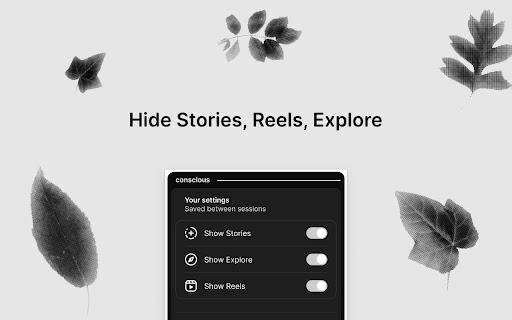

Add video controls on Instagram and hide Stories, Reels, Explore. Take control of your Instagram™ feed. Hide Stories, Reels and Explore tabs, and get proper video playback controls to browse with more focus. Are you tired of endless, algorithm-driven Reels and Stories derailing your focus on Instagram™? Do you wish you could simply skip through a video without having to re-watch the whole thing? Conscious for Instagram is the tool you need. This extension gives you back control over your feed, allowing you to hide distracting elements and adding video playback features. Create a calmer, more intentional, and less overwhelming browsing experience. KEY FEATURES: ⁕ Hide Instagram Stories: Remove the Stories tray from the top of your feed to reduce the fear of missing out and help you focus on the posts you care about. ⁕ Hide Instagram Reels: Clean up your navigation bar by removing the Reels tab. Stop falling into endless, distracting video feeds. ⁕ Hide the Explore Page: Disable the Explore tab to avoid getting pulled into a sea of algorithm-recommended content. ⁕ Advanced Video Controls: Add a proper progress bar to all videos on Instagram. ⁕ Click to Seek: Instantly jump to any part of a video with a single click on the progress bar. ⁕ Thumbnail Previews: Hover your mouse over the timeline to see a small thumbnail preview of the frame, just like on YouTube. ⁕ Timestamp Tooltip: Always know where you are in a video with a clear timestamp that appears on hover. ⁕ Simple & Private: Your preferences are easily managed from a popup menu. The extension respects your privacy, with no extra permissions required. WHY YOU WOULD WANT TO INSTALL IT: ⁕ Reclaim Your Focus: This extension is perfect for anyone who wants to use Instagram more intentionally. By hiding the most addictive parts of the platform, you can reduce mindless scrolling and focus on connecting with the people and content you actually follow. ⁕ A Better Video Experience: Stop the frustration of dealing with Instagram's limited video player. Our enhanced controls make watching and re-watching videos easier and more efficient. ⁕ Fully Reversible: Want to see Reels or Stories for a bit? Just open the popup and flick a switch. You are in complete control of your experience, and your settings are saved for your next visit. Disclaimer: Instagram™ is a trademark of Instagram, LLC. This extension is an independent project and has no relationship to Instagram™ or Instagram, LLC.

Instagram Video Controls
Adds video player controls to Instagram reels, stories, and feed on desktop. Configurable via popup. Instagram's desktop web player is missing a lot of what you get on mobile: a progress bar to seek, volume control, playback speed, fullscreen, picture in picture, and basic keyboard shortcuts. Instagram Video Controls adds all of that back. It works on reels, stories, and feed videos (home, profiles, single posts). No sign-in, no account, no data collection. • Full video player controls on reels, stories, and feed videos. Click to scrub, drag to seek, adjust volume, change playback speed, go fullscreen, or pop out with picture in picture. • Two player skins, switchable from the popup: – Browser native controls (default): the standard HTML5 video UI from your browser. – Instagram-like thin scrubber: a 3 pixel progress bar at the bottom of the video that fades in on hover, thickens while dragging, and shows a floating time label. Keeps Instagram's own UI (like, comment, share, caption) fully visible. • Audio memory, four modes: – Instagram default: the extension never touches audio. – Mute by default: every new video comes muted. – Unmute by default: every new video comes unmuted at full volume. – Remember last choice: unmute once and every new video carries your choice forward, across reloads and devices. • Keyboard shortcuts: press the left or right arrow key to seek 5 seconds on reels and feed videos. • Pause new videos by default (opt in): every newly loaded video stays paused until you press play, so you choose what to watch instead of getting autoplayed at. • Disable loop: videos pause at the end instead of restarting on a loop. • Stories support: native controls appear on story videos too. When the Instagram-like skin is on, Instagram's reply, like, direct, and reactions stay visible alongside the thin scrubber. When the browser native skin is on, the overlays are automatically hidden so the native controls are fully usable. • Popup with every toggle, synced across your Chrome profile via chrome.storage.sync. Changes take effect on the already open Instagram tab in real time, without a reload. This extension does not collect, transmit, or sell any data. It does not make any network requests. It only reads and writes your preferences to chrome.storage.sync (settings) and chrome.storage.local (remembered audio state). The "storage" permission is used for that and nothing else. The "host_permissions" for instagram.com is used to inject the content script that does the work on Instagram pages, and nothing else. A small content script runs on instagram.com, finds video elements in scope, and enables the browser's native video controls on them. It also raises the video above Instagram's invisible click catcher so clicks on the control strip reach the native player instead of opening the description. New videos are picked up as you scroll or navigate via a MutationObserver. GPL v3. Source code, issue tracker, and changelog at https://github.com/kbrianps/instagram-video-controls This project is not affiliated with, endorsed by, or connected to Instagram or Meta Platforms, Inc. All trademarks referenced are property of their respective owners.

Anonymous Instagram
Instagram Anonymous Story Viewer - Watch and Download Instagram Stories Install the extension to view and download Instagram Stories anonymously 🔹 Key Features: • Watch Instagram Stories without showing up in views • Download Stories • Switch between anonymous and regular modes instantly

NoReels - Remove YouTube Shorts and Remove Instagram Reels
Reclaim your focus. Permanently block Shorts and Reels on YouTube, Instagram, and Facebook. Stop doomscrolling and reclaim your focus. NoReels is a powerful productivity tool designed to block YouTube Shorts, Instagram Reels, and Facebook Reels/Stories permanently, helping you stay away from addictive short-form video loops. If you want to use social media for work or intentional browsing without being interrupted by the infinite scroll, NoReels is the ultimate solution for a cleaner, distraction-free digital environment. What NoReels blocks for you: Removes the Shorts shelf from your Home feed. Hides the "Shorts" side button/tab from both the expanded and mini sidebar (fully compliant with latest UI). Cleans up Shorts from your search results. NEW: Option to hide Comments, Home Recommendations, and Related Video Recommendations to keep you 100% focused! ✅ Instagram Reels: Hides the Reels tab and removes short video content from your main feed. ✅ Facebook Reels & Stories: Blocks Reels sections and "Suggested Reels" from your news feed. NEW: Removes the Stories section so you don't fall into another distraction trap. Why choose NoReels? 🎯 Fully Customizable: Toggle any specific block (like Shorts, Stories, or Comments) on or off directly from the extension popup depending on your needs. 📈 Time-Saving Analytics: Tracks how many distractions were removed and estimates the amount of time you've saved from doomscrolling! 🚀 Silent & Automatic: Works instantly in the background. No setup required. ⚡ Performance Focused: Lightweight CSS injection that won't slow down your browser or cause loading loops. 📟 Minimalist UI: A sleek, pixel-art inspired popup to check your protection status and manage your settings. 🔒 Privacy First: No data collection, no tracking, and no high-risk permissions. Just pure productivity. Take control of your time and transform your social media experience into a focused workspace.

Hide Shorts, Reels & Stories – YouTube, Facebook, Instagram
Hide YouTube Shorts, Facebook Reels, Stories, Videos, and Instagram Reels, Stories, or Explore to stay focused online. Hide Shorts, Reels & Stories is a powerful productivity Chrome extension designed to help you remove distractions, stop endless scrolling, and stay focused while browsing YouTube, Facebook, and Instagram. Instantly hide YouTube Shorts, Facebook Reels, Stories, and videos, plus Instagram Reels, Stories, and Explore — to create a cleaner, distraction-free browsing experience built for productivity, studying, and deep work. Whether you're a student, developer, remote worker, creator, or productivity enthusiast, this extension helps you take back control of your attention and reduce social media distractions with one click. • Hide YouTube Shorts from the homepage, feed, and navigation • Remove Facebook Reels from your timeline and feed • Hide Facebook Stories instantly • Block distracting Facebook Videos • Hide Instagram Reels from your feed and navigation • Hide Instagram Stories and the stories tray • Hide Instagram Explore links and the Explore grid • Smooth Instagram feed — hidden Reels and Stories turn into compact placeholders, so your feed keeps loading instead of stalling or jumping back to old posts • Focus Mode to reduce distractions and improve concentration • Simple one-click toggle controls for every platform • Dark / Light / Auto Mode support • Lightweight, fast, and privacy-friendly (no data collection) • Clean and modern user interface • Improve productivity and reduce screen time Why Use This Extension? Short-form content is designed to keep users scrolling for hours. YouTube Shorts, Facebook Reels, and Instagram Reels, Stories, and Explore can quickly interrupt focus, reduce productivity, and create endless distraction loops. This extension helps you: • Stay focused while studying or working • Reduce mindless scrolling and dopamine-driven distractions • Create a cleaner YouTube, Facebook, and Instagram experience • Improve concentration and digital wellbeing • Build healthier browsing habits Focus more on what matters — and less on algorithm-driven distractions. Perfect For Your privacy matters. This extension does NOT: • Track browsing activity • Collect personal data • Store user information • Sell or share data Everything runs locally in your browser for a fast and secure experience. • Added Instagram support: hide Reels, Stories, and Explore • Smooth Instagram feed — hidden Reels and Stories become compact placeholders, so the feed keeps loading instead of stalling or jumping back to older posts • Added an Instagram tab and app icon to the popup • Fixed Facebook filtering issues on newer Facebook routes and subdomains • Improved Reels, Stories, and Watch blocking reliability for desktop Facebook pages • Fixed Youtube Shorts visibility issue • Added an Auto option to the popup theme switcher so Light, Dark, and device-based theme selection work from the same control • Updated Facebook Reels and video selectors for more reliable hiding on newer Facebook markup • Added an optimized lightweight build system for faster performance and cleaner extension packaging • Improved dynamic content filtering and navigation handling for YouTube and Facebook pages • Enhanced reliability when blocking Shorts, Reels, Stories, and distracting content during page refreshes • Refined popup UI with dedicated Focus Mode, Shorts, Reels, and Facebook Stories icons • Improved toggle-row alignment, icon sizing, and overall visual consistency • Minor UI polish and performance optimizations for a smoother browsing experience • Complete popup UI redesign with a modern card-based layout • Improved toggle rows, tabs, and CTA sections • Enhanced usability and cleaner visual hierarchy • Better responsive layout and smoother interaction experience • Added Dark Mode / Light Mode toggle • Improved popup accessibility and visual consistency • UI enhancements and smoother interactions • Added tab system for organizing YouTube and Facebook controls • Improved navigation and settings management • Performance optimizations and faster execution • Enhanced privacy and Chrome Web Store compliance updates • Internal stability improvements • Improved modal interface and toggle system • Added active status indicators and count display • Refined modern UI components • Hide Facebook Reels “See more” button • Redirect Facebook Reels page to homepage
