
jdkmmjkcmjjhfegmbmaijcnlgkfnfcpm


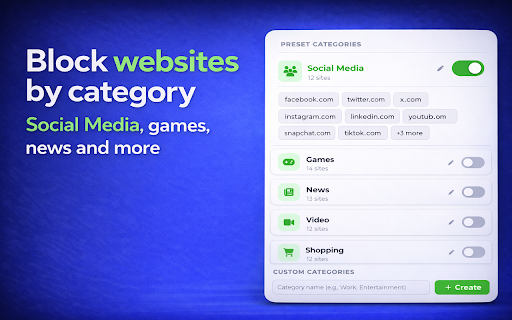
Use Block Websites on Chrome - Website Blocker & Focus Timer: Block sites, stay focused with a pomodoro timer and productivity tools Tired of distractions? This is the most powerful website blocker and focus timer you need. Whether you want to manage your browsing, use the focus moder, or improve your daily routine with productivity tools, this extension does it all in one clean package. If you ever asked yourself how to block websites on chrome, the answer is simple. Install this blocksite chrome extension, click the icon, and press the green button. Done. No complicated setup, no confusing menus. ⭐ KEY FEATURES 🚫 Complete Site Blocker This website blocker gives you full control over blocking websites on chrome: • Remove access to any domain (e.g. YouTube, Facebook, Reddit) • Restrict specific URLs with wildcards (e.g. youtube.com/shorts/*) • Filter by keywords - automatically catches pages containing specific words • One-click control from the popup • Toggle any entry on or off instantly How do you block websites on chrome? Just open the popup, see the current page, and hit the green button. That is how to block a website on chrome in under 3 seconds. 📂 Categories Stop wasting time on entire groups of distracting pages: 1️⃣ Social Media - Facebook, Instagram, TikTok, X and more 2️⃣ Games - 14 popular gaming domains restricted with one toggle 3️⃣ News - stop the endless scrolling 4️⃣ Video - streaming platforms covered 5️⃣ Shopping - remove temptations You can also create custom categories with any domains you want. The best blocksite chrome tool for organized management. ⏰ Schedule - Smart Time Management Set time-based rules for your browsing: ➤ Restrict sites from 9 AM to 6 PM on weekdays ➤ Choose specific days of the week ➤ Add multiple time intervals ➤ Use quick presets: Workday, Evening, Always Stay focused during work hours and relax after. Smart time management built into your site blocker. 🎯 Focus Timer This is not just a website blocker. It is a full pomodoro timer app inside your browser: ▸ Built-in pomodoro timer with Focus and Break sessions ▸ Restrict specific domains only during focus sessions ▸ Track your streaks and completed cycles ▸ Presets: Pomodoro technique 25/5, Short 15/3, Long 50/10 The pomodoro timer online works directly from the popup. Start a session, stay focused, take a break. No separate pomodoro timer app needed. 🔒 Password Protection Prevent bypassing in a moment of weakness: - Set a password (minimum 8 characters) - Recovery code for reset - Great for parental controls - Keeps your restricted list safe from changes ✅ Tasks - Built-in To-Do List Combine restrictions with productivity tools: - Create tasks with categories: Personal, Work, Daily - Add up to 3 custom categories - Track completed tasks alongside focus sessions - Filter by All, Active, or Completed 📊 Statistics & Progress Tracking See how your site blocker helps you stay focused: - Restricted pages today and this week - Top restricted domains - Focus sessions completed and total focus minutes - Tasks completed - Share your progress 🔧 HOW TO BLOCK A WEBSITE ON CHROME 1️⃣ Install the extension and pin it to your toolbar 2️⃣ Click the icon on any page you want to restrict 3️⃣ Press the button - the domain is now added to your list 4️⃣ Open Settings for Schedule, Categories, Focus Timer and more That is the fastest way of blocking websites on chrome. Block sites on chrome in seconds, not minutes. 💡 WHO IS THIS FOR • 📈 Professionals - eliminate distractions during work. Use the focus timer to stay productive • 👨👩👧 Parents - password-protect the list and manage access by category for your children • 🎓 Students - use the pomodoro timer to study without distractions. Block YouTube and social media • 🏠 Remote workers - use Schedule to restrict access during work hours • 🧘 Anyone who wants better time management and needs to stay focused ❓ FAQ Q: How to block websites on chrome? A: Install the extension, click the icon on any page, press the green button. Done. Q: How do you block websites on chrome by category? A: Open Settings, go to Categories, toggle on Social Media, Games, News, Video or Shopping. Create custom categories too. Q: Can I block a website on chrome only during certain hours? A: Yes. Use Schedule to set days and time ranges. Q: Does it have a pomodoro timer? A: Yes. Full pomodoro timer app with customizable sessions. Supports the pomodoro technique with presets. Q: Can I block YouTube? A: Absolutely. One click or add it to a category. Use the focus timer to restrict it only during focus sessions. Q: Can I set a password? A: Yes. Go to Settings and enable Password Protection. 🔑 PERMISSIONS This blocksite chrome extension requires minimal permissions: • Access to page content - to redirect restricted domains • Storage - to save your settings and lists • We do NOT collect or sell your personal data Block website distractions, stay focused, boost productivity. The only website blocker and focus timer you need. Block site access now and take control of your browsing.

Website Blocker — Block Sites, Focus Timer & Productivity Tools
Block distracting websites, schedule focus sessions, and boost productivity. Keyword blocking, profiles, Pomodoro timer & more. Web Blocker Chrome Extension is a productivity tool that helps users stay focused on their work by blocking unproductive websites. This extension offers a user-friendly interface for blocking a website, selecting blog type, and easily managing a block list for adding or removing sites. In addition, the extension features a permanent block and an attempt-wise block, which limits the number of attempts to access a blocked site and timewise block which limits the time of hour or minute to access a blocked site, encouraging more productive behavior and Exact URL meaning that the selected URL is exactly the same as all tab URLs and Contains URL meaning that the selected URL is included in exactly all tab URL. Free Features: • A simple and easy-to-use Chrome extension that acts as a website blocker, effectively blocking distracting websites. • Ability to add sites to the block list with a single click. • Permanent block: Permanently block a site so it will always be inaccessible. • Attempt-wise block: Option to limit the number of attempts to access a blocked site, encouraging more productive behavior. • Time-wise block: Option to limit the hour or minute of times to access a blocked site, encouraging more productive behavior. • Exact: This means that the URL must be exactly the same as all tab URLs. • Contain: This means can have additional parameters, subdomains, and protocols that match with all tab URLs. • Offers a user-friendly interface for adding or removing sites from the block list. Pro Features: - Focus Timer (Pomodoro) : work in timed sprints with break reminders - Keyword Blocking : block pages by content and text, not just URL - Silent Block Mode : close tabs instantly with zero indication - Bypass Prevention : cooldown timer prevents impulsive disabling - Multiple Profiles : separate rules for Work, Study, Relax and more - One-click Focus Toggle right in the popup The Website Blocker Chrome extension is designed with ease of use and a hassle-free solution for managing online distractions. The interface is intuitive and user-friendly, making it easy to add or remove sites from the block list with just a few clicks. With its user-friendly interface and comprehensive features, anyone can increase productivity and minimize distractions in no time. Additionally, this extension serves as a versatile URL blocker and domain blocker, effectively managing online distractions to help users stay on task.

Block Websites on Chrome
Boost productivity with Block Websites on Chrome - easily block certain distracting websites 🚀 Boost Your Productivity with Block Websites on Chrome In today's digital age, distractions are just a click away. Whether you're working from home or in an office, staying focused can be challenging. That's where Block Websites on Chrome comes in. This powerful extension is designed to help you to prevent open pages that are distracting, allowing you to concentrate on what truly matters. 🌟 Why Choose it? 1️⃣ Simple and Intuitive: With a user-friendly interface, you can easily restrict access to sites with just a few clicks. No technical skills required! 2️⃣ Customizable: Whether you want to restrict a site forever or just during work hours, this extension offers flexible options to suit your needs. 3️⃣ Boost Productivity: By blocking websites on Chrome that are known time-wasters, you can significantly enhance your productivity and focus. 4️⃣ Secure and Private: Your data is safe with us. The extension does not track your browsing activity, ensuring your privacy is maintained. 5️⃣ Cross-Platform Compatibility: Whether you're using a PC, Mac, or Chromebook, you can disable access seamlessly. 🔹 How Can You Block a Website on Google Chrome? Filtering sites has never been easier. Here's how you can do it: - Install the Extension: Download and install the Block Websites on Chrome extension from the Web Store. - Add Websites to Block List: Navigate to the extension settings and add the URLs of the websites you wish to block. - Set Schedule: Customize when you want the websites to be blocked, whether it's during work hours or all the time. - Activate: Enable the prevention feature and enjoy a distraction-free browsing experience. 🔸 Features ✔️ Blacklist Specific pages: Easily create a list of pages you want to ban forever or temporarily. ✔️ Password Protection: Prevent unauthorized changes to your blocked websites list by setting a password. ✔️ Time Management: Use the scheduling feature to deny access during specific times of the day. ✔️ Whitelist Mode: Allow access only to specific websites, blocking all others by default. ✔️ Instant Activation: Quickly enable or disable the blocking feature with a single click. 📈 How to Block a Website on Mac and Other Devices Wondering how to block a website on your MacBook Pro easily? The extension is compatible with all devices running Chrome. Simply follow the installation steps, and you'll be able to block websites on Chrome regardless of your device. 💡 Frequently Asked Questions ➡️ How do I block a site on Chrome? Simply install the extension, add the site to your ban list, and activate the filtering. ➡️ Can you restrict a page permanently? Yes, you can block a site forever by adding it to your permanent ban list. ➡️ How to restrict a page for specific times? Use the scheduling feature to set specific times when the websites should be blocked. ➡️ Is it possible to filter pages for kids? Yes, you can use the extension to filter inappropriate pages, ensuring a safe browsing environment for children. 🔥 Benefits of Using Chrome Website Blocker - Enhanced Focus: By restricting distracting sites, you can maintain your focus on important tasks. - Improved Time Management: Spend less time on unproductive sites and more time on meaningful activities. - Reduced Stress: Eliminate the temptation to visit distracting sites, reducing stress and increasing peace of mind. - Better Work-Life Balance: By managing your online activities, you can achieve a healthier work-life balance. - Increased Efficiency: With fewer distractions, you can complete tasks more efficiently and effectively. 🎯 How touse it for Free The Block Websites on Chrome is available for free. Simply download and install it to start blocking websites on Chrome without any cost. Enjoy all the features and benefits without spending a dime. 💎 Conclusion In a world full of digital distractions, staying focused is more important than ever. With the extension, you can easily block websites on Chrome that hinder your productivity. Whether you need to ban a site forever or just during specific times, this extension offers the flexibility and features you need. Download it today and take control of your online experience. Your productivity will thank you!

Block Site - Site Blocker & Focus Mode
Block sites, protect your time with site blocker! Website blocker and password protection help you stay focused. Block Site is one of the best productivity tools available to help people procrastinate less, become more productive and reach their life goals. You’ll never have to worry again about how to stay focused at work. Block disturbing websites easily and Stay focused. This Block Site & Stay Focused extension allows you to block any website. Please note that, the extension blocks the whole domain. When you want to take a break you may deactivate the blocking easily for all blocked sites. Want to know how to block a website? We’ve got you covered! Just add websites to your block list and we’ll do the rest, we’ll even throw in some really funny images if you try and go on the sites while they’re blocked Stay Focused Extension You can now remove all distracting and harmful websites from your life by blocking them while you need to stay in the zone and be productive. You can even set yourself a focus timer and make sure you keep on track throughout the day while at work or school. Focus Mode The focus mode timer feature enables you to control your schedule via the Pomodoro technique timer. Break down your tasks into intervals, traditionally 25 minutes followed by a short break. With ‘Focus Mode’ you can set times when to disable websites and when to browse freely - no willpower necessary. Block by words Keyword Blocker that allows you to define a list of forbidden words that, when used, will block the content (discussion, comment, poll, etc.) This extension will soon be able to be used for blocking triggers or avoiding spoilers. Password Protection If you’ve blocked an app or a website you can unlock it with a passcode of your choosing, making it that bit harder to procrastinate. You can also password protect the options page to keep you from easily removing sites from your list. Adult Content Ever wondered how to block adult content on your device? Well now you can...easily! With the built in adult blocker that blocks all known adult sites by default making sure that you don’t see any inappropriate content. Site blocker may also come in handy if you don`t want to be annoyed by a certain website. In that case you just block site and forget about it. The extension is a real productivity tool that denies access to websites you don`t want to see. Surf the internet safely! Safer browsing and digital protection just got stronger with our brand new dashboard. Track all things internet safety in one place. Sites Blocker extension is going to help you increasing your productivity at workplace. BlockSite easy to install, easy to use and absolutely free extension specially for you! Don't hesitate, install Free Site Blocker & Focus Mode and feel the improvement.

Adblock Unlimited - Adblocker
Effectively ad block tool on all popular websites in Chrome. Block ads and pop up, banners, pre-roll. Adblock Unlimited can help stop annoying online ads from bothering you, make web pages load faster, and even enhance your security. See how much faster websites open once unwanted ads no longer appear. Try Adblock for free right now to enjoy all these advantages. FEATURES: - Block pop ups, ads, and annoying banners (even remove video ads!) - Block third-party trackers and protect your privacy - Browse safely by blocking malicious ads with malware, scams, and cryptocurrency miners - Improve page load times and enjoy a faster Internet - Customize your experience with filters, whitelists, dark mode, and other colorful themes Key Benefits: 1. Block Ads Effectively Stop seeing all sorts of ads on the websites you visit and start enjoying the web more. 2. Browse the Web More Safely Protect your privacy and personal information by disrupting tracking systems and blocking sneaky scams or suspicious ads. 3. Open Websites Faster Preventing ads from showing up makes websites appear more quickly so you can get more done. 4. Trust Your Favorite Websites Put the websites that you want to support on an exception list so they can keep earning money by showing ads to you. Your suggestions can make Adblock Unlimited even better. Share your ideas through feedback on extension web store.
