
jdiacjnlomdmccmgkkmeomeohhhdkhbg
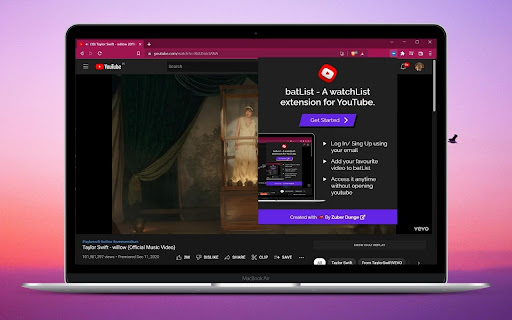
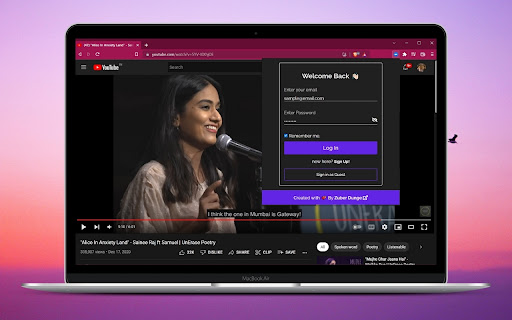
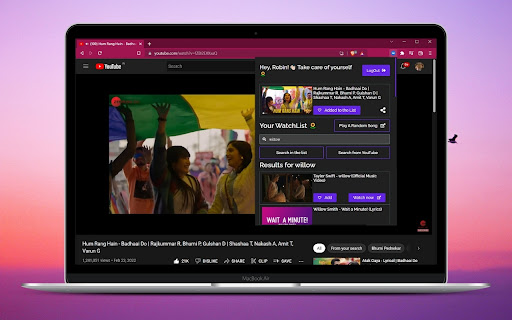

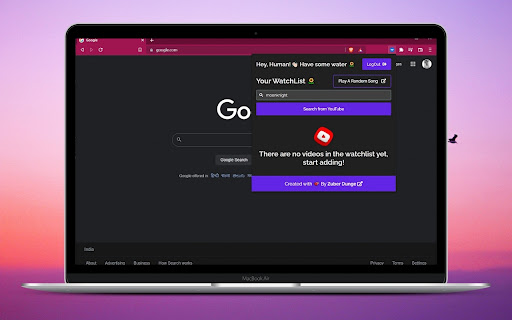
WatchList extension for YouTube With batList, you can access videos anytime from any website or tab with a single click, you don't have to open YouTube first. And with batList you can search for a video from YouTube and add that to the list in the extension itself or you can just click on watch now and the video will start playing in a new tab! You can search in your list and click on it, it'll open that video in the New tab. Easy af. And one more thing, on batList there's a special button as "Play a random song", it'll play a song from a few popular Playlists. And sometimes, a beautiful song is all we need. To know about it in detail, click here https://blog.zuberdunge.tech/batlist-a-watchlist-extension-for-youtube Getting started - - Sign In using your email, or as a guest. Adding video to the list - - You can search for videos directly from extension or you can open a youtube video and add that to the list as well. Delete a video from list - - You can delete videos from the list with the delete icon.

RealTwit - See Real Twitter Blue Checkmarks
See who is actually verified and who paid on Twitter. Twitter removed legacy verification on 4/20/23 and RealTwit brings back the old experience everyone loved and trusted.

YouTube Watchlist
Easily create a watchlist of YouTube videos and watch Ad free Summary Easily create and manage a watchlist of your favorite YouTube videos. Save videos directly from a URL and view them anytime. Description YouTube Watchlist is designed to help users gather and organize videos from across different YouTube channels and playlists into one place. This extension allows you to save videos directly from a URL, so you can return and watch them later, whenever it's convenient. Our extension focuses on privacy and simplicity. Users do not need to create an account or provide any personal information to use YouTube Watchlist. Instead, a unique device ID is generated during the first use, allowing the extension to identify you across sessions without needing personal data. Easily collect and save YouTube videos from different channels Organize videos into a custom watchlist for later viewing No account creation required, preserving your privacy Automatically generates a device ID to sync your watchlist across multiple sessions Simple and intuitive interface for a smooth user experience This extension requires minimal permissions to function, ensuring your data stays secure. YouTube Watchlist enhances your browsing experience by making it easier to save and organize videos without any additional hassle. Install now to enjoy a smarter way to manage your YouTube video collection!

StarterCSS
Rapidly implement CSS layouts, effects, and designs without parsing through online docs StarterCSS is a beginner-friendly version of devtools that cuts out time spent Googling for CSS docs and tutorials. StarterCSS provides a dashboard to implement, experiment with, and visualize CSS features at just a few clicks. The dashboard is directly embedded as a devtool panel (alongside the "Styles" and "Computed" panels) for quick access. Simply inspect an element and quickly make changes to it in the StarterCSS panel. With StarterCSS, you can: ✅ Add and customize layouts like flexboxes and grids, in addition to various visual attributes, in seconds ✅ Visualize and test CSS code in isolated environments ✅ Encounter fewer context switches from needing to look up CSS docs ✅ Export created designs/layouts into CSS for copying into your local code editor To access the extension, go to the "Elements" Tab in Chrome Devtools (Right Click > "Inspect" or Command+Shift+C). You should see a separate row with tabs like "Styles", "Computed", and "Layout". StarterCSS will be another panel here; if you've just downloaded the extension, you may have to click the ">>" (see more) icon to see all panels. If you'd like to leave feedback, visit bit.ly/startercss-feedback.

Cards & Colors
Extension enhances visibility to issues and cards on Jira Agile boards based on colored edges and statuses Boost the visibility of issues on your cloud Jira agile boards by adding colors based on: - colored edges for cards ("Board settings - Card colors" settings that added colored edges for cards based on selected method (JQL queries, etc) - issue status (for example "Ready For QA", "Fixes Needed", "Blocked in QA") - issue type (for example Bug-sub-task) Also, the extension adds a button "Statistics" in the top menu, which displays the number of issues on board summarized by issue type.
