
jdfpnhobcnlokhaoihecmgmcnpjnhbmm
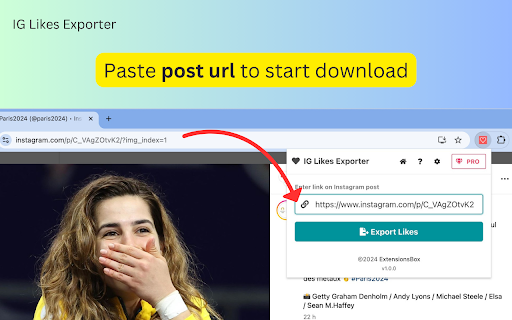


Streamline Ins analytics! Export likes from any post in CSV, JSON, or Excel with a few clicks. Data privacy guaranteed! IG Likes Exporter offers a seamless solution for gathering insights from Instagram posts. With its intuitive interface, you can export likes from any post in just a few clicks. The extension supports multiple export formats including CSV, JSON, and Excel (XLSX), catering to various data analysis needs. How It Works Using IG Likes Scraper is straightforward and efficient: - Navigate to any instagram.com post. - Click the "Download Likes" button on the right side of the page, or copy the post URL and paste it into the extension's main interface. - Watch as the extension fetches the likes list, with progress displayed in a pop-up window. - Once complete or paused, click "Download Items" to save your data in your preferred format including CSV, JSON, and Excel (XLSX). Benefits That Matter - Time-Saving: Automate the process of collecting likes data - Data Analysis Possibilities: Export available data for further analysis and insights - Ease of Use: A simple interface requires no technical expertise - Up-to-Date: Adapts to the latest Instagram API changes API Compliance and Current Limitations Recent updates to Instagram's official data API have introduced some limitations. Up to the latest 100 likes are available for posts by other users, while for your own posts, you can access up to the latest 1,000 likes. We continually monitor these changes and explore methods to provide comprehensive data within Instagram's guidelines. Transform your Instagram analytics today. Install IG Likes Extractor and unlock the power of your engagement data, all while staying compliant with the latest platform changes. Data Privacy Your data stays on your device and is not stored or transmitted to our servers. We prioritize keeping your information secure and confidential. Disclaimer This extension is an independently developed product by ExtensionsBox and has no association with META Inc.

Followers Exporter for Ins
Export Instagram followers & following lists with one click. Simplify data gathering for analysis. Support CSV, JSON, Excel formats. Follower Exporter for Ins is a powerful tool that simplifies gathering followers and following data from Instagram profiles. You can export valuable information for social media analysis and strategy development with just one click. Key Features: • One-click export of followers and following lists • Multiple export formats: CSV, JSON, Excel (XLSX) • User-friendly interface • Local data processing for enhanced privacy How to Use: 1. Go to any Instagram profile 2. Click the download button next to "followers" or "Following" 3. Monitor progress in the pop-up window 4. Click "Download Items" to save data in your preferred format Perfect for: • Social media managers • Marketers • Researchers • Business owners Unlock the potential of your Instagram network data with Follower Exporter for Ins! Data Privacy: We prioritize your security. All data processing occurs locally on your device and is never transmitted to our servers. Disclaimer This extension is an independently developed product by ExtensionsBox and has no association with META Inc.

Comments Exporter for Ins
Streamline Ins analysis with Ins Comments Exporter—export comments effortlessly in CSV, JSON, or Excel formats with one click! IG Comments Exporter extension offers a powerful solution for those seeking to harness the full potential of their Instagram post comments. IG Comments Scraper is a browser extension designed to simplify the process of gathering comments from Instagram posts. With just a single click, users can export a comprehensive list of comments, transforming hours of manual data collection into a seamless, automated process. This versatile tool allows you to export your data in CSV, JSON, or Excel (XLSX) formats, catering to various analysis needs. Its user-friendly interface ensures a smooth experience for users of all technical levels. How It Works Using IG Comments Scraper is straightforward and efficient: 1. Navigate to any Instagram post you wish to analyze. 2. Click the "Download Comments" button on the right side of the page. Alternatively, copy the post URL and paste it into the extension's main interface. 4. The extension will retrieve the comments, displaying progress in a pop-up window. 5. Once complete or paused, click "Download Items" to save your data in CSV, JSON, or Excel (XLSX) format. IG Comments Extractor offers numerous benefits for its users. By automating the tedious task of manually copying comments, it saves you valuable time. This efficiency allows you to focus on analyzing comment patterns, sentiment, and user engagement, providing data-driven insights to enhance your content strategy. With easy access to comprehensive comment data, you can refine your approach to audience interaction and improve customer service by efficiently tracking and responding to user feedback and queries. IG Comments Downloader is more than just a tool – it's your gateway to deeper Instagram insights. By providing easy access to valuable engagement data, this extension empowers you to make informed decisions, enhance your content strategy, and build stronger connections with your audience. Data Privacy Your data stays on your device and is not stored or transmitted to our servers. We prioritize keeping your information secure and confidential. Disclaimer This extension is an independently developed product by ExtensionsBox and has no association with META Inc.

IG Exporter & Scraper: Export Instagram Followers & Following data to list
Extract up to 50,000 Instagram followers and followings per profile. Pick into CSV and Excel formats. IG Exporter & Scraper is a powerful Google Chrome extension and scraping tool for gathering up to 50,000 Instagram followers and followings per profile. Export your data effortlessly into CSV and Excel formats, covering both followers and following lists. Perfect for analytics, content management, and social media strategies. Use this best-in-class online service to scrape data from Instagram for free, making it the ideal web scraping tool! ▬▬▬▬▬▬▬ How to Use ▬▬▬▬▬▬▬ 1. Click Ins Tools - Ins Follower Export Tool icon, which is on browser toolbar, then open IGTools popup page via IGTools Net 2. Click "Export Instagram Data" button, an IGTools option page will be opened. 3. Input a valid IG profile URL or IG username 4. Click "Start export" button, and our IG Tools will run automatically. After this processing is finished, you can download IG followers or IG followings to CSV or Excel. ▬▬▬▬▬▬▬ Features ▬▬▬▬▬▬▬ ● Export IG followers and IG following with one click by extension ● Export up to 50K IG followers or IG following ● CSV and Excel formats support ● Handles IG rate limit errors ● Processing in one click via IGTools net ▬▬▬▬▬▬▬▬ Security ▬▬▬▬▬▬ ● The extension neither ask for your IG password, nor any of your data including IG user information, story, visit history, posts, and social relationships. ● IG enforces IG rate limit, i.e. limit on the number of requests. The rate limit is not public information and varies depending on your IP address. ▬▬▬▬▬▬▬▬ How it works in IG Follower Export tool ▬▬▬▬▬▬ ● After every time you get 50 users the extension goes to Cool down minimum 10 seconds (you can change it in settings tab).

InsFo - IG follower export & analysis tool
Export Instagram Follower/Following/Comment/Tag/Location and Analyze. InsFo elevates your Instagram marketing and analytics to the next level by enabling the export of Instagram followers or following lists into a CSV/Excel file. Now with added functionality to analyze follower data, InsFo can identify ghost followers and pinpoint the most valuable targets for marketing efforts. Export millions of records in minutes. Advanced analytics capability to analyze follower data. Identify ghost followers to optimize your engagement strategy. Pinpoint high-value followers for targeted marketing campaigns. Utilizes Instagram's official API for secure data export. Free users can export the first 500 records effortlessly. Premium users enjoy unlimited export capabilities. No password required for enhanced security. All data is processed locally, ensuring confidentiality and privacy. Your exported data remains private - your secret is safe with us.
