
jclfhoehbmhgcjjigadlcgfddcflcnko
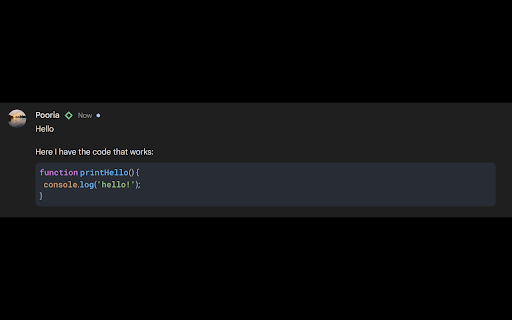
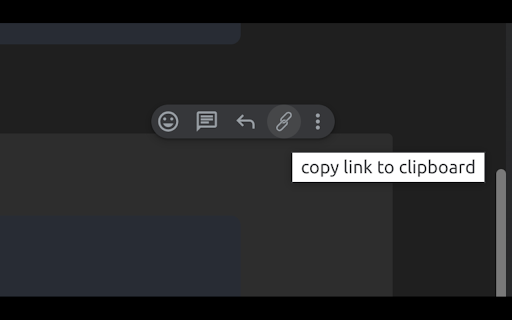
- Adding a copy link button on the menu, easily copy a topic's direct link - Save messages for every chat - Highlighting code: You can use this format to write code: After ``` you can write the language alias you want to enforce. You can find the full list of supported languages here: https://github.com/highlightjs/highlight.js/blob/main/SUPPORTED_LANGUAGES.md#supported-languages

Chat Plus — All-in-One Productivity Suite for Google Chat™
Supercharge Google Chat: polls, code snippets, screen/audio recording, scheduled messages, exports & more — all in one extension Chat Plus transforms Google Chat into a full-fledged productivity hub — giving you tools that go far beyond basic chat. ⦾ Pop-out Chat Window: Detach chat into a separate browser window for easy multitasking across desktops. ⦾ Canned Responses & Scheduled Messages: Save time with templated replies — or schedule messages to send later. ⦾ Audio, Screen & Video Recording: Record quick voice notes, screen sessions or video + audio content — then share directly. ⦾ Sketchpad: Draw diagrams, flowcharts or sketches and send them in chat. ⦾ Dictation: Convert speech to text — great for typing in non-standard languages or on the go. ⦾ Location Sharing: Share your current location or any place via Google Maps link. ⦾ Message Encryption/Decryption: Keep sensitive messages secure with password-protected encryption. ⦾ Bookmark, Forward & Export Messages: Bookmark important chats; forward messages (even across multiple spaces/DMs); download entire threads or selections as CSV or Excel for archiving or analysis. ⦾ All-in-one tool: no need to install multiple extensions ⦾ Makes Google Chat powerful for developers, teams, freelancers, and remote workers ⦾ Boosts productivity and collaboration — from code sharing to task scheduling to secure communication ⦾ Works seamlessly inside Google Chat — no external apps needed 💡 Great For: Anyone looking for richer multimedia and productivity tools — without leaving Google Chat Install Chat Plus today and unlock the full potential of Google Chat — your team (and your workflow) will thank you.

Chat and Meet for Google
Google Chat and Google Meet for Google Chrome. Notifications, messages, emojis, calls, video-calls. Google Hangouts. Gmail Chat ★★★★★ Everything is done directly on Google Chat and Meet platform 💚 with real-time notifications and fast-switch on all platforms 🚴 No need to register in other platforms 🔑 or share your account credentials to third party applications 🔓 Just open the extension and it by default will open the Google Chat, previously Classic Hangouts. From there you can Message, Call and Video-Call your friends and family. Just add their contact email/phone number. If you and to make a virtual meeting with you friends and family it's also possible with Google Meet. You can switch between the Chat and Meet by click on the top menu or hamburger button options 🎓 FEATURES ★ The old Google Hangouts is now retired, now is called Google Chat 📧 open the extension and have real-time silent notifications in the App icon (badge) on the Browser Toolbar 📌 ★ Google Chat allows to send messages for users with a Google account 💼 ★ Google Meet allows for calls and video-calls for users with a Google account 💼 ✔ Auto-Start when browser starts 💻 ✔ Configurations in a Options 🔧 section. ✔ Quickly see your chats 💬 and contacts. ✔ Very Low CPU/RAM/Bandwidth consumption 📌 This extension includes promotion to other WWEVENTS extensions to increase awareness of other work that we produce, you may found some very useful 😀 All our extensions are free to use and available on Google Chrome Webstore 📌 💎 Building Apps and Extensions for Google Chrome and Android 🔥📣 📔 Available on the product page: https://jitt.wwevents.fun/project/chat-and-meet-for-hangouts/#changelog Hangouts/Chat/Meet™ is a trademark of Google Inc., registered in the U.S. and other countries. This is an independent project developed by WWEvents and has no relationship to Hangouts/Chat/Meet™ or Google Inc. By installing this product you agree to our privacy policy & terms of service: https://jitt.wwevents.fun/privacy-policy/ You may consult the list of permissions and the reason why they are required on the product page: https://jitt.wwevents.fun/project/chat-and-meet-for-hangouts/#permissions “notifications” – Used to send desktop notification. For example when a new message arrive or App is updated. “contextMenus” – Allow to add more settings when right click in the App icon in the browser toolbar and browser context menu. “storage” – Used to save settings on your local computer. “scripting” – Used to be able to insert JS or CSS on the required host/domains. “system.display” – Used to detect the display size and position the Extension window. “unlimitedStorage” – Storage is limited to 5MB of data that may not be enough to store all configs. “host_permissions” – Permission to access to some hosts/domains that we must modify in order to provide the desired functionality detailed in the functionality. It also allows that you can share content (links or text) from other pages directly to inside the App and send it as a SMS/Chat to a friend for example. Also used to allow intercommunication with other WWEvents Apps (i.e. Emojis). “activeTab” – Permission to access the window that the extension is running and is show to the user. “all_urls” – Permission required for users be able to take screenshots of the current window – captureVisibleTab. This information is also available inside the App: Options -> About

0xTeabag
Stop Scams. Spot Phishing. Cross-Chain Security with Transparent Accounting. Tagging Ethereum Addresses and Blockchain Assets Graphically Introducing 0xTeabag – your one-stop solution for organizing and managing all your blockchain interactions across prominent explorers like Etherscan, Arbiscan and many others! 🚀 With 0xTeabag, you can effortlessly label and comment on addresses and transactions, giving you a clear picture of your activities at a glance. No more struggling with random strings of characters - just simple, recognizable labels that keep you one step ahead of scams. Enjoy seamless persistence across all blockchain explorers, ensuring that you always know what's happening with your addresses and transactions. Stay in control and never lose track again! 🎯 But that's not all! 0xTeabag’s robust team and permissions model lets you tailor access to your stored data, giving you complete control over who can view or edit. Collaboration has never been this secure and easy! 🔐 Want more? 0xTeabag offers optional integration with Tres.finance, allowing you to automatically track your Web3 finances while you navigate the extension. Monitor and manage your crypto world with convenience and confidence. Experience the future of blockchain management with 0xTeabag today! 🌐✨

Google Chat Code Block
Adds button to create a code block on Google Chat and adds button to quote replies
