
jciaajikhlfbhoacombmgahnkienjbhf

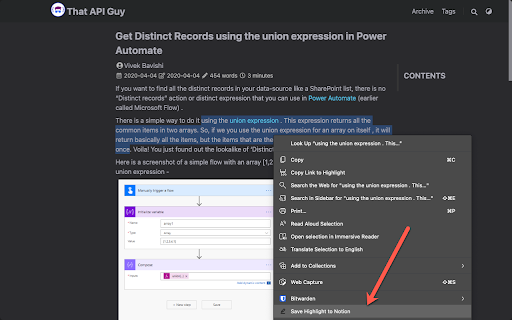
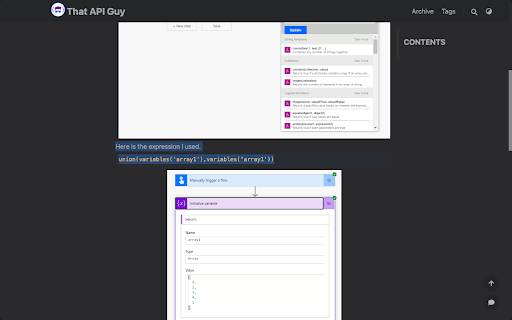
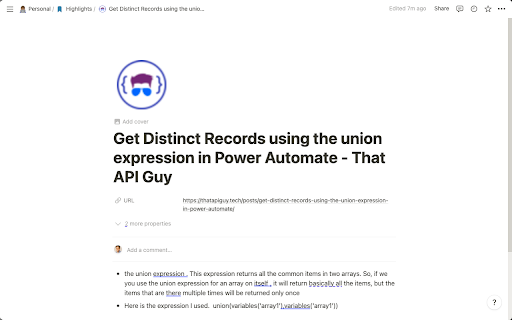
Highlights to Notion is a browser extension that allows you to easily save highlights from any webpage directly into your Notion database. With a straightforward and smooth user experience, you can effortlessly save important information while browsing the web and keep it organized in your Notion workspace. Highlight text on any webpage Save the selected text to a Notion database with just a few clicks Automatically save associated metadata, such as page title, URL, and favicon Customize the Notion database you want to save to Choose your preferred property mapping for title and URL in your selected database Save multiple highlights from the same webpage as bullets in the Notion page Using Highlights to Notion, you can greatly enhance your web browsing experience and ensure that you never lose any important information. Boost your productivity and knowledge organization with Highlights to Notion! Install the extension and click on the extension icon to open the popup. Enter your Notion API key and choose the Notion database that you want to save highlights to. Map the Title and URL properties in your selected database. Browse the web and highlight any text you want to save to your Notion database. Right-click on the highlighted text and select "Save Highlight to Notion" to save the selected text along with the page title, URL, and favicon to your Notion database. Start using Highlights to Notion today, and make web browsing more productive and organized!

Notion Highlighter
A chrome extension for saving highlighs to your notion A chrome extension for saving highlighs to your notion

Notion Capture
Quickly save links to your Notion databases ≡ Features - Direct save link by right click - Config default properties when save https://discord.gg/pAztBJEnrJ twitter: https://twitter.com/xuke11 help:https://ziyouma.vercel.app/notion buy a coffee:https://ko-fi.com/xukek

Add to Notion
Seamlessly save web content to Notion with a single click Add to Notion - Seamlessly Capture and Organize Your Ideas Add to Notion is a powerful Chrome extension designed to enhance your productivity by allowing you to effortlessly save web content directly to your Notion workspace. Whether you're a student, professional, or anyone who loves organizing information, this extension is your perfect companion. ✔️Instant Saving: Quickly save articles, images, and any web content to Notion with just a click. ⭕️Customizable Organization: Organize your saved content into specific Notion pages or databases, making it easy to find and manage later. 📶 Streamlined Workflow: Eliminate the hassle of copy-pasting and switching between tabs. Add to Notion integrates smoothly with your browser for a seamless experience. ✅Enhanced Productivity: Focus on what matters by keeping all your important information in one place, accessible anytime, anywhere. Add to Notion is perfect for anyone looking to enhance their productivity and streamline their workflow. By integrating with Notion, it ensures that your ideas and important content are always at your fingertips, organized the way you want. Whether you're conducting research, planning a project, or simply gathering inspiration, Add to Notion makes it easy to capture and manage your digital life.

Notion Tools
Make your Notion experience a little bit better with some QOL including colored headings, folded sidebar buttons and more. This extension provides a group of options that aim to improve your experience with the Notion website. These include: + ⭐ Automatically highlighting every heading across all your Notions. + 🔥 Having more vertical space in the sidebar by folding the "Search", "Inbox", and "Settings" buttons into horizontally lined icons (the notification counter also works). + Additional headings indication by adding # symbol at the end of it. + More horizontal space for your database board view. + Slightly more vertical space on page by reduced margin above it icon/name. + Ability to hide "invite members" button from sidebar. Every option can be disabled, if you want. I will continue adding more features over time. Hope you like it! ♥ UPDATE 1.2.2 - Added support for dark theme.
