
jcgholhpbpcnglbilaflciokdnhjlfgl
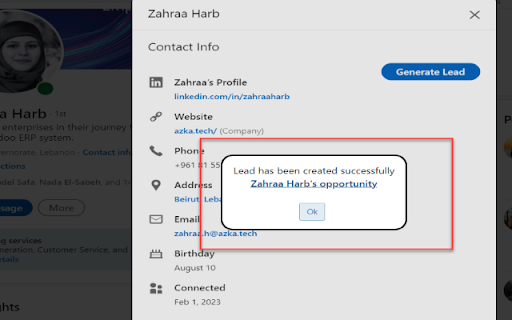
Read LinkedIn contact page and create an Odoo Lead with a single click Reads the LinkedIn contact and create an Odoo lead in a single click

Odoo Integration for Gmail
View Odoo contacts, CRM opportunities, tasks and tickets in Gmail. Create records, log emails and more from your inbox. Bring your Odoo CRM data directly into Gmail. Stop switching between browser tabs and keep your workflow in one place. WHAT YOU CAN DO 📋 VIEW CUSTOMER INFORMATION • Contact details and company information • CRM opportunities with revenue, stage, and probability • Project tasks with status and assignments • Support tickets with priority and team assignment • Smart contact detection while reading emails • View 5 records per section ⚡ TAKE ACTION FROM YOUR INBOX • Create new contacts, opportunities, tasks, and tickets • Log emails to Odoo records (including attachments) • Open Odoo records with one click • Refresh data to see latest updates 🚀 POWER USER FEATURES (PLUS plan, 14-day free trial) • Auto-log Gmail threads to Odoo records (background sync) • Real-time search across opportunities, tasks, and tickets • View up to 50 records per section (vs 5 in free tier) • Multi-company support • Financial insights (credit limit, invoiced totals) • Related contacts by domain (siblings + smart suggestions) • Recent activities from Odoo conversations • Notification email organization with module badges • Email participants info from Odoo • Group records by stage/status • Switch between contact and company views • Customize visible sections • Performance insights & metrics 🔌 FLEXIBLE COMPATIBILITY • Works with Odoo.com SaaS • Works with self-hosted Odoo installations (your own server, accessible via internet) • Supports custom domains (e.g., erp.yourcompany.com) • Compatible with Odoo Community and Enterprise editions • Compatible with Odoo 14.0 to 19.X (verified) 🔒 SECURE & PRIVATE • Uses your Odoo API key for authentication • All Odoo data stays between your browser and Odoo • Respects Odoo's permission system GETTING STARTED 1. Install the extension 2. Log into your Odoo instance in your browser 3. Get your API key from Odoo (Settings → My Profile → Account Security) 4. Configure the extension with your Odoo URL and API key 5. Open any email in Gmail to see the extension's sidebar REQUIREMENTS • Active Odoo instance (Community or Enterprise edition) • For helpdesk tickets: Odoo Enterprise with Helpdesk module

Odoo CRM
This extension allows you to directly create leads in any Odoo instance. Please note that this is the beta version. ✅ Create Odoo CRM Opportunities Instantly – Right from Your Browser This Chrome extension lets you create opportunities directly in your Odoo CRM, without switching tabs or logging in manually. 📌 What it does: The extension detects and loads information from the current page, helping you quickly fill out opportunity fields in your Odoo CRM. 💡 Why it’s useful: Save time and effort by creating new CRM opportunities from any page you’re on — fast, simple, and efficient. 🔑 Log in to the extension and make sure the connection is successful 📝 Enter the contact name, email, phone number, and other details ✅ Click "Submit" — the opportunity will be created in Odoo CRM Disable 2FA before connecting to Odoo using this extension. If you prefer to keep 2FA enabled, follow these steps to authenticate using your Odoo API key: 🔗 https://hsxtech.net/how-to-generate-your-odoo-api-key-in-4-simple-steps/

SummarAI
Introducing SummarAI, the cutting-edge Chrome extension that empowers you to quickly and accurately summarize PDFs, text, and videos using advanced AI technology. With just a click, SummarAI extracts the most important information from your content, helping you save time and stay focused in the age of information overload. Swiftly summarize PDFs, text, and videos with a single click Utilize AI-powered algorithms for precise and accurate summaries Customize summary length to suit your needs Compatible with a wide range of content types and sources Ideal for students, researchers, professionals, and anyone who values brevity How it works: Install the SummarAI Chrome extension Navigate to the content you wish to summarize Click the SummarAI icon in your browser toolbar Choose your desired summary length and let the AI work its magic Read, share, or save your concise, AI-generated summary With SummarAI, you'll never again feel overwhelmed by endless streams of content. Whether you're a student trying to digest lengthy articles, a professional seeking to stay informed, or simply someone who values their time, SummarAI is the perfect tool to help you cut through the clutter and focus on what truly matters. Join the SummarAI community today and experience the future of content summarization! Note: SummarAI requires an internet connection to function, as it utilizes AI models hosted in the cloud. The extension respects user privacy and does not store any personal data or browsing history.

Odoo CRM Marketing Assistant
Potencia tu Odoo CRM con esta extensión. Con OpenAI GPT-3.5 Turbo y análisis de sentimiento para marketing eficiente. Esta extensión fue desarrollada para complementar las funcionalidades de Odoo CRM implementado para la empresa Evimed. Con ella podrás generar correos electrónicos con inteligencia artificial mediante la API de OpenAI y cargar encuestas de cursos para analizar los comentarios de los encuestados mediante análisis de sentimiento, obteniendo un puntaje y comentario general del curso, también con inteligencia artificial.
