
jcemocpiapkpjilbpenbfbnelddkgolm
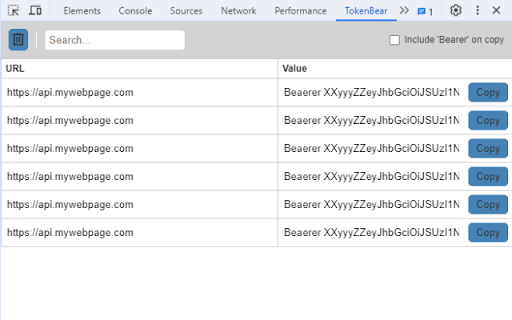
A simple way to copy Bearer tokens (and other Authorization header values). A simple way to copy Bearer tokens (and other Authorization header values). The extensions adds a new panel to the Developer tools, that shows all requests with the 'Authorization' header and the header value. Also a 'Copy' button for easy copying.

Token Devtools Inspector
Retrieve Authorization header from the request made in your tab. You'll have a faster way to paste or go to JWT.io 🚀 Token Extractor: Streamline Your Authorization Workflow in Chrome DevTools! Token Extractor, a robust Chrome extension, is your go-to tool for effortlessly extracting authorization tokens from HTTP requests within Chrome DevTools. 🛠️ With just a few clicks, developers can identify requests containing authorization headers, extract tokens, and seamlessly perform essential tasks. How to Use: 1. Open your Dev Tools in Chrome 🌐 2. Locate the Token Inspector panel (similar to Console, Network, or Application panels) 🕵️ 3. Voila! Your tokens are right there for easy access 🎉 Rest assured, no sensitive data is extracted. Check out the source code on https://github.com/Guuri11/token-inspector for peace of mind. Key Features: - Effortless Token Extraction: Say goodbye to manual inspection! Token Extractor automates the detection of requests with authorization headers. - Flexible Token Handling: Tailor the output to your needs by choosing to include or exclude the "Bearer" keyword from the extracted token. - User-Friendly Interface: Seamlessly integrated into Chrome DevTools, the extension offers an intuitive and easy-to-use interface for swift token extraction. - Enhanced Workflow: Copy extracted tokens to the clipboard with a single click, ensuring seamless integration into your applications and APIs. - Token Inspection: Dive deeper into extracted tokens by inspecting them on jwt.io. Understand token structures and contents effortlessly. ⏰ Save valuable time and elevate your development workflow with Token Extractor. Install the extension now to simplify your token extraction process! 🚀

Get Bearer Token
Fetch and copy Authorization headers from website requests. Get Authorization Header is a lightweight developer tool that makes it easy to capture and copy Bearer tokens from website requests. Whenever a webpage sends an authenticated request, the extension detects the Authorization header and displays the Bearer token directly in a clean, dark-themed popup. With a single click, you can copy the token to your clipboard and use it instantly in tools like Postman, Insomnia, or cURL for debugging and testing. Designed to be simple and focused, the extension ensures developers and testers can quickly inspect authentication flows without distraction. Lightweight, fast, and built for productivity, this extension is the easiest way to fetch and reuse Bearer tokens during development.

JWT Sniffer
Catch and decode all the JWTs Show, Decode and Copy all the Json Web Tokens. Are you sending JWT tokens in your HTTP requests? Tired of copying tokens from the developer view into jwt.io when debugging? It will detect all the HTTP(S) requests with Header and Cookies containing a JWT and conveniently display the content.

Access Token Grabber
Access Token Grabber - One‑click JWT tokens from Dev-Tools for faster API testing (Open-source) Get your web request access tokens instantly without digging through DevTools. This lightweight, background Chrome extension detects tokens as you browse and lets you copy them with a single click, perfect for Postman, cURL, or any API client. Open‑source. Transparent. Your token never leaves your computer. 👉 Why it’s better Stop hunting for auth requests in Network tab and manually copying headers. Access Token Grabber automatically surfaces detected tokens and marks them with a small “1” badge when one is ready. Click once to copy - no extra steps, no context switching, no guesswork. 🔑 Key benefits - One‑click copy: Grab the token directly from the extension with a single click. - Works while you work: Runs silently in the background and detects tokens when requests fire. - Dev‑friendly: Ideal for testing backend endpoints, reproducing issues, and iterating with Postman or other API tools. - Open‑source and transparent: Review the code, contribute, and trust what runs in your browser. - Privacy: No tokens leave your machine. ❓ How to use 1. Install the extension from the Chrome Web Store. It'll automatically run in the background. 2. Browse to your app or the page that triggers authenticated requests. 3. When a token is detected, you’ll see a "1" indicator on the extension icon. 4. Click the extension icon once to copy the token to your clipboard. 5. Paste into Postman, cURL, or your API client’s Authorization header and start testing. ⚙️ What it detects Access Token Grabber looks for access tokens in outgoing requests and defined auth headers used by modern web apps. It’s designed to simplify typical developer workflows without changing how your app authenticates. 🔒 Privacy & security - Tokens stay locally in your browser. - Fully open‑source so you can audit the code yourself. 👉 Get involved Check out the source code, open issues, and contribute on GitHub: https://github.com/yannherren/access-token-grabber-extension Make token retrieval a one‑click action and get back to building.
