
jcclpokcpfgcdflcmhlpggfpfcbnlcei
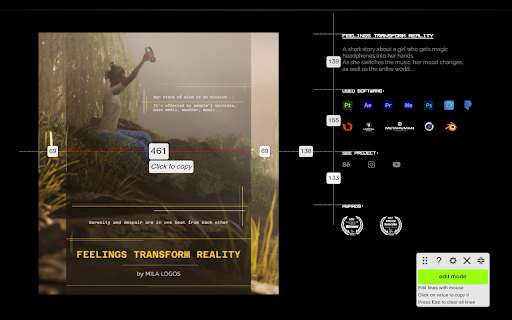


Pixel-perfect screen measurement tool for web Pixel Screen Ruler is a modern tool for measuring pixels on web pages. ⚡️ It features lightning-fast measurements with pixel-perfect precision. 🧑🎨🧑💻 It's built for designers, creators, and web developers, to address their need for quick and precise measurements. Tired of measuring objects on the screen by thumb? Need to open cumbersome graphics software just to compare two lengths? Forget about that! 📐With Pixel Screen Ruler, you will solve all these tasks in the blink of an eye! :🚀 Boost your performance and save time with this simple yet powerful tool, helping you become a more productive version of yourself! Intuitive and minimalistic design ensures swift and easy learning curve. Master Pixel Screen Ruler quickly with our helpful how-to guide at https://logosnikita.com/ruler/how-to Wait no more! Install now and experience precision at your fingertips!

GridMaster with Pixel Ruler and Crop
A simple grid line ruler with pixel rulers and cropping functionality to help place content on a webpage in a straight line. GridMaster is a simple yet powerful Chrome extension designed to help web designers, developers, and anyone who works with web content to place elements on a webpage in a perfectly straight line. With pixel rulers, customizable grid lines, and a cropping tool, GridMaster makes it easy to ensure precision in your designs. Grid Lines: Add horizontal and vertical grid lines to your webpage for easy alignment of content. Pixel Rulers: Measure dimensions and distances accurately with rulers at the top and side of the viewport. Full-Page Grid: Toggle a full-page grid overlay to see your content's layout at a glance. Cropping Tool: Easily measure specific areas on the webpage with a crop box that shows pixel dimensions. Whether you're a web designer looking to align elements perfectly or a developer needing precise measurements, GridMaster is the tool for you.

Pixel Measurement
An online ruler for measuring pixels on screen

Screen Ruler - Measure and Inspect the Web
Web inspector for designers & developers. Measure elements, extract CSS & colors, capture screenshots & more. Screen Ruler is the perfect companion for web developers and designers wanting to validate the implementation of their websites. Once activated, it allows you to view the sizes, margins, paddings, tag names, IDs, and classes simply by hovering over any web content. You can also select an item to measure distances to others. - Toggle the extension by clicking the icon, selecting from the right-click context menu, or using the shortcut `Alt/Option + Shift + R`. - Hover over items on web pages to display their sizes, margins, paddings, tag names, IDs, and classes. - Select an item by clicking on it directly; this will turn the highlight red. To deselect, click again, press Escape or select a different item. - To select the parent, use `Alt/Option + Up`. Use `Alt/Option + Down` to reverse your selection. - View the computed CSS of the currently selected item in the side panel. Click the "Copy CSS" button to copy the computed CSS to your clipboard. - Measure the pixel size of any element. - Measure the pixel distance between any two elements. - HTML tag names, class names and IDs. - Parent/child selection shortcuts. - Responsive selections resize with your browser window. - Access from the context menu. - Computed CSS inspect. - Copy CSS to clipboard. - Page rulers for precise measurements (horizontal and vertical guides with crosshair). - Color picker tool to sample and copy colors from anywhere on the page. - Element Screenshots: Capture cropped screenshots of selected items using `Ctrl/Cmd + Shift + S`. - Accessibility Issues: Automatically detect and highlight WCAG contrast failures in your selection with actionable recommendations. - SEO Issues: Catch common SEO problems like missing titles, multiple H1s, missing alt text, and absent meta tags. - Meta Tags: Inspect SEO, Open Graph, and Twitter card meta tags grouped by category. - Social Preview: Preview how your page renders when shared on Facebook, X, and LinkedIn using the page's actual metadata. - Works on any web page. - Customize keyboard shortcuts by visiting `chrome://extensions/shortcuts`. Screen Ruler PRO A PRO tier is also available which unlocks additional features. - Live CSS Editor: Edit any element's CSS directly in the side panel with full @media query support and pseudo-state forcing. Changes apply instantly and a Changes tab tracks every override per element so you can copy or revert. HTML editing tools let you cut, copy, paste, duplicate, and delete elements. Text editing mode lets you rewrite page copy in place. - Floating Inspector: See detailed properties when you hover, including position, size, rendered font, colors and more. Press Space to pin inspectors and compare multiple elements side by side. - Responsive Mode: Test your designs across different device viewports with an interactive device emulator and custom dimensions. - Source: Browse the source stylesheet rules that apply to any element, grouped by source file with @media wrappers and cascade conflicts visibly marked. - Tailwind CSS Generator: Instantly convert any element's computed styles into Tailwind v4 utility classes. - Box Shadow Visualization: Interactive breakdown of multi-layer box shadows with an exploded view. - Animation Analysis: Visualize CSS animation timing curves and copy animation properties. - Transition Inspector: Visualize CSS transitions and timing function curves alongside animations. - Gradient Visualization: Inspect and visualize CSS gradients with a detailed breakdown of color stops and direction. - Asset Extraction: Extract and download images, SVGs, and vector assets. - Color Extraction: Extract and copy color palettes from selected content with hex, RGB, and HSL values. - Typography: Analyze and extract all typography styles used in your selection. - Technology Detection: Identify the frameworks, libraries, and tools powering any website with over 180 technologies supported. - Layout Grid Overlay: Overlay a customizable layout grid for perfect design alignment. - Layout Inspection: Visualize Flexbox and Grid layouts with a clear breakdown of alignment, direction, and structure. - Breakpoints: Detect and visualize CSS media query breakpoints with colored boundary lines directly on the page. - CSS Selector Search: Find and highlight items using CSS selectors. - X-Ray Mode: Reveal the underlying structure of the page by outlining all content. - Canvas Inspection: Inspect HTML5 Canvas elements. View dimensions, context types, and extract color palettes. - Page Weight: See exactly what's loaded on any page, broken down by scripts, stylesheets, images, fonts and more. PRO requires a one-off payment for lifetime access. Made For - Developers: Spot layout issues or identify alignment problems. Whether you're tweaking margins and paddings, or just making sure everything lines up correctly, this tool becomes an indispensable addition to your development toolkit. - Designers: Ensure your designs have been implemented with pixel-perfect accuracy. It acts as a bridge between design and development, allowing you to check if every component aligns exactly as you intended. - Designed specifically for stability in Google Chrome 116+. - Installable on any Chromium browser; however, for the best experience, make sure your browser supports all the required APIs (like Side Panel and Offscreen). If there are any issues with installation, update your browser to the latest version and try again.

Measuremate — Pixel Ruler for Web Design
Measure distances, inspect the box model, drop guides on any live page. A pixel ruler for the web — no DevTools. Measure distances between any elements on any website. Pixel ruler, CSS inspector, and alignment guides — everything you need for pixel-perfect design handoff, right in your browser. Measuremate is a measuring tool built for frontend developers, web designers, and QA engineers who need precise pixel measurements without leaving the browser. Lightweight, private, and fast. 🔍 INSPECTOR MODE — Click any element to inspect it. See dimensions, distances to neighboring elements, and full CSS details. Hover to preview before selecting. 📐 GUIDES MODE — Place vertical and horizontal ruler guides anywhere on the page. Snap to element edges, measure between guides, and verify alignment like in Figma. Switch between modes with a single keystroke. ━━━━━━━━━━━━━━━━━━━━━━━━ WHAT YOU CAN DO ━━━━━━━━━━━━━━━━━━━━━━━━ 📏 MEASURE DISTANCES between any two elements — spacing, gaps, padding, margins. On-page dimension lines show exact pixel values. 🎯 INSPECT THE CSS BOX MODEL with visual breakdown of content, padding, border, and margin (including negative margins). 🔬 VIEW DETAILED CSS by category — Layout (display, position, flex, grid, z-index), Text (font, color, line-height, letter-spacing), and Attributes. 🌳 NAVIGATE THE DOM TREE — browse from root to any element, hover to preview, click to inspect. 📐 DROP VERTICAL OR HORIZONTAL GUIDES on any page with a single keystroke. Use arrow keys for 1px precision, Shift+arrows for 10px jumps. 🧲 SNAP TO ELEMENTS — guides and cursor automatically snap to element edges and centers. Cmd+Shift+M (Mac) / Ctrl+Shift+M (Win) — Toggle Measuremate on/off 1 — Switch to Inspector mode 2 — Switch to Guides mode M — Show/hide the control panel V — Drop a vertical guide at cursor H — Drop a horizontal guide at cursor S — Toggle snap-to-alignment Q — Clear all guides Arrow keys — Move cursor/guides 1px (Shift for 10px) Esc — Clear selection ━━━━━━━━━━━━━━━━━━━━━━━━ WHO IT'S FOR ━━━━━━━━━━━━━━━━━━━━━━━━ • Frontend developers verifying pixel-perfect implementation against designs • Web designers checking spacing, alignment, and typography on live sites • QA engineers validating responsive layouts across breakpoints • Teams doing design handoff from Figma, Sketch, or other design tools • Anyone who needs a fast, clean ruler for the web ✓ Clean UI — does nothing until you activate it. No interference with the pages you browse. ✓ Lightweight — under 500 KiB, no bloat, no telemetry. ✓ Privacy-first — zero tracking, zero data collection. ✓ Works on any website, including SPAs and iframes. ✓ Figma-like distance measurements you already know how to read. ✓ Keyboard-first workflow for power users. 1. Click the Measuremate icon in your toolbar (or press Cmd/Ctrl+Shift+M) to activate 2. Hover over any element to preview its dimensions 3. Click to select — see distances to nearby elements appear on the page 4. Open the Main Panel with M to see full CSS, box model, and DOM tree 5. Press 2 to switch to Guides mode and drop alignment rulers ━━━━━━━━━━━━━━━━━━━━━━━━ FREE AND PRO ━━━━━━━━━━━━━━━━━━━━━━━━ We ship updates regularly. Feature requests and bug reports are always welcome.
