
jcabocjijfbdpakkppainoflododlead
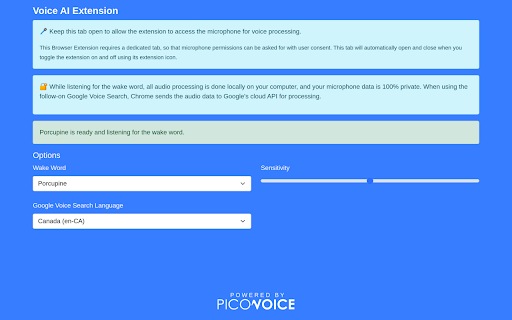
Voice AI Search Extension Picovoice Web Browser Extension. The extension allows you to use Picovoice's Porcupine wake word engine to listen for a wake word, and then uses the SpeechRecogniton API to perform a Google Search via voice.

EchoLog AI Voice Assistant
EchoLog AI Voice Assistant: Improve web accessibility with voice commands for hands-free browsing and a better user experience. Navigate the web effortlessly using voice commands! EchoLog AI Voice Assistant is a browser extension designed to enhance accessibility and provide a seamless hands-free browsing experience. Whether you have mobility impairments or simply prefer voice-based control, EchoLog lets you interact with websites using just your voice. Key Features: ✅ Hands-Free Navigation – Open links, click buttons, control videos, get page descriptions and interact with web pages using voice commands. ✅ Accessibility-Focused – Designed to assist users with mobility challenges and vision problems. ✅ Essential Web Controls – Scroll, switch tabs, and navigate effortlessly. ✅ Form Filling & Submission – Enter text into input fields and submit forms with voice. ✅ Media Control and Page Description (New in this Version!) 🔹 Play, pause, toggle full screen, return to the default view, and exit full screen using voice. 🔹 Describe the page, what are the heading on this page, the cheapest flight, etc. ✅ Easy to Use – Install the extension, enable microphone access, set up your API, and start issuing commands. ✅ Works Across Websites – Compatible with most web pages for smooth interaction. Voice Commands Supported: 🗣 Open – Load a website by saying "Open website.com" or "Open News." 🗣 Click – Select elements like "Click Sign-In" or "Click Play." 🗣 Scroll – Move up, down, left, or right on a webpage. 🗣 Tab Navigation – Switch between browser tabs with voice. 🗣 Go Back/Forward – Navigate browser history hands-free. 🗣 Fill Value – Enter text into input fields. 🔹 Example: "Set value Hello, How are you? in the message box." 🗣 Fill Value and Enter – Enter text and submit it. 🔹 Example: "Set value Beyonce songs and search." 🗣 Media Control (New!) – Control videos and media players with voice: 🔹 "Play video" / "Pause video" 🔹 "Full screen" / "Exit full screen" 🔹 "Default view" 🗣 Page Description (New!) – Describe page elements 🔹 Example: "Tell me all the video names on this page." 🔹 Example: "Describe this page." Who Can Benefit? 🔹 Users with mobility impairments and vision problems. 🔹 Anyone looking for a voice-controlled browsing experience Enhancing Digital Accessibility EchoLog is committed to making web navigation more inclusive and intuitive. Try it today and browse the web effortlessly—no mouse or keyboard needed!

Voixa AI SEO Tool - Rank First in AI & Voice Search
Optimize your website for AI and voice search! Get free traffic from AI-search platforms like ChatGPT, Perplexity, Siri & Alexa. Optimize for AI & Voice Search – Boost Traffic with Voixa (AEO Tool) Voixa is a free Chrome extension that helps your website rank higher in AI search engines like ChatGPT, Perplexity, Siri, Alexa, and Google Assistant. Using advanced AEO (Answer Engine Optimization) strategies, Voixa helps SEO specialists, content creators, and webmasters get discovered in voice search and AI-powered results. Why Voixa? Traditional SEO is no longer enough. AI-driven platforms prioritize clear, structured, and conversational content. Voixa helps you adapt by offering actionable insights and tools designed for voice search SEO and AI search optimization. Key Features: ✔ Voice Search Score – Get a percentage-based score indicating how well your page is optimized for AEO. ✔ Speakable Tag Analysis – Detects and verifies Google’s Speakable structured data for better AI indexing. ✔ Content Structure Analysis – Ensures proper use of H1, H2, H3 tags and organizes content for optimal voice search ranking. ✔ FAQ Detection – Identifies Q&A sections, improving Google voice search SEO and answer engine optimization (AEO). ✔ Keyword Analysis – Finds long-tail keywords that match voice search queries for improved discoverability. ✔ Content Length Analysis – Checks if your content meets best SEO strategies for voice search. ✔ PDF Report Export – Download a full AEO audit report with actionable recommendations. Why Optimize for AI & Voice Search? With the rise of AI search platforms like ChatGPT, Perplexity, DeepSeek, Siri, and Alexa, SEO is evolving beyond traditional rankings. Voice SEO optimization tools are essential because: ✔ Users search differently when speaking - using conversational, long-tail queries. ✔ AI prioritizes structured data, fast-loading pages, and answer-focused content. ✔ AEO vs traditional SEO: AI-driven search results require specialized optimization strategies. Voixa ensures your website ranks higher by following best practices for structured data, page speed, and content formatting, making it more discoverable for both traditional SEO and AEO driven search results. Perfect for: - SEO specialists - Content creators - Bloggers & webmasters - Digital marketers How It Works: 1 Click "Optimize" to scan your page. 2 Get Insights: Gain professional insights enhanced with AI for accurate recommendations. 3 Download a structured data for voice search report (PDF) for future improvements 4 Apply Changes: Implement expert-backed suggestions to elevate your voice search ranking. Data Persistence – Your analysis results remain saved even if you accidentally close the extension. Start using Voixa – your Voice SEO & AEO assistant for the AI-powered web.

Handsfree for Web - Voice Control
Browse the web using just your voice This app is useful to navigate the web handsfree. There are hundreds of commands supported, everything you can do manually with the mouse and keyboard now you can do it just by talking to the computer. Browse the web Open websites, click things, move around Complete forms Dictate text, fill any type of inputs, copy and paste Use the browser Manage your bookmarks, downloads, history and tabs Reproduce media content Control the video and sound content Search something Do a global search using google or find some text into the current web page Help You can ask for help anytime, anywhere, you'll get a full list of available commands Check out the entire command support in the website www.handsfreeforweb.com or in the forum https://community.handsfreeforweb.com/

Multilingual Voice Search
Google voice search in languages different from your OS and location settings. Google voice search in browser pre-determined the language for you based on your OS, location, and google account settings. For instance, I can't search in Cantonese if I'm located in Taiwan using and an English OS... This extension simply allow us to explicitly choose the language before making voice searches. ⭐️ No special permission required for installation ⭐️
