
jbpnjfdckbjlekklakcmkjbffapbhpaf


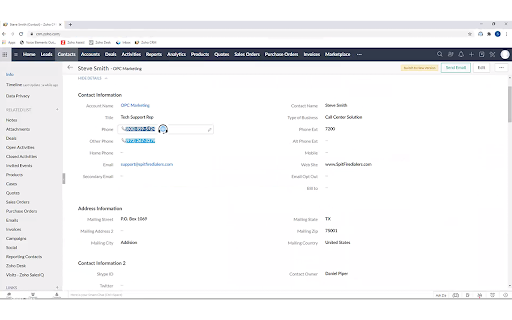
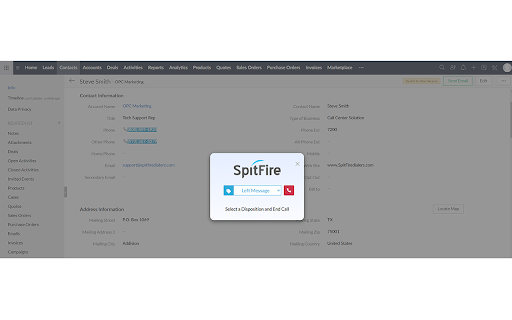
SpitFire Click2Dial Chrome extension converts phone numbers found on any web page or web based CRM, into clickable links to dial! This extension seamlessly integrates with SpitFire Enterprise Contact Center software application. Once a telephone number is selected it will auto-populate in the SpitFire application so you can quickly and conveniently place calls. The SpitFire Click2Dial application allows the user to end the call and select a disposition that can be written back to the client’s record. Fast, Easy & Productive!

Telephone Number Detection
This extension will update all telephone numbers on a page, with the ability to dial. Version 1.1.9: -------------- - Fixed: Failure to update page. - Fixed: Issue where text contained excessive whitespace. - Fixed: Updated Chrome API. Version 1.1.7: -------------- - Updated search patterns. - Options: Can select protocol type to use. (instead of just 'dial:') - Options: Option to replace existing clickable telephone numbers on web pages. - Paragraphs with multiple numbers no longer gets ignored. - Fixed issue where some sites break the phone icon transparency. Version 1.1.6: -------------- - Updated number detection. - Better Google Contacts Support*. (Note: Number invokes Google dialler, icon invokes your preferred dialler.) - Options panel: Set Min/Max number length.

Fixdigital plugin for Gmail and WhatsApp
The CRM platform that will grow your business through a plugin for Google and WhatsApp WATCH YOUR MARKETING AND SALES GROW Professional inquiry management platform The most advanced sales management package A winning combination – handles inquiries from all digital channels and sale closing processes Our Products : CRM Google integration Facebook integration Integrates with websites and landing pages Smart phone numbers for call measurement Send inquiries by automated SMS or email Dashboards display data summaries and let you review call, meeting, and transaction costs Smart lead manager Automation Receipt of alerts Landing pages based on Elementor Landing pages based on Drag&Drop (with no need for a programmer, and including readymade templates) Automatic reminders Calendar sync WhatsApp integration Smart web chatbot forwards inquiries directly to the CRM CRM app for inquiry and sales management Google Analytics integration API integration Integrates with telephone answering systems Integrates with external platforms Option to upgrade to CRM Premium

Moitele Click-To-Dial
Enables click-to-dial functionality for phone numbers found in pages. The MoiTele browser extension is a free click to call extension that works with MoiTele softphone. This extension works in all Chromium based browsers such as Chrome, Brave and Microsoft Edge. This free click2call browser extension is designed and developed to be used with cloud telephony services from MoiTele.com. This extension is a perfect fit for call center agents, customer service agents or sales team whose role involves making numerous phone call s as part of their job. MoiTele chrome extension identifies any phone number that has minimum 9 digits and upto 16 digits in common phone number formats. The identified phone numbers become clickable ie., a telephone call could be initiated over a softphone with a simple click (no need for copy/paste of phone numbers). Upon clicking the extension activates the softphone (desktop app or a browser app) and pastes the phone number onto the dialpad of the softphone. MoiTele extension could also be used to call phone numbers from any CRM, website that could be opened in a browser (Chrome, Brave and Microsoft Edge browsers). Thus we enable telephony for every CRM out of the box. Further, the conversations from the MoiTele softphone are enhanced with various call handling features such as - 1. Removal of special characters from various phone number formats 2. Integration blacklists to prevent calling the unwanted numbers 3. Allow calling only to the specific countries 4. Webhooks to capture call specific features for logging, automation, triggering specific events 5. Call history 6. Call recordings 7. Power keys for expert call centre employees for enhanced productivity 8. All call handling features such as mute, hold, DTMF Additionally, MoiTele softphone offers the following features - 1. Plug and Play installation and setup - it is easy and fast 2. Calls to phone numbers - video/audio mode switching over internet 3. Chat (optional) 4. High-quality voice Please note - This extension works only with the credentials available to our customers from MoiTele.com. Create your account and start using MoiTele for all your international calls.

Logimeter Click to Call
The Logimeter Click to Call extension allows a User to highlight a number on a web page and request a call is made to it. Logimeter Click to Call Extension allows you to dial any number from a web page in your Chrome browser without any integration. The Logimeter Click to Call extension allows a User to highlight a number and request a call be made to it. Logimeter will first call the User's phone and invite them to speak to the highlighted number by pressing 1 on their dial pad. When 1 is pressed, the highlighted number is contacted and the two parties are connected. All calls are recorded and the call records and recordings are made available in a Logimeter web dashboard called xTracker. Users receive access to this web dashboard when they register for the Logimeter Click to Call service This service is currently only available in South Africa. Is your team working from home? With the Logimeter Click to Call you will have all the metrics required to measure your team activity, regardless of their location. You will know how your customers are being dealt with by listening to the call recordings. Plus you will not need to invest in cellular contracts for your users as the calls come into the user’s phone and connect them to the desired number. Therefore all the billing is done centrally. With the Logimeter web dashboard xTracker, you will also be able to see the activity of each team member, and with the added Post Call Survey function you can capture additional information that captures and displays the call outcomes. To get started, install the extension, pin it to your taskbar and click on the red phone icon.. To use the service, you first need to open an account with Logimeter. To do this, you need to click on the Click to Call Registration email link and you will receive an email response from the Logimeter sales team. When you have signed an agreement and opened your account, you will be emailed your Username and will be asked to create a password. When you have completsales@logimeter.comed this process you enter your username, password and whichever phone number you wish to receive your requested calls on. Once this is completed you will receive the login successful popup. When you see a telephone number you wish to call via the extension, you right click on the number and the pop-up will display. You will see it includes the number you entered when you registered for the service. If you wish to edit the number the service calls, you can change it at any time. Once you click on ‘Call’ your entered phone number will ring and when you answer it, Press 1 on your phone and the selected number will be called. If you do not press 1, the service will not call the requested number. If you have any issues with this service please send an email to support@logimeter.com and a case will be opened and assigned to a support representative. Logimeter will get back to you asap.
