
jbhdbmffapbbghcejohkekfecihgehlc
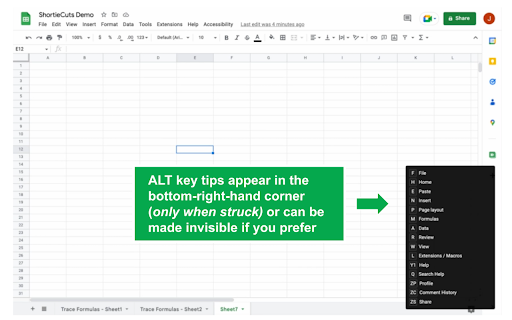

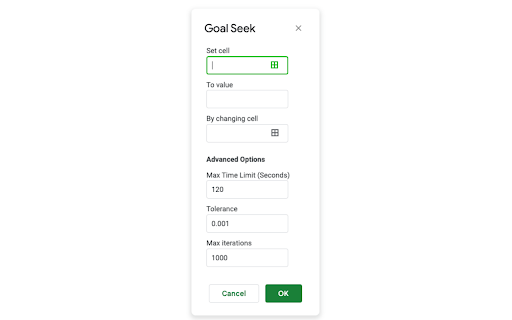
Extension that Enables Excel-style ALT-key Shortcuts for Google Sheets, plus Trace Formulas, Goal Seek, and More ★ KEY FEATURES ★ • 300+ ALT-key shortcuts • Trace formulas • Goal seek • CTRL-style navigation and edit shortcuts (where possible) • Some Google Docs and Google Slides shortcuts (see below) ➤ 300+ "ALT KEY" SHORTCUTS SUCH AS: • ALT, H, A, C --- center text • ALT, A, G, G --- group rows/columns • ALT, H, F, C --- change font color • ALT, H, B, U --- add top and double-bottom border • ALT, W, F, F --- freeze pane • ALT, W, V, G --- remove gridlines + plus hundreds more ➤ MORE SHEETS SHORTCUTS: • Goal Seek (ALT, A, W, G) • Insert/delete rows and columns like excel • Easier-to-see color palette selection • Copy formula to adjacent highlighted cells using CTRL + ENTER • Some TTS Macro-style formatting shortcuts (for Mac only) • Etc. ➤ Google DOCS and Google SLIDES: • ALT, H, A, L - align text left • ALT, H, A, C - align text center • ALT, H, A, R - align text right • ALT, H, H - background color • ALT, H, F, C - font color • ALT, H, F, S - font size • ALT, H, F, F - font • F4 - redo last action ➤ PRICING (Individuals) 14 Days Free Trial, then $7.99 /month or $69.99/year or $299.99 for life ➤ FEEDBACK? • This app is in beta. If you have feedback, email us at info@shortiecuts.com

Google Sheet Search
This extension adding search for google docs sheets Usage 1. Install 2. Reload google sheet page 3. Click search button 4. Enjoy

Google Sheets Formula Generator
Use Google Sheets Formula Generator to create google sheets formulas with AI, including vlookup, array, sum and countif functions 🚀 Tired of spending hours figuring out complicated calculations in your spreadsheets? The Google Sheets Formula Generator is your ultimate AI-powered solution. This extension uses artificial intelligence to instantly transform plain English prompts into ready-to-use Google Sheets formulas. 🤯 Many users struggle with formulas. Even simple tasks like how to do math in Google Sheets can be confusing. Complex ones like vlookup Google Sheets formula or countif often feel overwhelming for beginners and time-consuming for advanced users. That’s exactly why this extension exists. The Google Sheets Formula Generator simplifies the process by letting you describe what you need in natural language and instantly generating the correct output. ✨ With Google Sheets Formula Generator, you will: 🔹Save hours of manual work 🔹Eliminate errors and frustration 🔹Increase productivity whether for personal projects or business tasks 🔹Get equations tailored to your exact need in seconds 🛠️ Key features include: 1️⃣ AI-powered editor based on natural language 2️⃣ Support for basic and advanced functions 3️⃣ Examples and guidance to help you learn faster 4️⃣ History of previously used Google Sheets formulas 👩💻 Google Sheets Formula Generator is perfect for: 🔸 Students learning spreadsheets for the first time 🔸 Professionals who use spreadsheets daily 🔸 Data analysts who need complex calculations 🔸 Entrepreneurs and marketers automating reports 🔸 Anyone frustrated with writing equations manually 📊 The Google Sheets Formula Generator supports the most widely used and powerful functions, making everyday tasks easier and advanced analysis possible. Among them are: 🔎 VLOOKUP Google Sheets Application – Perfect for quickly finding and pulling data from large tables without manual searching. It’s one of the most popular functions for handling reference lookups. ⚖️ Google Sheets IF Function Logic –A flexible way to add conditions to your spreadsheets. Use it to create rules that automatically decide values, mark statuses, or categorize data. ➕ SUM Function– A fundamental tool for adding up values across rows, columns, or custom ranges. Ideal for financial reports, budgets, and any data that needs fast totals. 🧮 COUNTIF Function – Helps you count cells based on conditions, such as the number of completed tasks, sales above a target, or specific categories in your dataset. It works with both basic and advanced equations. 📝 Using the Google Sheets Formula Generator is simple: 1️⃣ Install the extension from the Chrome Web Store 3️⃣ Type your request in plain language like you’d ask a colleague 4️⃣ Get the result instantly from the AI creator 5️⃣ Copy and paste it directly into the needed cell 💡 Example prompts you can try in Google Sheets Formula Generator: ▶️ How to subtract and how to sum a column in Google Sheets 💬 Prompt: Subtract value in C2 from value in B2 ✅ Result: =B2-C2 💬 Prompt: Add all the numbers from column A ✅ Result: =SUM(A:A) ▶️ How to add and how to find ratio of two numbers in Google Sheets 💬 Prompt: Add values in cells D2, D3, and D4 together ✅ Result: =D2+D3+D4 💬 Prompt: Find ratio of sales in B2 to costs in C2 ✅ Result: =B2/C2 ▶️ How to use IF and OR and a VLOOKUP Google Sheets example 💬 Prompt: If column C is greater than 100 or column D equals Yes, mark as Approved, else Not Approved ✅ Result: =IF(OR(C2>100,D2="Yes"),"Approved","Not Approved") 💬 Prompt: Look up the product price in column B when the product name in A2 matches data from another table in Sheet2 ✅ Result: =VLOOKUP(A2,Sheet2!A:B,2,FALSE) 🤔 Here are answers to questions you might have: ❓ Can it generate advanced equations? ✅ Yes, the Google Sheets AI formula creator supports cases of any complexity, even the ones like nested if, array, and vlookup. ❓ Is it beginner-friendly? ✅ Absolutely. Even if you’ve a beginner, the AI makes it simple. ❓ Does it replace learning functions? ✅ No, instead it helps you learn faster by being shown correct examples. 🔥 Stop wasting time searching how to create a formula in Google Sheets. Install the Google Sheets Formula Generator today and let AI do the hard work for you. Boost your productivity, avoid mistakes, and turn natural language to get perfect results instantly. 👉 Try it now and experience the future of artificial intelligence for smarter spreadsheets.

SnapKeys - custom shortcuts for Google Suite
Create custom keyboard shortcuts for Google Sheets, Docs, and Slides. Stop reaching for your mouse. SnapKeys adds custom keyboard shortcuts and a quick-access ribbon to Google Sheets, Docs, and Slides — so you can work at the speed of thought. Custom Keyboard Shortcuts — Assign any key combination to any action. Format text, insert rows, navigate menus, all without touching your mouse. Quick Access Ribbon — Pin your most-used actions to a toolbar. Trigger them with Alt + 1-9 or a single click. ⚡ Built for Power Users - Works across Sheets, Docs, and Slides - Set up your first shortcut in under 30 seconds - Eliminate repetitive mouse clicks on formatting, inserting, and navigating - Shortcuts sync across devices 🎯 Who It's For Data analysts, writers, spreadsheet pros, and anyone who spends hours in Google Workspace. If you've ever wished Google's apps had better keyboard support, this is for you. Personal Gmail users (@gmail.com) get full access free. Business users get 3 shortcuts and 1 ribbon action free, or upgrade to Pro for unlimited access.

Notion Tools
Make your Notion experience a little bit better with some QOL including colored headings, folded sidebar buttons and more. This extension provides a group of options that aim to improve your experience with the Notion website. These include: + ⭐ Automatically highlighting every heading across all your Notions. + 🔥 Having more vertical space in the sidebar by folding the "Search", "Inbox", and "Settings" buttons into horizontally lined icons (the notification counter also works). + Additional headings indication by adding # symbol at the end of it. + More horizontal space for your database board view. + Slightly more vertical space on page by reduced margin above it icon/name. + Ability to hide "invite members" button from sidebar. Every option can be disabled, if you want. I will continue adding more features over time. Hope you like it! ♥ UPDATE 1.2.2 - Added support for dark theme.
