
jbcklblmgdbpagndcggcjnhnoocibnmk


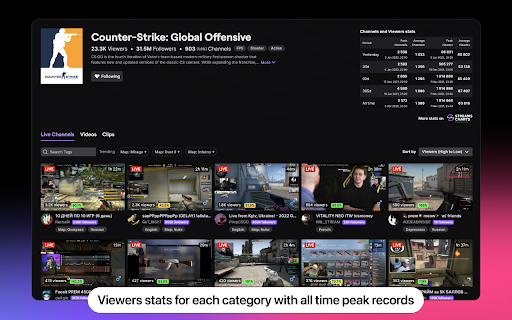
Your personal access to world-class streaming analytics on Twitch by StreamsCharts.com Especially for Twitch viewers and stats lovers, StreamsCharts.com has developed a Twitch extension for Google Chrome browser that will help you get up-to-date data on a streamer without leaving Twitch. Update from July 2025: Twitch no longer provides third-party analytics services with Authorized Viewers Ratio via API, so we had to remove this metric from the extension. Now it is only available if the streamer gives permission during authorization. Visit Streams Charts to access tens of thousands of streamers and their authorized viewers & audience retention data. Major Update from October 29, 2024: ver 2.0.7 is now live. Fixed bugs that caused extension not working for some users (manifest v3 update), fixed white screen on certain streams, as well as bugs with theme. Major Update from December 21, 2023: ver. 2.0 is now live. Read more on it here: https://streamscharts.com/news/extension-upd Twitch Stats extension by Streams Charts include: - Current channel’s stream stats and comparison with previous broadcast. - Short bio about streamers including name, age, country, etc. - Top channels from each category (no need entering the category). - Key stats of channel for the last 30 days with daily dynamics. - Key stats for each category of the watching stream. - Air time of live channels you follow. - Top clips of following channels (for last 3/7/30 days). - Flexible sorting of stream/channel clips. - Viewers stats for each category with all time peak records. - Gender information about streamers. Also provides a direct link to channel’s stats on Streams Charts and pages with Live Followers Count and Viewers Count. Creators about extension:

Toklytics - Free TikTok Analytics
🚀 TOKLYTICS - The #1 Free TikTok Analytics & Insights Extension Instantly see detailed analytics for any TikTok creator, influencer, or competitor right on their profile page. Real-time engagement rates, viral scores, performance metrics, and exportable data — completely free, no login required. Trusted by social media managers, content creators, marketers, and agencies worldwide. • Creator Score (A+ to F) — Instantly evaluate any creator's overall performance • Engagement Rate Calculator — Accurate engagement % based on views, likes, comments, shares • Average Views Analysis — Understand typical video performance • Viral Ratio Tracking — See what percentage of videos go viral (100K+ views) • Posts Per Week — Analyze posting frequency and consistency • Total Views Counter — Aggregate lifetime view counts • Likes Per Follower — Measure audience loyalty and engagement quality • 30-Day / 3-Month / 12-Month / All-Time Views — Filter by any time range • Click Any Bar to Open Video — Jump directly to any video from the chart • Views vs Likes Comparison — Visual side-by-side analysis • Engagement % Trend Line — Track engagement changes over time • Identify Top Performers — Instantly spot viral hits and underperformers Export comprehensive analytics for further analysis: • 90+ Data Points Per Video — The most detailed export available • Video URLs — Direct links to every video • Full Engagement Metrics — Views, likes, comments, shares, saves, reposts • Calculated Rates — Engagement %, like rate %, comment rate %, share rate %, save rate % • Performance Comparisons — "vs Average Views %" shows how each video compares • Viral Flags — Automatically marks videos exceeding 2x average views • Music & Sound Data — Track which sounds drive performance • Hashtag Analysis — See all hashtags with usage frequency • Creator Metadata — Followers, following, total hearts, bio, verification status • Timestamps — Created date, captured date for historical tracking Perfect for spreadsheets, databases, reporting, and business intelligence tools. • Top 6 Hashtags — See most-used hashtags for any creator • Usage Percentages — Know how often each hashtag appears • Trend Identification — Spot hashtag strategies that drive growth • Niche Analysis — Understand which topics creators focus on ✅ Content Creators & Influencers Analyze competitors, reverse-engineer viral content, find winning strategies, benchmark your performance ✅ Researchers & Journalists Study trends, analyze virality patterns, gather data for reports and articles ✅ Music Labels & Artists Track how songs perform, identify creators using your sounds, discover trending audio Why pay $50-$500/month for other tools? Toklytics offers: • FREE (not $50-500/mo) • Real-time data ✓ • Works directly on the platform ✓ • No login required ✓ • Unlimited data export ✓ • Full video-level data ✓ Save $600-$6,000+ per year while getting instant, on-page analytics. 1️⃣ Install Toklytics — One click, no account needed 2️⃣ Visit Any Creator Profile — Navigate to any public profile 3️⃣ See Analytics Instantly — Overlay appears automatically below the profile header 4️⃣ Explore the Data — Click chart bars to view videos, change time ranges, analyze trends 5️⃣ Export Anytime — Download CSV for offline analysis No setup. No configuration. No learning curve. Just install and go. Your privacy matters to us: • No Account Required — Use immediately, no signup • No Personal Data Collection — We don't track your browsing • No Passwords Stored — We never ask for credentials • Browser-Based — All processing happens locally • Single-Site Access — Extension only activates on supported pages • Open Development — Transparent about how we work • GDPR Friendly — Compliant with privacy regulations ✓ Real-time analytics overlay on every profile ✓ Creator performance scoring (A+ to F grades) ✓ Engagement rate calculator ✓ Average views & viral ratio metrics ✓ Interactive video performance timeline chart ✓ Clickable chart bars — jump to any video ✓ 30-day, 3-month, 12-month, all-time filtering ✓ Top hashtags analysis with percentages ✓ Professional CSV export (90+ columns) ✓ Video-level metrics & calculated rates ✓ Sound & music tracking ✓ Works on all public profiles ✓ Auto-updates as you browse ✓ Zero configuration required ✓ 100% free, no limits We're committed to making Toklytics the best analytics tool available: • Active Development — Regular updates with new features • Bug Fixes — Issues resolved quickly • Feature Requests Welcome — We build what users want • Responsive Support — Real humans answer your questions If Toklytics saves you time and money: ⭐ Leave a 5-star review — Helps others discover us 📤 Share with colleagues — Spread the word 💬 Send feedback — Tell us what features you need 🐦 Follow us on X — @Toklytics for updates & tips Toklytics is built by a team passionate about democratizing social media analytics. We believe powerful insights shouldn't be locked behind expensive paywalls. Our mission is to give everyone — from individual creators to enterprise agencies — access to the data they need to succeed.

Twitch Tracker
Easily get notified when a stream goes live. An extension by www.SirMrE.com. Re-upload of the original Twitch Tracker chrome extension by SirMrE. It was accidentally deleted when I moved my email accounts away from Google - Sorry about that! -------------------------------- Track as many twitch accounts as you wish, and get visual and/or audible notifications when they go live. Does not use any personal information, or access any sort of sensitive data. There are no ads, tracking/data collection or other means to monetise this extension (not even analytical data like Google Analytics). It has been and always will be completely free. Known issue -------------------------------- - The Twitch Helix api does not support non-english channel names. Please import channels from Twitch directly and see if that helps!

Twitch Auto Points
Automatically finds the bonus point button on the website and clicks it for you. - NEW: the extension icon now shows the amount of points it collected for the channel you opened in your tab - Works in multiple tabs and windows at the same time. - Optimised for performance - Only works on twitch websites and gets automatically disabled on other websites - No data collection whatsoever - Works in moderator view - Updated to work with the new twitch UI

Twitch Live Clock
The clock of the time when the past broadcasts on Twitch was live-streamed This extension displays the time when the past broadcasts on Twitch was actually being live-streamed. It uses the browser’s time zone, not the streamer’s time zone.
