
jaokbnmpdigpgfjckhgpdacpcokipoha

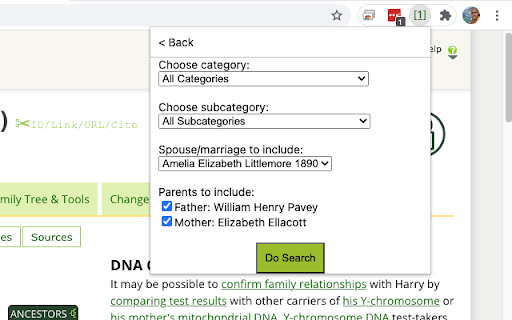
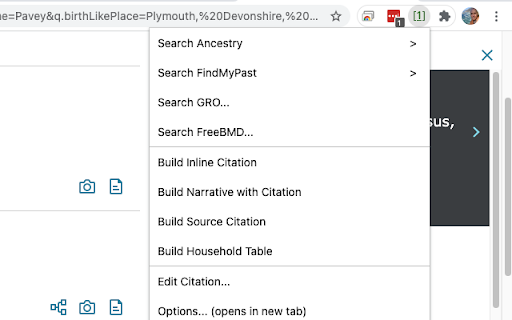

WikiTree Sourcer assists in finding and citing genealogy sources for use on wikitree.com. The WikiTree Sourcer extension saves time and typing by assisting WikiTree users with three main tasks: 1. From a WikiTree profile page it provides the ability to search other genealogy websites for relevant records. 2. From one of these genealogy websites' records page it can extract data and build a citation. 3. Also from one of these genealogy websites records page it can search other genealogy websites for similar records. For example on an Ancestry page it can help find free versions of the same original source. In addition the extension can display icons on several genealogy websites to indicate connections to WikiTree. The extension is free but donations are welcome at: https://buymeacoffee.com/RobPavey

Ancestor Surname Highlighter
Genealogy buffs! Everyone should have this handy tool, which highlights the surnames you are looking for on busy pages. If you've ever squinted at a Gedmatch pedigree list or tried to find your relative's name in a tree with tiny letters or just wanted to know if your ancestor was mentioned in long-winded will or property transaction, this plugin will save you heaps of time!

Chromosome Mapping Helper for DNA Painter
Extract chromosome data from MyHeritage and push to DNAPainter The Chromosome Mapping Helper for DNA Painter makes it easy to copy chromosome segment data from MyHeritage DNA match pages directly into your DNA Painter chromosome maps — with one click. WHAT IT DOES The extension copies chromosome segment data from the MyHeritage DNA match page and copies it to your clipboard, ready to paste into DNA Painter's "Paint a new match" field. • Open a DNA match page on MyHeritage • Scroll to the bottom so the chromosome browser fully loads • Click "Capture & Copy Segments" in the side panel • In DNA Painter, open your chromosome map → Paint a new match → paste • Optionally paste match details (name, relationship, cM, notes) in the match notes field. Note: some matches do not share chromosome data — in that case there is nothing to copy. This Extension doesn't give you access to more than you already have on either MyHeritage or DNA Painter. It only takes data your browser has downloaded and simplifies the process of moving it from one please to the other. DATA COPIED • Match name and predicted relationship • Shared DNA: total cM, segment count, largest segment • Labels and notes (if loaded) • Full chromosome segment data: chromosome number, start/end positions, cM, SNP count PRIVACY No data is collected, stored, or transmitted to any third party. All processing happens entirely within your browser, from pages you manually choose and load. Segment data is read from your local session and written to DNA Painter only at your explicit request - when you paste it there. Release Notes v1.3.1 Shorthand fix — relationships like “4th cousin’s daughter” now correctly produce 4C1R instead of 4C. Possessive descent and ascent wording (“…’s son / daughter / grandchild / great-grandson…”, “…’s mother / father / grandparent…”, and the inverse “daughter of Nth cousin” form) is now recognised. Shorthand is English-only — when MyHeritage is set to a non-English language the Shorthand row shows a notice instead of a value, and the line is omitted from the copied match details. In Settings, the “Append shorthand to match name” checkbox and the “Relationship shorthand” row in the match-details picker are greyed out with a note, so it’s clear why they don’t do anything until you switch MyHeritage to English. v1.3.0 Relationship shorthand — cousin relationships get a compact label (1C, 1C1R, 2C2R, 1C1R-2C…). Either append it to the match name (e.g. “Jane Doe (1C1R)”) — which also auto-fills the DNA Painter Save Match name field — or copy it as its own line in the match-details list. Settings → Append relationship shorthand to match name + Match details to copy. New release notes indicator — a small dot pulses next to the Release Notes link when there are notes you haven’t seen yet, and unread version sections inside the modal are tagged NEW. Clicking the link clears the dot. v1.2.0 Customisable match details — in Settings, choose which match-detail fields are copied (match name, relationship, shared DNA stats, notes, labels, source URL) and drag to reorder them. Top bar reordered to About | Help | Release Notes | Settings. Help text refreshed for the new feature set v1.1.3 Expand and copy match notes (Settings, opt-in) — briefly opens the MyHeritage notes panel during capture so any note on the match is included automatically. The panel closes again afterwards. v1.1.2 Clear data button — added to the top of the panel for quick reset between matches. Clears captured data and the clipboard. v1.1.0 Push mode preference — choose what to copy when capturing: segments & match details (default), segments only, or match details only. Steps that don’t apply to the selected mode are greyed out in the panel. v1.0.1 Stability improvements and bug fixes. v1.0.0 Initial release. Four-step wizard UI; IndexedDB-first chromosome segment extraction from MyHeritage; clipboard-based transfer to DNA Painter with automatic match details pre-load on Save Match. ------------ ------------ ------------ DISCLAIMER This is an independent, community-built tool. It is not affiliated with, endorsed by, or associated with DNA Painter (dnapainter.com) or MyHeritage (myheritage.com).

Genealogy Blurring Tool
Automatically blurs sensitive elements on genealogy websites for privacy-minded screenshots and screencasts. Genealogy Blurring Tool is a free extension that automatically blurs sensitive details like DNA match names and names of living people on popular genealogy websites. This tool works seamlessly when navigating between pages and can be enabled/disabled with a single click. Focus on sharing your discoveries without worrying about complicated editing software. Whether you're hosting an online presentation, collaborating with fellow researchers, or posting screenshots online, Genealogy Blurring Tool works instantly on every page you load to blur any sensitive personal information. The blurring effect is applied instantly, allowing you to effortlessly capture and share secure screenshots or screen recordings of personal genealogy pages. This extension ensures you adhere to genealogical privacy standards by protecting the sensitive information of your DNA matches and any living individuals. Genealogy Blurring Tool works with Ancestry, MyHeritage, 23andMe FamilySearch and FamilyTreeDNA. If you notice any place that is not being blurred, please click the button titled "Missing a spot? Let us know!" located at the bottom of the Genealogy Blurring Tool pop-up panel. Install the Extension: Download and install Genealogy Blurring Tool directly from the Chrome Web Store. Access the Extension: Click the puzzle piece icon on the right hand side of the Chrome toolbar to locate Genealogy Blurring Tool. To keep it handy, click the pushpin icon next to its name to pin it to your Chrome toolbar. Activate Blurring: Enable the blurring effect by clicking the Genealogy Blurring Tool icon in the Chrome toolbar and selecting the green "Enable Blurring" button in the pop-up panel. Once activated, the icon in the toolbar will change from an open eye to a closed eye, signaling that the blurring is active. Disable Blurring: To turn off the blurring effect, click the Genealogy Blurring Tool icon in the Chrome toolbar and select the red "Disable Blurring" button in the pop-up panel. This will instantly reveal all text on the page. Use DNA Match Initials: You can choose to have names in your DNA match list on Ancestry, MyHeritage, 23andMe and FamilyTreeDNA replaced with the persons initials. Blur Your Personal Information: Choose whether to blur your own name, or the name of the test you manage by toggling the "Blur Your Personal Information" option in the Genealogy Blurring Tool pop-up panel. Blur DNA Match Profile Photos: Choose whether to blur DNA match profile photos by toggling the "Blur DNA Match Profile Photos" option in the Genealogy Blurring Tool pop-up panel. Blur DNA Match Notes Section: Choose whether to blur notes attached to DNA matches by toggling the "Blur DNA Match Notes Section" option in the Genealogy Blurring Tool pop-up panel. Check out our other Chrome extension, Genealogy Assistant! It adds 100+ custom features to popular genealogy websites like Ancestry, MyHeritage, 23andMe, FamilySearch, FamilyTreeDNA and more. Search for "Genealogy Assistant" in the Chrome Web Store. Latest update: Friday May 1st, 2026 v1.5.8: Updates for AncestryDNA and FamilyTreeDNA blurring locations.

Michael's Upgrade for TrakED
Upgraded features for TrakED in the THS. (This extension is not an official product of the THS or Intersystems TrakCare software.) Upgraded features for Trak ED in the LGH. Features: - Re-enable spell check in the triage page - Use the enter key when logging in - Handover sheet for ED Main Floor and EMU - ED Main Floor filters and persistent sort - Triage Summary print out - Filter and count results of an enquiry - Count patients currently breaching length of stay targets -- This extension is not an official product of the LGH or InterSystems Trak software.
