
jajpeoodgnclcpkcldfieifkcinhcnmg
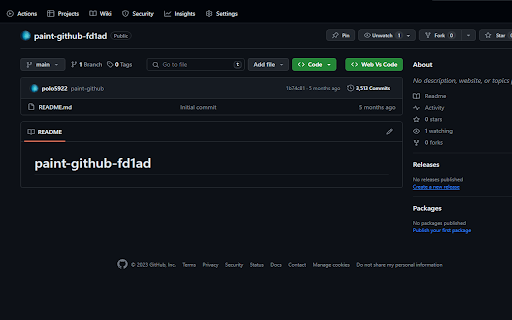
Extention chrome for adding vscode button in github The GitHub Open Button for Chrome extension revolutionizes your workflow by seamlessly integrating Visual Studio Code Web (VS Code Web) with GitHub. This Chrome extension places an "Web Vs Code" button right on GitHub repositories, transforming your browsing experience into a coding journey. Streamlined Workflow: Access your GitHub repositories in VS Code Web with a single click, eliminating the need for manual URL copying and pasting. Productivity at Its Best: Stay within your coding environment to boost productivity and minimize distractions. Open Source: This extension is open-source, empowering you to contribute to its development and tailor it to your unique needs. Install the "Vs Code github for Chrome" extension from the Chrome Web Store. Sign in to your GitHub account if prompted. Visit any GitHub repository in your Chrome browser. Look for the "Web Vs Code" button on the repository page. Click the button to open the repository directly in Visual Studio Code Web. Start coding immediately in a familiar and focused environment. Stay Connected: Elevate Your VS Code Web Experience: With the Vs Code github for Chrome extension, simplify your interactions with GitHub and elevate your coding experience in the browser.

Genio Notes
The Chrome extension for Genio Notes We’re making it easier to use Genio Notes for online learning and video content, eliminating the need for multiple tabs and windows. Maximize your focus and retention with our handy integrated side panel to take notes directly alongside your online lectures and videos. 'It was great having everything in one spot and not using split screen to be able to watch and take notes at the same time!' You must be a Genio Notes user (excluding our Genio Notes Teams plan) to access this extension. Not used Genio Notes before? Try it free for 30 days at https://app.genio.co/try

github-vscode-icons-updated
[UPDATED] This extension shows a VS Code icons in GitHub Repositories This is an updated extension that shows a VS Code icons in GitHub Repositories Displays vscode-icons in GitHub repo with new UI, nearly 1200 file/folder icons Additional support for bitbucket, gitlab, sourceforge and more

Kamino
This extension shows a button on Github issue pages that can be used to clone github issues across repositories Kamino is a Chrome extension that is used to clone Github issues from one repository to another. Go to an issue page and click "Clone issue to", choose a new repository and the original item will be closed and cloned to the new repository you have chosen. This tool is very handy for feedback repositories whose issues need to be distributed to the actual project repository. For detailed instructions and info on updates, please visit https://github.com/gatewayapps/kamino and view the ReadMe file. kamino v4.2.1 bug-fix - Fix issues with navigating back to the original issues list - by @johnmurphy01 miscellaneous - Add build and deploy automation to make it easier to update Kamino - by @johnmurphy01 bug-fix - Add retry and error handling and options to prevent mentions - by @johnmurphy01 feature - Add option to enable or disable blockquotes - by @johnmurphy01 bug-fix - Fixed various issues with batching cloning feature - by @johnmurphy01 miscellaneous - Add playwright testing to make Kamino more stable - by @johnmurphy01 feature - Optionally prevent blockquote formatting and source attribution - by @johnmurphy01

Gloc
Gives approximate LOC from repo page (private and public)
