
jadjicoipoakmiahodaniigoocompfpi
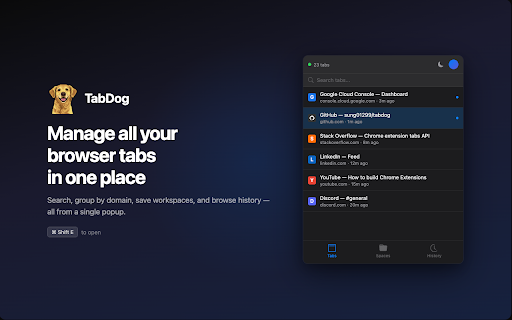


Manage all your browser tabs in one place - search, group by domain, save workspaces, and quickly switch between tabs TabDog — Manage All Your Browser Tabs in One Place TabDog is a powerful tab manager that helps you search, organize, and switch between tabs instantly. Save workspaces, browse history, and take control of your tabs — all from a single popup. 📋 Tab Management • Instant search — find any tab by title, URL, or domain • Domain grouping — tabs automatically organized by website • Recently closed — reopen tabs closed within the last 30 minutes • Close tabs individually or by domain group 🔍 Workspaces • Save your current tabs as a named workspace • Add custom URLs with smart autocomplete from open tabs and history • Restore a workspace instantly — tabs open alongside your current ones • Color-coded labels (9 colors) for easy organization • Chrome Tab Groups — restored workspaces are grouped with matching name and color ⚡ History • Browse the last 7 days of browsing history • Search and filter by keyword • Entries grouped by date (Today, Yesterday, etc.) • Cmd+Shift+E (Mac) / Ctrl+Shift+E (Win/Linux) — Open TabDog • ↑ / ↓ — Navigate through the list • Enter — Activate selected tab or expand group • C — Close selected tab • Cmd+F / Ctrl+F — Focus search bar • Cmd+1/2/3 — Switch between Tabs, Workspaces, History • Escape — Clear search or close popup • Type to search instantly PERMISSIONS • tabs / tabGroups / sessions — Read and manage tab information • storage — Save settings and local data • history — Browse your recent history and power autocomplete • identity — Google sign-in for workspace cloud sync • alarms — Periodic workspace sync • No host permissions. No access to page content. 🔄 WHAT'S NEW — v3.0.0 • Complete UI rewrite — rebuilt with Svelte 5 for a faster, modern interface • New keyboard navigation — full arrow key support with visual highlight • Smart autocomplete — custom URL input suggests from open tabs and history • Simplified workspace restore — one click to open, no extra steps • Improved discoverability — action buttons are always subtly visible TabDog is open source and available on GitHub. Feel free to: • Review the code • Report issues • Suggest features • Contribute improvements GitHub Link: https://github.com/sung01299/tabdog Having issues? Questions? Feedback? • Check our GitHub repository for documentation • Open an issue for bug reports • Star the project if you find it useful! Take control of your tabs. Download TabDog today. 🐕 Your tabs. Your way. Your menu bar.

Tab Manager
Your tab manager: save, restore, organize, search, switch, close browser tabs & sessions easy. All tab in one saver management tool Declutter Your Browser, Restore Your Focus 🚀 Too many open pages become inconvenient, making you worry about losing important work if Chrome crashes? Maybe you have 50 or 100+ important and necessary tabs, but do they slow down the browser or add cognitive stress. We have created tab manager for you, the simple, intuitive, and reliable solution for superior browser item management. We make managing your digital workspace easy. Our chrome extension manager helps you save pages chrome instantly, organize entries into clear sessions, and restore pages exactly when needed. Use session saver for organization today Tab manager provides crucial features in a minimalist, efficient package. It's the chrome browser manager that respects your workflow. 💾 Instant Save: One-click saving for all or selected open pages. Our fast save tabs function captures your browsing state. 🛡️ Auto-Save Protection: Work confidently. Tab Manager automatically saves your current browsing state periodically, a safety net against crashes. See "Last autosave" status clearly. 📥 Seamless Import: Easily import from our extension and SessionBuddy. Switching your management tool is smooth. 🔍 Quick Search & switch tabs: Instantly find any currently open webpage across all windows or within your saved sessions. Lost something specific? Hover, click the arrow, jump straight to that page! ✨ Popup-First Design: Access everything directly from the browser toolbar popup. No extra page needed! We prioritize quick workspace management. 🖱️ Drag-Select Items: Select multiple entries for saving by dragging your mouse – faster than clicking one by one. Efficient content management streamlined. 💻 Works Privately: All session data stored securely locally. We have NO access to your information. Your browser session is confidential. 📄 Easy Backup/Export: Export all to a file anytime. Your management data is portable. 📌 Smart Pinned Tab Handling: Intelligently separates your pinned items (like Email or Calendar) from your working session. This feature of the chrome tab manager that also closes pinned tabs, ensuring you only save what you need. Tired of Toby's limits and look for tab managers like toby? Worried about data loss in OneTab or Session Buddy? Tab Manager offers a simple, reliable, honest approach. Save unlimited sessions locally, import data easily, enjoy a clean interface without aggressive paywalls. We're the chrome plugin manager focused on the sweet spot of what you love. 1️⃣ Click the icon: See your current open pages. 2️⃣ Select (Optional): Click entries or drag-select. 3️⃣ Save: Click "Save Items". 4️⃣ Name (Optional): Auto-name ready, or type your own. ➤ Click icon, switch to "Your Sessions". ➤ Find session. ➤ Click "Restore" or expand to open individual pages. - List & Grid Views: Switch between layouts for better session overview. - Theme Switcher: Toggle dark/light mode for comfortable viewing. - Flexible Search: Find by session names or search across all entries within your saved collections. - Customizable Interface: Adjust what appears on your main screen – hide pinned items or entries from other windows for a cleaner view. - Fullscreen Mode (for those who find it more convenient and familiar): Optional full-page view with drag-and-drop organization. - List Density Control: Adjust view density in Settings. - Tooltips: Minimalist icons include helpful tooltips. - Import/Export: Manage your data via Settings for complete control. - Privacy is Key Use our extension manager for secure content saving. We help you manage pages safely. ❓ Is Tab Manager free? 💡 Yes! Core saving, restoring, organizing, import/export, and auto-save are free. ❓ Crash recovery? 💡 Yes! Autosave restores your sites after unexpected browser closures or crashes, keeping backups every 5 minutes for the past hour and daily for the last 7 days — choose any to reopen all windows. ❓ Is data private? 💡 Absolutely. All local. Your browser session info stays yours. Install Tab Manager – the clean, reliable session organizer you need. Ideal for efficient workspace management, managing items for work, or just less browser clutter. Click "Add to Chrome" for effortless content saving! Master browser management.

TabTap - Clean & Fast Tab Manager
Search, organize, and manage tabs with ease. Make browsing simple and stress-free. 🔎 Search and filter tabs across all open windows 🗄️ Archive tabs to declutter and revisit later 🗂️ Group tabs by domain or window ↕️ Sort tab groups by tab count or by time 👓 Handle duplicate tabs effortlessly ♻️ Restore closed tabs with one click 🏂 Add up to 3 quick-access shortcuts ⚙️ Customize your interface in Settings 🏗️ Manage tabs across multiple windows 🔒 Privacy First: your data stays on your device, no tracking, no collection 🎨 Flexible Views: switch between tab list, domain, or window grouping 🛠️ Make it yours: customize TabTap to your workflow ⚡ Fast and lightweight: simple, clean, and quick 🌙 Light and dark themes: pick what feels right for you [v1.15.0] - Close All Duplicates: close all duplicate tabs with one click [v1.13.0] - Choose whether to keep tabs in the archive after reopening Reopening archived tabs now offers two options: 1. Reopen and keep in archive 2. Reopen and remove from archive You can customize the interface by toggling "Show Options for Removing from Archive when Reopening" in Settings. [v1.11.1] - Remember Archive Toggle in Settings: choose whether the plugin reopens in Archive mode if that was your last session - Group actions for archived tabs: fixed inconsistencies with restore/delete operations caused by a race condition [v1.10.1] - Archive Recovery: restore recently deleted archived tabs - Current Tab Finder: locate and scroll to the current active tab - Full URL Display: display complete URLs instead of domains in tab subtitles [v1.8.1] - Archive: archive tabs and groups for later use [v1.7.1] - Open Tabs in the Current Window: open a tab or a group of tabs in the current window [v1.6.0] - Open Tabs in a New Window: open a tab or a group of tabs in a new window - Focus Window: focus a specific window with one click [v1.5.3] - Duplicate Tab Management: identify and manage duplicate tabs [v1.3.1] - Group Close: close all tabs in a domain or window group with one click [v1.2.0] - Tab Counter Badge: quickly check your open tab count - Tab Counter Badge Toggle: enable or disable the tab counter badge in Settings [v1.0.0] - Tab Grouping: view, search and manage tabs grouped by window or domain [v0.2.0] - Quick Access Shortcuts: add shortcuts to your favorite websites [v0.1.0] - Tab Search and Filter - View Open Tabs - Remove Tabs - Restore Closed Tabs - Dark/Light Themes 💬 We'd love to hear from you! Your feedback helps make TabTap better. If you have any suggestions, feature requests or bug reports, please leave a comment in the Support section! 😊 If You like TabTap, please leave a rating on the Chrome Web Store:) It makes a big difference for us and helps us a lot.❤️ Hope you enjoy TabTap! ^^

Tabbiy - Auto Group & Sidebar Tab Manager
The ultimate sidebar tab manager! Auto-group, customize titles, save, hibernate & switch tabs fast for a clutter-free browser. 🚀 Tabbiy: The Ultimate Sidebar Tab Manager & Auto-Organizer Tabbiy is an elegant sidebar tab manager designed to end the headache of having too many tabs. By providing a powerful vertical tab list and auto-grouping features, Tabbiy turns your cluttered browser into an organized, high-performance workspace. Whether you want to reduce Chrome memory usage or find a specific page in seconds, Tabbiy is the productivity tool you’ve been looking for. ✅ End Tab Clutter: Transform a messy horizontal tab bar into a clean, searchable sidepanel list. ✅ Smart Auto-Grouping: Automatically group tabs by domain or custom rules to keep related tasks together. ✅ Save Memory & CPU: Hibernate tabs or move idle pages to a "Staging List" to drastically boost browser speed. ✅ Custom Tab Titles: Rename any tab to eliminate vague labels and identify your content at a glance. ✅ Fast Switching: Use shortcuts to jump between current and recent tabs instantly, perfect for cross-page comparison. ✅ Pro Data Portability: Export your tab lists and titles in JSON, HTML, CSV, or Markdown (Pro). 1️⃣ Sidepanel Management (ALT+D): A dedicated vertical interface for grouping, saving, hibernating, and drag-and-drop reordering. 2️⃣ Auto-Grouping: One click to categorize tabs by domain. Pro unlocks 3 sets of custom rules, fixed colors, and unlimited groups. 3️⃣ Tab Hibernation: Suspend active tabs to free up RAM and quickly resume access whenever you need them again. 4️⃣ Tab Staging (Saving): Move temporarily unused tabs to a staging list to clear your interface while maximizing memory release. 5️⃣ Rename Tabs: Easily edit any tab title directly from the list to clear up vague labels. Your custom titles are saved automatically for quick identification. 6️⃣ Multi-Format Export: Free JSON export; Pro version unlocks CSV, HTML, and Markdown for professional backups. 7️⃣ Quick Switch (ALT+E): A lightning-fast shortcut to toggle between your current page and the last opened one. 8️⃣ Dark & Light Themes: Beautifully designed UI that matches your system theme for a comfortable visual experience. 💬 How do I disable auto-grouping? 🌲 Simply click the "Auto" button at the bottom of the sidepanel to turn off grouping and clear all current groups. 💬 How can I group tabs more effectively? 🌴 Go to "Settings" -> "Grouping Rules" to define custom patterns, then click "Apply" to see the magic happen. 💬 Does it support collapsing groups? 🌵 Currently, we focus on a "visible at a glance" design to help you find tabs faster without extra clicks. 💬 Can I use individual features without Auto-Grouping? 🍀 Yes! All features—sidepanel, hibernation, saving, and renaming—work independently to fit your specific workflow. ✅ Added one-click button to close duplicate tabs in the toolbar. ✅ Added an option to view all custom grouping rules in the saved list. ✅ Configure 3 sets of auto-grouping rules and switch freely. Pro.feat ✅ Configure fixed colors for auto-groups, including renaming and recoloring the "Others" group. Pro.feat ✅ Create an unlimited number of custom groups. Pro.feat ✅ Support import/export of all saved links and edited titles; JSON available in free version, and HTML, CSV, Markdown unlocked in Pro. Pro.feat ✅ Optimized:Added skeleton screen for the first screen of the sidebar. ✅ Fixed: When auto-grouping and default selection are enabled, changing the current tab URL may incorrectly trigger the default selection. 🍺 Productivity starts with a clean browser. Tired of messy tabs slowing you down? Install Tabbiy today and refresh your browsing experience! 📨 Questions or Feedback? We’d love to hear from you: support@tabbiy.top

Tabs in One | Tab Manager to Free Up Memory
Manage all your tabs in one column: transfer, close, restore — clean and fast browsing. Tabs in One — All Tabs on One Page 🧩 Tired of browser chaos? Tabs in One is a tab manager that neatly gathers all your open pages into a single clean and convenient column. Your browser becomes lighter, and working becomes calmer and faster. Install and check it out — you lose nothing, but you can gain a lot. ✨ What Tabs in One can do: 🔹 Moves all open tabs to a single page-column for a visual overview. 🔹 Closes unnecessary tabs with one click — saves memory and eliminates visual noise. 🔹 Restores sites back into new tabs with a click or opens all at once. 🔹 Deletion with protection: "✖️" button + ability to undo deletion within 5 seconds. 🔹 Auto-adds new tabs: just click the extension again — fresh links appear in the list. 🔹 Light and dark themes adapt to your system settings. 🔹 Works as a lightweight tab manager: helps organize and quickly find the needed page. ✅ What Tabs in One offers: ✔️ Organizes your browser and helps you focus without heavy managers. ✔️ Reduces memory and CPU load. ✔️ Makes finding the needed link easier, even with hundreds of open sites. ✔️ Guarantees privacy: all data stays on your device. 🌀 Browser overloaded? Tabs don’t fit, and the needed page is lost in chaos? Tabs in One — all tabs on one page — is what you really need. Just install the extension and feel how everything becomes easier: to work, search, switch. Tabs in One is a lightweight Chrome extension that simplifies working with tabs. It automatically collects them into a convenient list, removes visual noise, and speeds up your browser. No more confusion — everything is now at your fingertips. 💡 The benefits are obvious: • Tab manager shows all pages on one page. • Restore tabs even after closing. • Everything is organized in one clean list. • Lightweight tab manager in one click. • Save tabs for later with no losses. • Clear visual tab list instead of chaos. • Smart tab control without the clutter. 🔹 Organizing and Managing Tabs Too many sites open? Can’t find the one you need? Tabs in One is made for this. Gather and view all pages in one tab as a column. Want to close everything unnecessary? One click — and it’s clean. This tab manager allows you to collect all windows into a list, find what you need fast, and restore it if necessary. Everything is simple, intuitive, and quick. Want to save tabs before restarting, or free up memory? Just use Tabs in One — it turns chaos into order. Now you manage your browser — not the other way around. 🔐 Security and Local Operation Most importantly — Tabs in One is a safe extension. It works only on your device. No data is transmitted online. No syncs, logins, or accounts — just you and your tabs. To show all tabs, it requests minimal browser access — only to display the list. Everything else is local. You can easily restore tabs, even if closed by mistake. There’s an undo button — convenient and safe. Memory optimization happens without compromising privacy. It’s the perfect blend of speed, comfort, and confidentiality. An ideal choice for anyone who values tab organization and peace of mind. ⚡️ Browser Acceleration and Optimization Your browser freezes when too many tabs are open? Tabs in One helps organize them and reduces RAM usage. How? All open pages move to a list, where they no longer slow the browser. See the full list, close what’s unnecessary, restore what’s important. A simple way to speed up Chrome and regain control. No need to keep everything open — everything is saved in the list. Convenient, intuitive browser optimization for everyone. 👁️ Visual Control and Interface Tabs in One displays tabs in a column. It’s a visual and tidy way to work with many sites. You immediately see what’s open, can show all tabs, close the excess, or open what’s needed. The interface is clean and responsive. Light and dark themes adapt automatically. It’s not just functional — it’s easy on the eyes. And most importantly — nothing unnecessary. A true minimalist interface that doesn’t distract. No more window chaos — just click the tab you need. Tabs in One is clear, visual, and truly convenient tab management. 📚 Simplicity for Everyday Work If you open dozens of sites, work with searches, articles, or tasks — you need convenience. Tabs in One makes handling many tabs easy and predictable. You get a handy list of tabs, can collect them all, and not worry about closing them — everything restores. Visually, it looks like a list of links with titles. Finding what you need is simple. Closing the rest — just a click. It’s not hard. It’s convenient. If you don’t want to learn complex tab managers, just install Tabs in One — it works for you. 🚀 Try It — It Works You know how easy it is to lose the right tab. How hard it is to find it again among dozens. Stop struggling. Try Tabs in One — all tabs on one page — and feel the difference. It’s a lightweight tab manager that truly helps. No registration, no delays, no complications. Managing lots of tabs is no longer stressful. Work faster, easier, and with peace of mind. Tabs in One — the best thing you can do for your browser. Just download, activate — and everything’s in order.
