
jaclholjkcdapeppngdgepndkjpomlfe

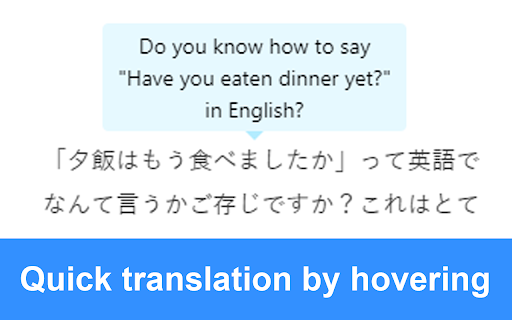


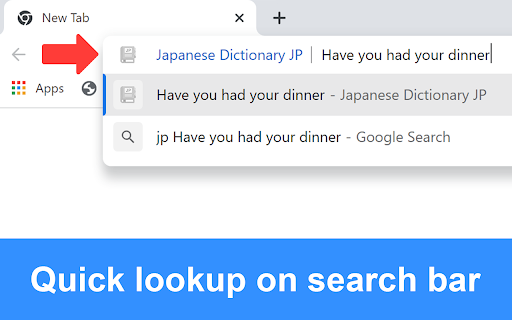
Look up vocabulary and Kanji, translate Japanese into multiple languages using JP Dictionary (JP Jisho/JP 辞書/JP じしょ) Click on the extension icon to toggle the functions on or off. 1) Look up when selected Select Japanese text to look it up. (Click on the extension icon to select your language.) 2) Quick translation by hovering Hover over the text to translate. 3) Look up with right-click Select text → Right-click → Click "Search on JP Dictionary" to look up, analyze, and translate the text. 4) Look up on the search bar In the browser's search bar, type "jp" + space → Enter the word or sentence you want to look up. - Turn off the checkbox when not in use. - Click on vocabulary or Kanji in the popup to see detailed content and comments. - Double-click to highlight a word, and triple-click to highlight a sentence. - Hold down Alt to highlight links. - If you use Edge, you can use the shortcut Ctrl + Shift + X to copy buttons or blocked parts, then look them up in the search bar (type "jp" + space → paste the copied content) for a quick lookup. - JP Dictionary can recognize handwritten characters and perform image recognition. Visit jpdictionary.com to use this feature.

Japanese Translate & Dictionary Mazii じしょ日本語
For learn japanese, work in all website. Select text and double click to translate. With Mazii, you can look up Japanese words easily Mazii Japanese Dictionary is a crucial search tool for Japanese learners. With just 1 click you can quickly translate Japanese into your language. With Mazii, reading Japanese newspapers and emails becomes easier than ever. Besides your language, Mazii also provides users with other languages translation , allows users to compare meanings to get the meanings accurately. Outstanding features of Mazii Japanese dictionary : - Allow multilingual translation. - Quick vocabulary and Kanji look up. - Save the history of Japanese look up. - Look up directly in the toolbar How to use it: 1. Restart chrome to make sure the Mazii is working properly 2. Mazii is ready, now double click on any word on the browser. 3. To translate the whole sentence, choose the whole the sentence, hold the Alt key and click on the sentence. 4. To turn off quick translation, click the Mazii icon on the toolbar, a small window will appear, click Options and uncheck "Turn on quick translation". 5. To translate into another language, click on the Mazii icon on the browser toolbar, a small window will appear, click Options, in the translate section, select the language you want to translate. Thank you for using Mazii. We look forward to supporting and getting your comments.

rikaikun
rikaikun shows the reading and English definition of Japanese words when you hover over Japanese text in the browser. As a Japanese dictionary, rikaikun helps you look up the only the words you don't know without losing your place. It's also useful for Japanese speakers wanting to know how to say Japanese phrases in English. Features: * Using shift or enter, switch between word, names, and Kanji dictionaries. * Enable text to speech in the options to hear Japanese words you look up spoken out load. * Press 'c' to copy the current word and definitions to the clipboard for making flash cards. * Customize how the pop up dictionary looks and what content it shows. Activate the extension by clicking the 理 icon in the top right. When the introductory pop up appears, rikaikun is ready for action. When it's activated, when you hover over Japanese words they'll be translated in a pop up. If you hit shift/enter, you'll see some information about the first Kanji. Press 'd' to hide the English definitions; press it again to bring them back. (Also changeable on the Options page.)

Từ điển tiếng Nhật JP
Tra từ vựng, Hán tự, dịch mọi ngôn ngữ ngay trên trang web với Từ điển JP (JP Jisho/JP 辞書/JP じしょ) Click vào icon của tiện ích để bật/tắt chức năng và xem hướng dẫn. 1) Tra cứu khi bôi đen Bôi đen tiếng Nhật để tra cứu nhanh. 2) Dịch nhanh khi di chuột Di chuột đến văn bản để dịch. 3) Tra cứu bằng chuột phải Bôi đen văn bản → Nhấn chuột phải → Nhấn "Tìm kiếm trên Từ điển JP" để tra từ, phân tích và dịch đoạn văn. 4) Tra cứu trên thanh tìm kiếm Trên thanh tìm kiếm của trình duyệt, gõ "jp" + dấu cách → nhập từ hoặc nội dung cần tra. Mẹo sử dụng hiệu quả: - Nhấn vào từ vựng, Hán tự trên Popup để xem nội dung chi tiết và bình luận từ người dùng. - Double click để bôi đen từ, triple click để bôi đen câu. - Nhấn giữ phím Alt để bôi đen liên kết (link). - Nếu bạn dùng Edge, có thể dùng phím tắt Ctrl Shift + X để copy button hay những phần chặn copy, sau đó tra cứu trên thanh tìm kiếm (gõ "jp" + dấu cách → paste nội dung đã copy) để tra nhanh. - Từ điển JP có thể nhận dạng chữ viết tay, nhận dạng hình ảnh. Hãy truy cập tudienjp.com để sử dụng tính năng. Chúc bạn học tốt với tiện ích tra nhanh của Từ điển Nhật Việt, Việt Nhật TudienJP.com

JP English Dictionary: English to 200 Languages
Free English dictionary with simple, clear explanations; translates English into 200 languages. Click on the extension icon to toggle the functions on or off. 1) Look up when highlighting Highlight English text for quick lookup: - Look up vocabulary with examples and explanations. - Translate passages. - Look up irregular verbs/adjectives. - Listen to the pronunciation of vocabulary and examples. - Click on vocabulary in the popup for quick lookup. 2) Quick translation by hovering Hover over the text to translate. 3) Look up with right-click Select text → Right-click → Click "Search on JP English Dictionary" to lookup, analyze and translate the text. 4) Look up on search bar On the browser's search bar, type "jp" + space → Enter the word or sentence you want to lookup. Tips - Turn off the checkbox when not in use. - Double-click to highlight a word, triple-click to highlight a sentence. - Hold down Alt to highlight links. - If you use Edge, you can use the shortcut Ctrl Shift + X to copy buttons or blocking parts, then lookup on the search bar (type "jp" + space → paste the copied content) for quick lookup. - JP English Dictionary can recognize handwritten characters, image recognition. Visit english.jpdictionary.com to use this feature.
